What Is a WebRTC Leak? How to Test for and Prevent It: The Complete Guide
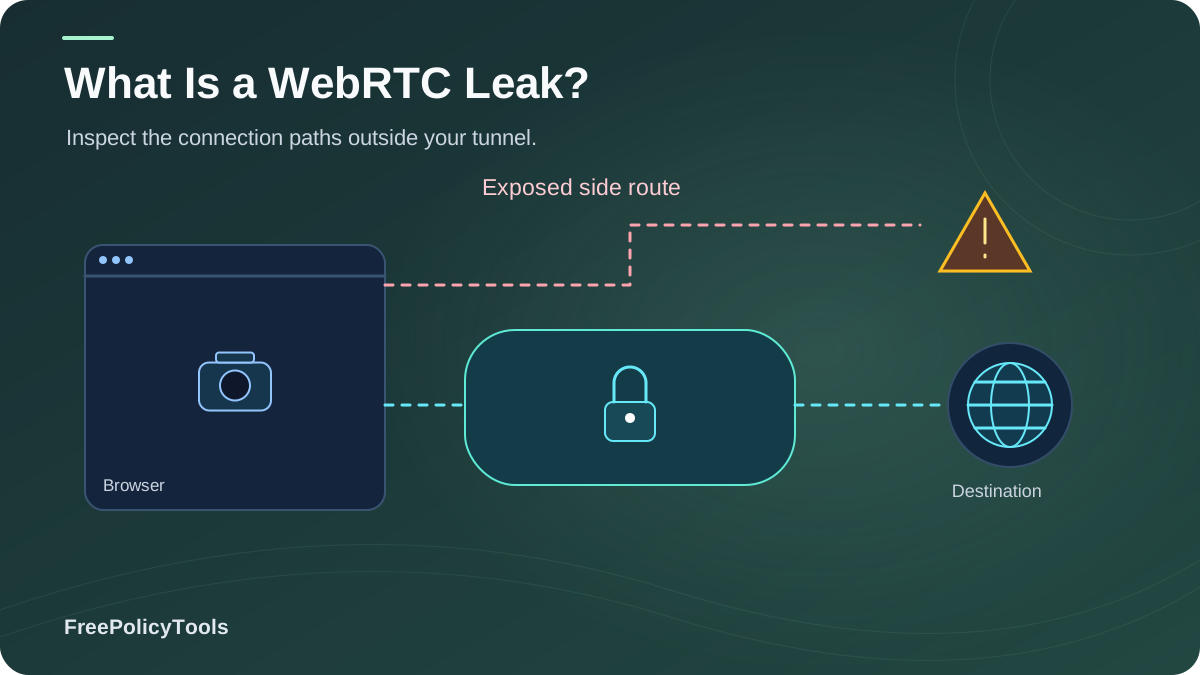
A WebRTC leak is a browser privacy flaw that exposes your real IP address — including your home IP and local network addresses — even while you're connected to a VPN or proxy. Disclosed publicly in January 2015 by security researcher Daniel Roesler, the issue potentially affects over 3 billion devices, because WebRTC ships enabled by default in Chrome, Firefox, Safari and Edge.
If you rely on a VPN for privacy or manage multiple accounts, a WebRTC leak can silently undo all of it in a single page visit. New to the topic? Start with what WebRTC is and how it affects browser privacy.
In this guide you'll learn exactly how the leak works at the protocol level, what a leak test actually shows you, how to run one in under a minute (including a no-tools console method), and the definitive prevention playbook for every browser — backed by published research from CSIRO, W3C/IETF history, and VPN leak testing.
Quick Answer (TL;DR)
- A WebRTC leak happens when a site uses the WebRTC API's STUN/ICE machinery to read your local (LAN) IP and, in misconfigured VPN setups, your true public IP — bypassing the tunnel.
- It requires no permission — unlike camera or microphone, the leak works with ordinary JavaScript.
- Testing takes seconds: visit a leak-test site or run a 3-line console snippet and read the ICE candidates.
- Prevention: disable WebRTC (Firefox about:config), use a leak-proof VPN with kill switch, or control WebRTC per profile in an anti-detect browser like Incogniton.
Year the WebRTC real-IP leak was publicly disclosed (Roesler)
Devices potentially affected — WebRTC is on by default in all major browsers
Of top VPN solutions found leaking customer IPs via the WebRTC bug (2015 tests)
Of free Android VPN apps leaked IPv6 traffic — VPNs themselves leak (CSIRO, 2016)
WebRTC in 60 Seconds
WebRTC (Web Real-Time Communication) is a W3C/IETF standard — formalized as a Recommendation in January 2021 — that lets browsers exchange audio, video and arbitrary data peer-to-peer, without plugins. Google open-sourced it in 2010, and Chrome 23 (November 2012) was the first major browser to ship it out of the box; today every major browser supports it by default. It powers browser video calls, screen sharing, multiplayer games — and, as a side effect, one of the most persistent IP leaks on the modern web.
Peer-to-Peer
To connect two devices directly, the browser must discover each device's network addresses.
STUN Servers
Browsers ask a STUN server "what address am I coming from?" — and the answer includes your public IP.
ICE Candidates
All discovered addresses (local + public) are packaged as "candidates" — readable by JavaScript on any page.
Timeline compiled from W3C publication history (Recommendation, 26 Jan 2021), OnSIP/Chrome release notes (Chrome 23, Nov 2012), and caniuse-style deployment data.
The paradox: the very mechanism that makes peer-to-peer calls possible — honestly advertising your network addresses — is what makes WebRTC a privacy liability. The full primer lives in what is WebRTC and how does it affect browser privacy. MDN’s ICE candidate type reference distinguishes host, server-reflexive, peer-reflexive, and relay candidates used when establishing WebRTC connections.
What Is a WebRTC Leak?
A WebRTC leak is the unintended disclosure of IP addresses through the WebRTC API. There are two distinct flavors:
1. Local IP Leak (Universal)
Every WebRTC-enabled browser reveals your private LAN addresses (e.g., 192.168.x.x, 10.x.x.x) as "host candidates" — on any page running JavaScript, VPN or not. This exposes your internal network topology and can correlate devices behind a router.
2. Public IP Leak (VPN/Proxy Users)
When a VPN or proxy fails to tunnel WebRTC's UDP/STUN traffic, the STUN request exits through your real connection — and the browser hands your true public IP to the site as an "srflx candidate." This is the classic 2015 vulnerability that unmasked VPN users.
No permission required: unlike camera or microphone access, IP enumeration via WebRTC needs no user consent and no prompt — which is why it's so dangerous and why it isn't covered by normal browser permissions.
Example: What a Leaked ICE Candidate Dump Looks Like
ICE candidates read by a site's JavaScript:
candidate:842163049 1 udp 2122260223 192.168.1.24 53122 typ host ← your local IP
candidate:842163049 1 udp 1686052991 203.0.113.45 53122 typ srflx ← your REAL public IP
candidate:3028365381 1 udp 41885439 198.51.100.7 3478 typ relay ← VPN/TURN IP
// Note: the site now sees ALL THREE — including the IP your VPN hides.
How the Leak Works (STUN & ICE, Step by Step)
1. Page Loads Script
Any website can instantiate RTCPeerConnection — no permission prompt, no visible UI.
2. STUN Request Fires
The browser contacts a STUN server (e.g., stun.l.google.com) over UDP to discover its public address for NAT traversal.
3. Candidates Gathered
The browser compiles host (local), srflx (public), relay and prflx candidates — the full address book of your device.
4. JavaScript Reads Them
onicecandidate events expose every candidate to the page's script, which can log, fingerprint, or de-anonymize you.
The mDNS Partial Fix (Chrome 79+)
Starting with Chrome M79, Chromium-based browsers replace local IPs with mDNS hostnames (e.g., "a1b2c3d4.local") by default, closing the LAN-address half of the leak. But mDNS does not stop public-IP exposure when UDP/STUN traffic bypasses a VPN tunnel, and other candidate types still leak metadata. Firefox ships a similar default; Safari's behavior varies by version. Defense in depth is still required.
Typical ICE candidate distribution observed in WebRTC enumeration tests (leak-test aggregators, 2024–2025). Host + srflx candidates are the privacy-critical ones.
What Exactly Gets Exposed
| Exposed Data | Via | Impact | Mitigated by mDNS? |
|---|---|---|---|
| Private LAN IP (192.168.x.x, 10.x.x.x) | Host candidates | Network topology, device correlation | Yes (modern Chromium/Firefox) |
| True public IP behind VPN/proxy | srflx candidates (untunneled STUN) | Full de-anonymization | No |
| VPN/TURN exit IP | Relay candidates | Low (expected address) | N/A |
| Local network hostname hints | mDNS names + timing | Device identification on LAN | Partially |
| NAT / network behavior metadata | Candidate timing & types | Fingerprinting signal | No |
Correlation amplifier: a leaked IP is rarely used alone. Combined with your browser fingerprint — canvas, WebGL, fonts and the other types of browser fingerprinting — it creates a durable, cross-session identity. That's why changing your IP doesn't change your fingerprint, and why fixing only one of the two leaves you identifiable.
Why WebRTC Leaks Are Dangerous
VPN Users De-Anonymized
Around 20% of top VPN solutions were found leaking customer IPs via the WebRTC bug shortly after its disclosure — and misconfigured clients still do. Your "hidden" identity is one STUN request away from exposure.
Multi-Account Bans
Ad platforms, marketplaces and social networks use leak-derived IPs to link accounts. One leaked home IP can tie ten "separate" profiles together and trigger mass suspensions.
Tracking That Survives Everything
The leak works in incognito, with cookies cleared, and with tracker blockers that don't handle WebRTC — see what incognito mode actually does and how websites track you regardless.
Local Network Surveillance
LAN addresses reveal your internal network, enabling device correlation at home, work or cafés — and aiding targeted attacks on your local devices.
Source: CSIRO study of 283 Android VPN apps (2016) — 84% did not tunnel IPv6, 66% did not tunnel DNS, 18% used no encryption. A 2026 follow-up study of 281 free Android VPN apps again found DNS and plaintext leaks at scale.
Advertising angle: leak-derived IPs feed ad-tech identity graphs the same way cookies once did — read how advertising networks track browsers to see where WebRTC fits in the stack.
How to Test for a WebRTC Leak
Testing takes under a minute. Do it once now, and again after every browser, OS, VPN or extension change — and pair it with a full check of your browser fingerprint.
Method A: Online Leak Test (60 Seconds)
- Note your real IP (your ISP's address) before connecting to anything.
- Connect to your VPN/proxy as you normally would.
- Open a reputable leak test page (e.g., ipleak.net, browserleaks.com/webrtc) in the browser you actually use.
- Read the WebRTC section: if your real public IP or your LAN IP appears anywhere — you have a WebRTC leak.
- Repeat in incognito and other profiles — incognito does not disable WebRTC.
Method B: The No-Tools Console Test
Paste into DevTools console (F12) on any blank page:
new RTCPeerConnection({iceServers:[{urls:'stun:stun.l.google.com:19302'}]})
.onicecandidate = e => console.log(e.candidate && e.candidate.candidate);
Every line printed is an ICE candidate your browser would hand to a website. Lines containing "typ host" show local addresses; "typ srflx" shows the public address your STUN traffic exits from. If srflx shows your real IP while your VPN is on — the tunnel isn't covering WebRTC.
How to Read Your Results
| What You See | Verdict | Action |
|---|---|---|
| Only VPN/proxy IP, no local IPs | Clean | Maintain; retest after updates |
| Local 192.168.x.x / 10.x.x.x visible | LAN leak | Enable mDNS defaults / disable WebRTC |
| Real public IP while on VPN | Critical leak | Fix tunnel (UDP/kill switch) or block WebRTC now |
| mDNS .local names only | Partially protected | Verify srflx behavior; don't rely on mDNS alone |
How to Prevent WebRTC Leaks (Every Browser)
There is no universal "off switch," so pick the control that matches your browser and threat model:
| Browser | Native Toggle? | Best Prevention Method |
|---|---|---|
| Firefox | Yes | about:config → media.peerconnection.enabled = false (or use Strict ETP + extensions) |
| Chrome / Edge / Brave | No | Extension (uBlock Origin "prevent WebRTC local IP leakage", WebRTC Leak Prevent) or enterprise policy; mDNS on by default |
| Safari | No user toggle | Rely on VPN with UDP leak protection + network-level blocking; WebRTC is comparatively restricted |
| Tor Browser | Yes (disabled by default) | Keep defaults; never enable WebRTC in Tor |
| Android / iOS browsers | Rarely | VPN app with WebRTC/UDP leak protection and kill switch |
| Anti-detect browsers | Per-profile | Set WebRTC policy per profile: disabled, substituted, or real — consistent with each identity |
The Layered Prevention Playbook
- Disable or constrain WebRTC where you don't need calls (Firefox config, extensions, Tor defaults).
- Use a leak-proof VPN: full-tunnel UDP, WebRTC leak protection, IPv6 handling and a kill switch; verify with tests. Compare stacks in VPN vs proxy vs anti-detect browser.
- Harden the transport layer: HTTPS, secure DNS and DNS-over-HTTPS close the sibling DNS-leak problem.
- Keep browsers updated: mDNS obfuscation and partitioning arrived via updates — browser updates matter for security.
- Audit extensions: some "privacy" extensions are trackers themselves — check for malicious browser extensions.
- For multi-account work: control WebRTC per identity in an anti-detect browser — see below.
Recommended Tool: Incogniton
Incogniton gives every browser profile its own WebRTC policy — fully disabled, spoofed, or bound to the profile's proxy — plus isolated fingerprints, cookies and proxies, so a leak in one context never links your identities. Learn what anti-detect browsers can hide, whether sites can detect them, if they really work, and whether they're safe and legal. Compare the best and cheapest anti-detect browsers, how profiles become digital identities, and isolation approaches via browser profile isolation, browser profiles explained, and profiles vs separate browsers vs VMs.
Get Incogniton Free →VPNs, Extensions & Anti-Detect Browsers Compared
~20% VPN-only leak rate from 2015 top-VPN testing (BleepingComputer); remaining values are editorial estimates aggregated from public leak-test aggregators, 2024–2025.
Key nuance: a VPN changes the network path but not your device signals — a VPN doesn't change your browser fingerprint. Extensions can break real-time apps and vary in coverage. Anti-detect profiles solve the multi-identity case that neither VPNs nor blockers address — see anti-detect vs VPN vs proxy and anti-detect vs incognito.
WebRTC Leak Myths
Myth: "My VPN protects me from WebRTC leaks."
Not automatically. Around 20% of top VPNs leaked via WebRTC when the bug went public, and split-tunnel or IPv6-misconfigured clients still do. Test your exact setup.
Myth: "Incognito mode stops WebRTC leaks."
False. Incognito changes local storage behavior, not the network stack — WebRTC enumeration works identically. See what incognito mode actually does.
Myth: "WebRTC only matters during video calls."
False. The leak uses STUN/ICE machinery that runs with plain JavaScript on any page — no call, camera, or permission needed.
Myth: "mDNS fixed the problem for everyone."
mDNS hides local IPs in modern Chromium/Firefox builds, but public-IP exposure via untunneled STUN remains, and Safari/older browsers vary. Defense in depth still required.
Myth: "Disabling WebRTC breaks the whole web."
Only real-time features (browser calls, some games, P2P apps). For everyday browsing, most users notice nothing.
Myth: "Mobile browsers don't leak."
WebRTC ships in mobile browsers too; app-level VPNs with leak protection are the practical mobile defense.
Bigger picture: WebRTC leaks are one channel among many. Put them in context with how websites track you, browser cookies explained, cookies vs local storage vs fingerprinting, and the difference between browser privacy and browser security.
Frequently Asked Questions
Is a WebRTC leak the same as a DNS leak?
No. A DNS leak exposes your domain lookups outside the VPN tunnel; a WebRTC leak exposes IP addresses (local and/or public) via the browser's peer-connection machinery. Both are tunnel-bypass leaks, and both should be tested — harden DNS with DNS-over-HTTPS as well.
Can websites read my local IP without WebRTC?
Not directly. Plain web pages cannot see LAN addresses; WebRTC host candidates (and historically cache/timing side channels) are the primary route. That's why mDNS obfuscation and disabling WebRTC are effective for the local-IP half of the leak.
Does WebRTC leak my IP if I'm not on a VPN?
Your public IP is already visible to any site without a VPN — that's normal networking. The "leak" concept matters when you expect an intermediary (VPN/proxy/Tor) to hide it, and for the always-on local-IP exposure.
Will disabling WebRTC break Google Meet or Zoom in the browser?
Browser-based real-time apps rely on WebRTC, so disabling it breaks in-browser calls and some P2P features. If you need calls, use a leak-proof VPN or per-profile control instead of a global disable.
How accurate is fingerprinting combined with a leaked IP?
Very. Fingerprints alone already identify roughly 1 in 286,771 browsers (EFF); adding a stable real IP makes cross-session, cross-account linking trivial. See how accurate browser fingerprinting is and whether it can be prevented.
What's the best setup for managing multiple accounts safely?
Per-identity isolation: an anti-detect browser profile with its own fingerprint, cookies, proxy, and WebRTC policy — plus routine leak testing. That's the workflow tools like Incogniton are built for, and it outperforms VPN-only or incognito approaches.
Related Resources
Conclusion
A WebRTC leak turns your browser's real-time communication standard into a surveillance channel: local IPs on every device, and true public IPs whenever a VPN fails to tunnel STUN traffic. Disclosed in 2015, standardized in 2021, and still enabled by default on 3B+ devices, it remains one of the cheapest ways for sites to de-anonymize VPN users and link "separate" accounts.
The fix is straightforward and testable: know your candidates, disable or constrain WebRTC where you don't need it, use leak-proof VPNs with kill switches, and for multi-identity work, control WebRTC per profile in an anti-detect browser. Then re-test after every change — privacy is a process, not a setting.
Key Takeaways
- • WebRTC leaks expose local IPs universally, and real public IPs when tunnels misbehave
- • No permission prompt is required — plain JavaScript suffices
- • ~20% of top VPNs leaked via WebRTC at disclosure; free VPN apps leak far more
- • mDNS (Chrome 79+) fixes the local half only
- • Test with a leak site or a 2-line console snippet; prevent with config, VPN, or per-profile control
Next Steps
- • Run a WebRTC leak test on every browser you own
- • Disable WebRTC where calls aren't needed
- • Verify your VPN's UDP/IPv6/kill-switch behavior
- • Check your fingerprint alongside your IP
- • Adopt per-profile WebRTC control for multi-accounting
Want every identity leak-proof by design?
Incogniton pairs per-profile WebRTC policies with isolated fingerprints and proxies, so no leak ever links your accounts. Try Incogniton for free.