VPN Obfuscation Explained: How to Bypass Deep Packet Inspection
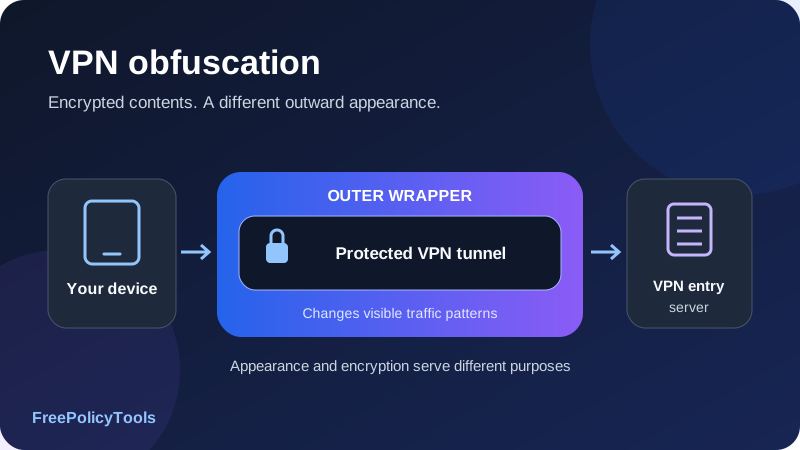
VPN obfuscation changes how a VPN connection appears on the network so that some forms of protocol recognition and blocking become harder. A normal VPN can encrypt your traffic while still looking like a VPN. An obfuscated mode adds or changes outward characteristics, such as framing, a transport wrapper or traffic patterns, while retaining the intended protected connection.
If your goal is to use a VPN to bypass deep packet inspection, first identify what is being blocked. A traffic-signature filter, an endpoint IP block and a website’s account restriction are different problems. This guide explains DPI, common obfuscation approaches, realistic limitations, provider examples and a practical setup and testing workflow. A successful connection is evidence of availability, not proof of invisibility.
Encrypt
Protect the tunnel’s contents
Transform
Change visible traffic features
Connect
Try a supported usable path
Verify
Test routing and recovery
What Is VPN Obfuscation?
Obfuscation is a technique for changing recognizable properties of a connection. In a VPN, the target is usually the appearance of traffic between your device and the service’s entry endpoint. The application may wrap the tunnel in another transport, alter framing or apply other transformations that make a particular classifier less effective.
The goal is different from encryption. Encryption protects contents from someone who lacks the keys. Obfuscation aims to make the traffic harder to identify as a particular protocol or service. Strongly encrypted packets can still have recognizable handshake formats, lengths or exchange patterns.
Three properties to keep separate
| Property | Main question | What it does not establish |
|---|---|---|
| Encryption | Can an intermediary read the protected contents? | Whether the traffic can be classified as a VPN. |
| Obfuscation | Can a particular observer recognize or filter the traffic type? | Whether contents are securely encrypted or the operator is trustworthy. |
| Anonymity | Can activity be linked to an identity across relevant observers? | A guarantee supplied merely by changing an IP or disguising a tunnel. |
Stealth and camouflage are product labels
Providers use terms such as stealth, camouflage, scramble or obfuscated servers. They are not a single technical standard. One option may modify an existing tunnel, another may use a distinct transport or relay arrangement. Two modes with similar names can behave differently on the same network.
The wrapper changes appearance, not the whole identity
Obfuscation primarily addresses observation of the entry connection. Your website account, browser identifiers, VPN exit reputation and provider records remain separate. Our guide to how VPNs work explains those different points along the path.
How Deep Packet Inspection Identifies Traffic
Deep packet inspection, or DPI, examines information beyond basic forwarding addresses to classify or apply policy to network traffic. It can be used for security, traffic management or filtering. The term does not necessarily mean the inspector can decrypt every encrypted payload.
What a network observer may inspect
Visible signals can include initial handshake bytes, protocol framing, packet sizes, timing, connection direction and transport behavior. Endpoint IPs and ports can add context, although an IP block is a different mechanism from identifying a protocol inside traffic.
| Signal | Example of the observation | Why encryption alone may not remove it |
|---|---|---|
| Handshake or framing pattern | A recognizable opening exchange or packet format | Some identifying fields or formats exist outside the protected application contents. |
| Packet lengths | A sequence of small control packets followed by larger transfers | Encrypting contents does not automatically hide packet sizes. |
| Timing and direction | Bursts, pauses and request/response patterns | Network delivery still has observable timing. |
| Transport behavior | UDP traffic, TCP stream patterns or connection reuse | The outer transport remains part of the visible connection. |
| TLS characteristics | Visible properties of a TLS handshake where available | Wrapping in TLS does not automatically reproduce a browser’s behavior. |
| Endpoint context | A known server address or hosting-network association | Packet transformation does not erase the address needed for routing. |
Classification is not the same as decryption
A network can decide that a flow looks like a VPN without reading the messages inside. By contrast, managed TLS inspection uses a different trust arrangement to decrypt and inspect traffic on supported connections. Cloudflare’s TLS inspection documentation explains that kind of gateway inspection.
On a managed device, installed certificates, endpoint software and administrator policies can change the observation model. A transport disguise is not a substitute for understanding who controls the device and its trust configuration.
Heuristics can have uncertainty
Some filters match relatively specific signatures. Others classify patterns statistically or apply broad rules to unfamiliar encrypted traffic. Their decisions can involve false positives and false negatives. A network may recognize a flow but allow it, so a successful connection does not tell you whether classification occurred.
DPI vs Other Types of Blocking
If a VPN will not connect, do not assume deep packet inspection is the cause. Name resolution, endpoint reachability, transport rules, account access and ordinary outages can produce similar symptoms. Obfuscation helps only when its actual changes address the relevant obstacle.
| Mechanism | What is restricted | Where obfuscation fits |
|---|---|---|
| Protocol-signature filtering | Traffic recognized as a particular VPN or transport | A suitable transformation may make the recognition rule less effective. |
| Endpoint IP blocking | Connections to known addresses or ranges | Changing packet appearance alone does not change a blocked destination. |
| Port or transport restriction | Specific ports, UDP paths or unsupported transports | A supported alternate transport may help; obfuscation and transport choice are separate. |
| DNS interference | Resolution of the service hostname | The entry endpoint must still be found; tunnel appearance alone does not resolve every DNS problem. |
| Active probing | A suspected endpoint is tested with new connections | Some designs resist these tests, but passive camouflage alone may be insufficient. |
| Strict allowlisting | Only approved services or traffic forms are permitted | Unrecognized encrypted traffic may be denied even without a VPN signature. |
| Website or account restriction | The destination rejects the exit IP or account context | Entry-connection camouflage does not automatically change the destination’s decision. |
Passive observation and active probing
Passive classification examines traffic already flowing. Active probing creates additional test connections to a suspected endpoint and observes its responses. An obfuscation design may need to avoid both a recognizable client exchange and an identifying response to an unsolicited probe.
Different networks can use several layers at once
One layer can interfere with DNS while another blocks endpoint ranges and a third examines traffic patterns. A mode that addresses one layer may still fail at another. This explains why a technique can work on one network and fail on a different network without either result proving that its encryption is broken.
Our website access guide discusses broader connectivity choices. Use the error and route evidence to identify the layer instead of repeatedly changing unrelated settings.
How an Obfuscated VPN Connection Works, Step by Step
The exact sequence depends on the provider’s design. In a common wrapper-based arrangement, the client and entry server cooperate on an outer transport while a protected tunnel carries the intended traffic inside it.
- The client selects a supported mode and endpoint. The app needs compatible server support. A standard VPN configuration file may not include the additional transport.
- The outer connection is established. This can involve a TLS-based wrapper, altered framing or another supported exchange. Its observable behavior is what the local network sees.
- The protected tunnel is established or carried. Depending on the design, authentication and tunnel encryption occur inside the wrapper or are integrated into the mode itself.
- Application traffic follows the configured route. The app sends intended packets through the tunnel and applies the selected routing and failure policies.
- The server handles the outer transformation. It removes or interprets the wrapper and processes the protected tunnel according to the compatible implementation.
- Traffic continues to its destination. For a consumer VPN, websites normally see the service’s exit IP. HTTPS separately protects website communication to its TLS endpoint.
- Replies return through the supported path. The server and client apply the corresponding protections and transformations on the return traffic.
Inner protection
The VPN or integrated tunnel protects the intended traffic contents across its defined span.
Outer appearance
The obfuscation design changes features visible between the device and entry endpoint.
Destination view
The website still observes the exit connection, requests and account signals it receives.
Changing appearance is not changing every observer
The local network, the service operator and the destination occupy different positions. A wrapper that makes the entry connection harder to classify does not hide the VPN exit from the website or prevent the operator from knowing connection metadata. Keep those perspectives separate when assessing a claim.
Our VPN encryption guide explains where the tunnel ends and why HTTPS remains useful after obfuscation is enabled.
Common VPN Obfuscation Techniques
Obfuscation is a family of approaches, not one extra checkbox with identical effects. A design can combine several techniques. Its usefulness depends on the classifier it faces, the endpoint arrangement and how convincingly the implementation behaves.
Transforming recognizable protocol bytes
A transformation can remove or alter fixed patterns that a simple signature matcher expects. Basic scrambling or XOR-style transformations can interfere with a basic matcher but are not a replacement for cryptographic protection. A predictable transformation may be reversible or acquire its own signature.
TLS-based wrapping and protocol imitation
A TLS wrapper can change the visible handshake and framing compared with the inner VPN protocol. However, a connection using TLS does not automatically behave like a browser visiting an ordinary website. Handshake details, subsequent exchanges and traffic patterns can still differ. Certificate validation and the outer endpoint’s authentication need appropriate handling.
Padding and traffic shaping
Padding adds data to change lengths. Shaping changes timing, grouping or other delivery characteristics. These can reduce the usefulness of particular features, but extra bytes or deliberate delay have costs. A classifier may also use signals that the chosen shaping does not affect.
Random-looking transports
Some approaches aim to avoid an obvious fixed protocol signature by producing less structured-looking traffic. That can help against one matcher and fail against a network that rejects unfamiliar encrypted traffic. Randomness is a property a classifier can examine, not a universal invisibility cloak.
Relay and discovery arrangements
A relay changes the endpoint the client contacts or introduces another stage before the protected service. This can address endpoint reachability in addition to traffic appearance. It also changes routing, operational dependencies and possibly trust boundaries. Address distribution and relay availability are separate from packet camouflage.
| Approach | What it changes | Main caveat |
|---|---|---|
| Byte or framing transformation | Recognizable patterns in an exchange | A weak transformation can remain detectable and does not supply encryption. |
| TLS-based wrapper | The outer handshake and transport framing | TLS use is not automatically convincing imitation of ordinary browsing. |
| Padding / shaping | Lengths, timing or grouping of traffic | Can add bandwidth, processing or delay; other signals remain. |
| Random-looking transport | Fixed patterns and apparent structure | Unfamiliar encrypted traffic can itself be restricted. |
| Relay-based arrangement | Contact endpoint and route dependencies | Relays can still be blocked, unavailable or distinguishable. |
Domain fronting is not a generic server setting
Domain-fronting designs historically use differences between outward and routed naming within a compatible infrastructure arrangement. They require specific support and can be restricted by hosting providers. Do not assume any VPN can use a major website’s hostname to gain an indistinguishable connection, or that such an arrangement is currently available everywhere.
OpenVPN, WireGuard and Stealth Modes
Ordinary tunnel security and resistance to traffic recognition are different design goals. A maintained modern protocol can protect data well while exposing a recognizable outer exchange. Obfuscation can be added around a protocol or incorporated into a service-specific mode.
OpenVPN: UDP and TCP are transport choices
OpenVPN can use UDP or TCP. Changing to TCP can help with some transport restrictions, but using TCP 443 does not turn the exchange into a normal HTTPS browsing session. A provider’s obfuscated OpenVPN service includes additional behavior that an ordinary OpenVPN endpoint may not implement.
WireGuard: the standard tunnel and added wrappers
Standard WireGuard uses UDP and is not a general protocol-camouflage system. A service can carry related traffic through an additional wrapper or provide another integrated mode. Ordinary WireGuard support in a router does not mean that router supports the provider’s obfuscation option.
IKEv2/IPsec and other recognizable arrangements
IKEv2/IPsec has its own negotiation and packet handling. Strong protection does not imply the traffic cannot be classified or filtered. If a network blocks that arrangement, use an officially supported alternative rather than assuming a port change or an unrelated profile reproduces a stealth mode.
Automatic selection and fallback
A provider’s automatic mode may try different protocols or endpoints. Verify whether it actually includes obfuscation, what it changes on failure and which app protections remain active. Automatic reconnect is also a different function from blocking unintended direct traffic during the change.
See common VPN protocols explained and WireGuard versus OpenVPN for the underlying comparison. A protocol name alone does not settle recognition resistance.
Provider Examples and Platform Support
Use product documentation for the exact app and mode you intend to run. The examples below illustrate different interfaces and designs, rather than a ranking of which provider bypasses every network. Availability and setup details can change.
NordVPN’s obfuscated server option
NordVPN’s current setup guide places the option under Specialty servers on supported desktop and mobile interfaces and documents separate Linux controls. It specifically states that the Linux obfuscated-server option uses OpenVPN TCP or UDP. Check your platform rather than applying a Linux requirement to every current app.
Our NordVPN review provides service context. Verify supported modes, current server availability and kill switch behavior before relying on the feature.
Proton VPN’s Stealth mode
Proton VPN’s Stealth explanation describes an obfuscated TLS tunneling approach over TCP. This is an implementation-specific mode, not a claim that every TLS-wrapped connection is indistinguishable or that every standard WireGuard client can use it.
Use current instructions for the installed app, since platform support and menus evolve. Our Proton VPN review covers the wider service considerations.
Tor’s pluggable transports as a related example
The Tor Project’s circumvention guide describes transports such as obfs4, WebTunnel and Snowflake. They illustrate distinct strategies for making a compatible Tor entry connection harder to block, including changing traffic appearance or the relay arrangement.
These are Tor client/bridge mechanisms, not universal commercial VPN settings. Do not assume enabling a transport in Tor Browser obfuscates every other application on the device. Our Tor versus VPN guide compares the broader architectures.
Affiliate disclosure: we may earn a commission if you purchase through this link.
Explore NordVPN’s PlansObfuscation vs VPNs, Proxies, Tor and Multi-Hop
These tools and features address different parts of a connection. Combining them can add complexity and latency without automatically improving the property you care about. Identify the observer and the specific constraint first.
| Tool or feature | Main function | Why it is not interchangeable with obfuscation |
|---|---|---|
| Ordinary VPN | Protected tunnel and selected routing through an endpoint | Its outer traffic can remain recognizable. |
| VPN obfuscation | Change outward connection features to resist some classification | Does not settle exit reputation, identity or provider logging. |
| Proxy | Relay configured application connections | Protocol, encryption and appearance depend on the actual proxy setup. |
| Tor Browser | Use Tor routing and browser privacy features | Its architecture and application scope differ from a device VPN. |
| Tor pluggable transport | Help a compatible Tor entry connection work under filtering | Requires the corresponding Tor client and transport infrastructure. |
| Multi-hop VPN | Route traffic through additional VPN endpoints | More hops do not automatically camouflage the first hop. |
| Encrypted DNS | Protect supported name queries to a resolver | Does not transform every VPN packet or remove endpoint IP visibility. |
| Private browsing | Reduce persistence of some local browser session records | Does not establish a disguised network tunnel. |
Routing and appearance are separate decisions
A proxy can change the source address a destination sees, but its outer connection might still be recognizable. A multi-hop path can alter which intermediaries see which connections while leaving the entry handshake unchanged. Neither property should be inferred from the word “private.”
Read VPN versus proxy and double VPN and multi-hop for those different design choices.
What VPN Obfuscation Cannot Guarantee
Obfuscation is useful against particular observation and filtering methods. Its protection is conditional on the design, endpoint and network. There is no universal transformation that makes every VPN indistinguishable to every observer.
Encrypted-looking traffic can still be classified
Research presented at USENIX Security on fully encrypted traffic detection shows how a studied filtering system used passive heuristics rather than decrypting the contents. The work demonstrates a limitation of assuming that random-looking encrypted data must be unrecognizable.
This is evidence about the system and period studied, not a live report of every country or network’s current filtering. The practical inference is that camouflage strategies must be evaluated against the observer’s actual methods rather than treated as permanent guarantees.
Endpoint addresses and other metadata remain
The network needs an address to deliver your connection. If that entry endpoint is blocked, packet transformation alone may not restore reachability. Timing, volume and connection duration also remain observable to relevant intermediaries. A provider may add relays or change infrastructure, but that is a separate architectural choice.
Active probing and allowlisting can change the challenge
A suspected service can be tested with additional connections. Some designs include resistance to those probes; others focus only on passive traffic appearance. Networks using strict allowlists may reject anything outside approved behavior even if it has no recognizable VPN signature.
Websites still evaluate their own view
A streaming site, bank or shop observes the exit connection and submitted application data. It can consider IP reputation, cookies, account country, location permissions and fraud signals. An obfuscated entry tunnel does not automatically alter those inputs or guarantee access.
The operator and device remain part of your trust model
Review the provider’s records and system design separately. Obfuscation does not prevent an infected device from reading data before encryption, remove local history or make a phishing page legitimate. See VPN logging policies and what VPNs do not protect against.
Define which result you need
Connection availability, secure routing and resistance to traffic classification are three separate properties. A test or product statement about one should not be presented as proof of the other two.
Performance and Overhead: Practical Charts
An obfuscation mode can add processing, transport framing, padding or another route stage. Some modes also change loss and retransmission behavior. The result depends on the app, hardware, endpoint and network, so a single universal speed penalty would be misleading.
All chart values below are teaching examples
The figures are invented or chosen for explanation. They are not product measurements, protocol rankings or typical overhead estimates. The tables repeat the values in accessible text.
Stacked bar chart: extra framing and padding use capacity
| Component | Reference VPN | Wrapped example |
|---|---|---|
| Reference tunnel traffic | 100 units | 100 units |
| Additional wrapper | 0 units | 12 units |
| Additional padding | 0 units | 8 units |
| Total | 100 units | 120 units |
The example adds 20% to the reference traffic: (120 − 100) ÷ 100 × 100 = 20%. That does not imply a 20% reduction in throughput, a 20% latency increase or a real-world obfuscation overhead rate. Those measurements depend on more than byte counts.
Line chart: repeat latency measurements
| Trial | Ordinary mode | Wrapped mode |
|---|---|---|
| A | 30 ms | 45 ms |
| B | 32 ms | 49 ms |
| C | 31 ms | 46 ms |
Latency, jitter, packet loss and useful throughput answer different questions. A working obfuscated connection may be more useful than an ordinary mode that is blocked, even if it has higher delay. Calls and games can react differently from bulk downloads.
Donut chart: a validation plan needs more than a connect test
| Area | Chosen checks | What to observe |
|---|---|---|
| Connection | 4 | Mode, endpoint and repeatable tunnel establishment. |
| Routing | 3 | Exit IP, application scope and relevant address-family paths. |
| DNS | 2 | Resolver choice and actual query route. |
| Recovery | 3 | Reconnect, network change and interruption policy. |
Compare complete configurations honestly
Keep the device, local network, destination and test window similar. Record protocol, mode, server region and app version. If switching modes also changes the server or route, acknowledge that the comparison does not isolate obfuscation alone.
Our VPN Speed Checker can help investigate performance, and VPN speed and latency explains why a high download number does not guarantee a responsive connection.
When VPN Obfuscation Can Help
Use obfuscation to address a defined recognition or connectivity problem. It is not automatically necessary on every network, and its additional complexity may not help a destination-level restriction.
| Situation | Possible role | What to verify |
|---|---|---|
| Ordinary VPN traffic is classified and blocked | A supported transformation may reduce that classifier’s effectiveness | Repeatable connection and actual routing on the network. |
| UDP path fails | An available alternative transport may restore access | Whether ordinary TCP suffices before attributing success to camouflage. |
| Known endpoint addresses are blocked | A service with suitable alternate entry infrastructure may help | Reachability; changing appearance alone is insufficient. |
| Network requires a captive-portal login | Usually a portal-completion issue rather than a DPI problem | Complete the documented login flow before testing the tunnel. |
| A website rejects the VPN exit | Obfuscation may have little effect at that observation point | Exit reputation, account rules and the site’s access requirements. |
| Ordinary VPN works reliably | A simpler supported mode may already meet the need | Whether enabling obfuscation adds a useful benefit or only overhead. |
| Managed workplace device or network | Use approved connectivity and supported remote-access arrangements | Administrator policy, device controls and required gateway. |
Travel and changing networks
A mode that works at home may behave differently on a hotel, mobile carrier or another internet provider. Keep current provider instructions and a supported recovery path available before depending on a particular connection. Our VPN travel guide covers related connectivity planning.
Permission and availability are different questions
Follow the applicable network and service rules for your context. A technical connection test does not determine legal or organizational permission. Requirements vary by location and can change; avoid assuming a general technical guide is a current jurisdiction-specific assessment.
Choose a mode for its actual function
Identify whether you need transport compatibility, different endpoint reachability or reduced protocol recognition. A provider may combine those changes in one mode, but separating the goals helps you interpret results and avoid adding unnecessary layers.
How to Enable an Obfuscated VPN Connection
Start with an updated official app and the provider’s current platform instructions. Obfuscation usually requires compatible client and server behavior, so do not assume importing a standard profile into another client activates the same feature.
- Confirm the supported feature. Determine whether the provider calls it obfuscated servers, stealth, a transport option or another mode. Check your exact app, OS and subscription requirements.
- Record your existing setup. Note protocol, server region, kill switch mode and split-tunnel exclusions so you can compare or restore the configuration.
- Select the compatible mode or server group. Follow official instructions. If a protocol change is required on your platform, use the documented combination rather than guessing.
- Review protection during the switch. Know whether the app must disconnect and whether its kill switch blocks direct traffic in that interval.
- Connect to a supported endpoint. Use the documented server selection and allow the app to establish the transport and tunnel.
- Confirm routing and name resolution. Verify the public exit address, app scope, DNS behavior and relevant IPv6 or browser paths.
- Test normal activity and recovery. Try harmless browsing, representative uploads or calls, and an appropriate controlled network transition.
- Keep the working details. Record app version, mode and endpoint region. A later failure is easier to investigate against a known reference.
When an option is missing
Possible reasons include platform support, app version, an incompatible selected protocol or a different interface. Check the current guide before assuming the provider removed the feature or that your account is broken. A Linux instruction may not apply to a phone, and a consumer app feature may not exist in its router configuration.
Keep routing protections intact
Read how VPN kill switches work before relying on transition protection. Review split versus full tunneling so intentional bypasses are not mistaken for obfuscated traffic.
Affiliate disclosure: we may earn a commission if you purchase through this link.
Explore NordVPN’s PlansHow to Test Connectivity and Protection
A practical test should state the claim it is evaluating. Establishing the tunnel, routing an application and resisting a network classifier need different evidence. Most ordinary user tests directly establish the first two, while providing only limited clues about the third.
Compare connectivity under similar conditions
Record whether an ordinary supported mode connects and whether the obfuscated mode connects on the same network. Where possible, keep the endpoint and route comparable. Repeat after a short interval and note errors, rather than using one timeout as proof of filtering.
If the obfuscated connection succeeds and the ordinary connection fails, the difference is consistent with a filtering or compatibility issue. It can also involve different servers, transports, congestion or DNS behavior. Describe the observation and those limits rather than declaring that DPI was definitively defeated.
Confirm the path applications actually use
Use our IP Address Checker from the application you intend to route. Inspect relevant DNS and address-family behavior with the IP Leak Test. These tools observe particular requests; they do not certify all traffic or the provider’s data practices.
Review DNS leak prevention and WebRTC and IPv6 exposure. An external resolver reached through the tunnel is different from an unintended direct DNS route.
Test interruption and recovery
With non-sensitive activity, observe a supported server change, sleep/wake or network transition. Record whether traffic pauses, falls back directly or resumes through the protected path. A reconnect feature and a kill switch are separate controls, and an obfuscation mode does not guarantee either.
| Test | Useful evidence | Important limit |
|---|---|---|
| Successful tunnel establishment | The chosen mode worked on that network at that time | The flow could still be recognized or logged. |
| Public IP comparison | The test request used an observed exit address | Does not prove every application followed the same path. |
| DNS/address checks | Observed resolver or address-family behavior | Requires route interpretation and may miss short transitions. |
| Repeated performance trials | Useful speed and latency under the tested conditions | Does not isolate obfuscation if server or route also changed. |
| Failure/recovery test | Behavior during the chosen event | Does not cover every startup or process-failure scenario. |
| Authorized packet observation | Visible outer patterns and paths on the observed interface | A plausible-looking flow is not proof that every classifier will accept it. |
Respect the scope of packet observation
On a device and network you control, packet observation can reveal the outer transport, endpoint and timing. Properly protected inner contents should not appear as ordinary readable application data there. But observing TLS or random-looking bytes does not establish that the flow matches every expected behavior of a benign protocol.
Our VPN testing guide provides a broader workflow. Record pass, fail or inconclusive against a defined expectation and repeat important checks after configuration changes.
Common Obfuscation Problems and Fixes
Investigate one layer at a time: ordinary network access, endpoint discovery, transport, compatible mode, routing and destination behavior. Repeatedly changing several settings makes it harder to identify the cause.
| Symptom | Possible explanation | Useful next check |
|---|---|---|
| No VPN mode connects | Underlying outage, portal, account issue or unreachable service | Verify ordinary network access and current provider status/instructions. |
| Obfuscation option is missing | Platform/version mismatch, incompatible setting or interface difference | Check the official guide for the exact installation. |
| Ordinary UDP fails but TCP works | A transport restriction or impaired UDP path | Do not attribute the whole difference to obfuscation alone. |
| Stealth mode also times out | Endpoint blocking, filtering, server failure or incompatible configuration | Try a documented alternative endpoint or mode and record the error. |
| Connected but names fail | DNS routing or resolver configuration issue | Inspect the supported DNS settings and query path. |
| One website rejects access | Exit reputation, account rules or destination-level policy | Review that service’s requirements rather than only changing camouflage. |
| Downloads work but calls lag | Latency, jitter, loss or transport queueing | Measure interactive performance and compare a supported alternative. |
| Connection fails after a network change | Recovery, route or interface integration issue | Update the app and check documented reconnect behavior. |
| Unexpected direct traffic appears | Exclusion, incomplete routing or failure-policy problem | Verify kill switch, split tunneling and address-family coverage. |
| Manual router profile lacks the feature | The wrapper requires provider app support | Use a documented compatible setup rather than assuming standard protocol support suffices. |
Avoid weakening validation to make a wrapper connect
A certificate error can indicate the wrong endpoint, stale trust configuration, an incorrect clock or interception. Investigate the cause using provider instructions. Disabling certificate validation as a routine fix can undermine the protection the connection is meant to provide.
Give support reproducible details
Provide OS, app version, mode, approximate time, region and whether other modes or networks work. Redact tokens, private keys and sensitive account information. See VPN troubleshooting for a structured approach.
How to Evaluate an Obfuscation Feature
Choose an implementation for its documented function and current device support. A marketing claim of “undetectable” is not a substitute for explaining the transport, endpoint arrangements and observed limitations.
| Topic | Question | Why it matters |
|---|---|---|
| Design | What transformation, wrapper or integrated protocol is used? | A label does not describe the observable behavior. |
| Threat model | Which recognition or blocking methods is it intended to address? | Signature filtering, endpoint blocks and probing are different problems. |
| Platform support | Does this exact app and OS support the selected mode? | General feature pages may combine several platforms. |
| Manual clients | Can the mode be used in a router or third-party client? | Ordinary protocol compatibility does not imply wrapper compatibility. |
| Protection compatibility | How do kill switch, DNS, IPv6 and split tunneling behave? | A usable connection still needs the intended routing boundary. |
| Review evidence | What technical documentation, code or scoped review is available? | Evidence must match the component and version being evaluated. |
| Endpoint availability | What supported alternatives exist if an entry point is blocked? | Appearance alone does not restore a blocked address. |
| Data practices | What does the operator retain or observe? | Camouflage does not establish a no-logs policy. |
Use a representative test period
Try the actual networks, apps and transitions you need. Keep records of connectivity and useful performance rather than only a maximum download number. A mode that works once on an unrestricted network has not established its behavior on the network where the problem occurs.
Our VPN Comparison Tool can organize options. Verify current documentation and the service’s terms before subscribing; no single feature removes the need to evaluate the provider.
VPN Obfuscation Myths and Misconceptions
DPI breaks VPN encryption
Classification can use visible patterns without decrypting protected contents. Decryption and recognition are different claims.
Using port 443 makes a VPN look exactly like HTTPS
The port is only one signal. Handshake, framing and subsequent behavior can remain different.
Random data is always invisible
Some networks reject unfamiliar encrypted traffic or classify its statistical properties.
Every stealth mode is the same
Providers can use different designs, transports and platform integrations under similar names.
A working connection proves DPI was bypassed
The result may reflect a different endpoint, route or transport, and recognition can happen without blocking.
Obfuscation hides the exit from streaming sites
Those services normally observe the outgoing exit connection and account signals, not just the entry wrapper.
More layers always improve privacy
Extra transports or relays add dependencies and tradeoffs. Define the property you need before combining tools.
Obfuscation automatically prevents leaks
Routing, DNS, address-family handling and failure blocking require their own supported implementation and tests.
The newest mode eliminates provider trust
The operator and endpoint security remain part of the connection regardless of its outward appearance.
A clear claim names the observer, network, mode and outcome. Prefer “this configuration connected and retained the intended route in these tests” to a promise that no network can detect it.
Putting VPN Obfuscation into Practice
VPN obfuscation changes outward traffic features to make some recognition and filtering methods less effective. It can help a compatible connection work where an ordinary mode is restricted, but it does not defeat every IP block, probing method or allowlist. Encryption, routing protection and provider privacy remain separate requirements.
Identify the obstacle, select a documented mode for your platform and verify the full connection. Test the exit path, DNS, address handling, recovery and useful performance. Describe what you observed without turning availability into a guarantee of invisibility.
Your practical starting checklist
Identify the failing layer → update the official client → choose a supported mode → connect to a compatible endpoint → verify routing and DNS → check interruption behavior → compare useful performance → retain the working configuration.
Affiliate disclosure: we may earn a commission if you purchase through this link.
Explore NordVPN’s Plans