Split Tunneling vs. Full Tunneling: Which VPN Setup Is Best?
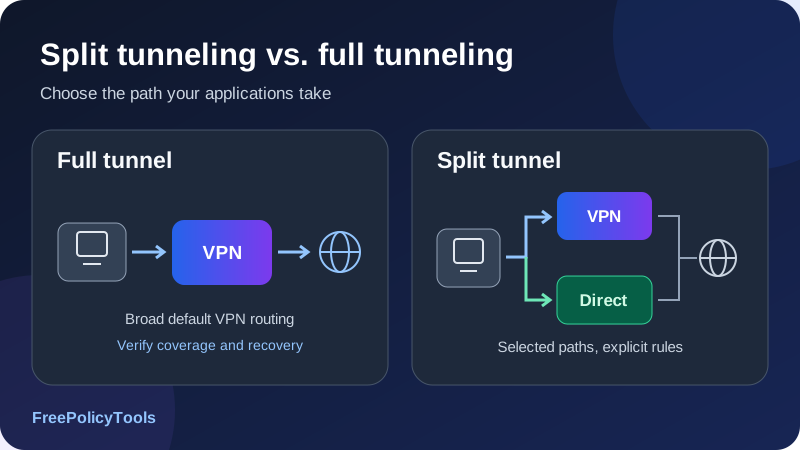
Split tunneling vs full tunneling is a choice about where your traffic goes. Full tunneling normally sends the covered device’s internet traffic through a VPN gateway. Split tunneling sends selected traffic through the VPN and lets other traffic take a direct path. Neither setting, by itself, changes the strength of the VPN’s encryption.
For a personal device, full tunneling is usually the simpler starting point when you want broad VPN coverage. Split tunneling makes sense when you have a specific reason to keep an app, destination or local resource outside that path and understand the consequences. For a work device, the organization’s approved routing and security policy determines the answer. This guide explains the tradeoffs, the settings that matter and how to test the result.
Full tunnel
Broad default VPN routing
Split tunnel
Explicit VPN and direct paths
Check DNS
Names need their own policy
Test failure
Verify what happens offline
Split Tunneling and Full Tunneling Explained
What is full tunneling?
Full tunneling, also called a full tunnel or sometimes force tunneling, makes the VPN the usual path for internet traffic within the connection’s scope. A device-wide client generally aims to cover the device; a browser extension generally covers supported browser traffic. The words “all traffic” must therefore be read alongside what the software actually controls.
The device still needs a physical network connection to reach the VPN endpoint. It sends protected tunnel packets over that connection, and the gateway forwards the inner traffic onward. Full tunneling does not mean the Wi-Fi adapter stops carrying packets. It means the application traffic is normally carried inside the VPN rather than sent directly to its destination.
What is VPN split tunneling?
Split tunneling assigns different traffic to different paths. A business VPN might send internal company destinations through the corporate gateway while sending public internet traffic directly. A personal VPN app might tunnel most traffic but exclude one selected app. Both are split configurations, even though their defaults are opposite.
An excluded connection does not receive the VPN tunnel’s protection on its direct path. It may still use HTTPS or another encrypted application protocol. “Outside the VPN” and “unencrypted” are therefore different statements. The direct connection also normally uses the ordinary network’s outward IP address rather than the VPN exit’s address.
| Question | Full tunneling | Split tunneling |
|---|---|---|
| Default internet path | VPN for traffic within the configured scope | VPN or direct, depending on the selected mode |
| Exceptions | May still include explicit local or other exceptions | Exceptions or inclusion rules are central to the setup |
| VPN encryption | Applies to traffic actually carried inside the tunnel | Applies to the selected tunneled traffic |
| Direct traffic | Not intended for covered internet traffic, subject to actual rules | Deliberately permitted for specified traffic |
| Main administration task | Verify coverage and failure handling | Verify classification, both paths and failure handling |
Read how VPNs work for the tunnel’s basic operation and VPN encryption explained for the separate question of protecting contents.
How the Device Chooses a Network Path
A VPN client can install routes, use operating-system filtering or apply application-aware policy. The exact mechanism varies. At the route-table level, a destination is matched against available routes. A more specific matching network generally takes precedence over a broader one; preference or metrics help select between otherwise comparable routes. Other policy layers can further constrain the result.
Default routes and specific routes
A default route covers destinations without a more specific match. IPv4 represents that broad route as 0.0.0.0/0; IPv6 uses ::/0. A full-tunnel implementation can install VPN defaults or equivalent routes and filtering. A destination-based split configuration can instead install selected networks through the VPN while retaining a direct internet default.
Microsoft’s VPN routing documentation describes Windows split and force-tunnel routing. It also notes that a more specific physical-interface route can take precedence in its force-tunnel configuration. The practical lesson is to inspect the effective policy rather than treating the mode’s name as proof that every packet follows one path.
| Destination match | Chosen path | Reason in this example |
|---|---|---|
| 10.20.0.0/16 | Corporate VPN | A fictional company network is explicitly included. |
| 192.168.50.0/24 | Local interface, if permitted | A fictional home LAN remains reachable. |
| Other IPv4 destinations | Direct internet | This example has a direct default. |
| IPv6 destinations | Must be specified separately | An IPv4 example does not define an IPv6 policy. |
| VPN endpoint itself | Underlying network | The outer tunnel must reach its entry endpoint. |
Routes are not the entire security policy
A route describes where traffic should go. A firewall or kill switch can block traffic even when a route exists. An application-aware client may classify connections by process rather than simply adding a destination subnet. Conversely, a route can exist without the intended filtering being active. Connection status, route choice and permission to transmit are separate observations.
Local private ranges can overlap with remote company networks. If both use the same subnet, the device may select an unintended interface or be unable to reach one side. Resolve that conflict through the approved network configuration rather than adding a broad bypass that creates a new exposure.
Include Mode, Exclude Mode and Other Split Rules
Exclude mode: tunnel by default
In an exclusion-based setup, most covered traffic stays inside the VPN and selected apps or destinations bypass it. This is often easier to reason about for a personal device because newly installed apps normally inherit the VPN path, within the client’s scope. Each exclusion is still a deliberate reduction in VPN coverage.
For example, you might keep your browsers and messaging apps tunneled while excluding a specific game after measuring a connection problem. That rule could also affect the game’s login, chat, telemetry and update connections if they belong to the excluded process. The label “game” does not mean every connection from it is nonsensitive.
Include mode: direct by default
An inclusion-based or inverse split setup tunnels only listed traffic. Other covered apps or destinations use the ordinary connection. It can fit a narrowly scoped corporate resource or a single application, but adding a new browser or tool does not automatically add VPN coverage. Forgetting one relevant process can change the result.
| Rule type | What it selects | What to verify |
|---|---|---|
| App or process | Connections attributed to selected applications | Helpers, shared processes, updates and executable changes |
| IP or subnet | Destinations matching an address or network prefix | IPv4 and IPv6, overlap and changing service addresses |
| Domain or website | Supported traffic associated with named domains | Subdomains, redirects, DNS and extension scope |
| Device or router policy | Traffic from selected devices or network segments | Device identity, local traffic and router failure behavior |
| Local-network exception | Specified nearby network destinations | Whether discovery and direct local access are allowed |
Domain rules are not permanent IP lists
Modern websites use multiple domains, content delivery networks and changing addresses. A hostname may resolve differently over time or by location. A client that supports domain rules can implement them differently from a manually maintained IP list. Do not assume excluding one page’s current address reliably excludes the whole service.
A browser extension may apply domain rules only within that browser. The same site opened in a standalone app can take a different path. Review VPN versus proxy before assuming browser-level routing covers your entire device.
Split Tunneling vs Full Tunneling: The Main Tradeoffs
The best comparison starts with your objective. Broad routing coverage, access to internal resources and application performance are different requirements. A useful configuration makes those requirements explicit and gives you a way to confirm them.
| Consideration | Full tunnel | Split tunnel |
|---|---|---|
| Coverage simplicity | One broad default is usually easier to explain | Requires keeping rules and their defaults clear |
| Local ISP visibility | Covered traffic appears as a connection to the VPN endpoint | The ISP can also observe direct traffic metadata |
| Destination IP view | Covered services generally see a VPN or corporate exit | Different apps can present different outward IPs |
| Gateway demand | More covered traffic traverses the gateway | Selected traffic bypasses the gateway |
| Latency | Depends on gateway location, path and congestion | Direct applications avoid the VPN path, without a guaranteed improvement |
| Local devices | May require a supported LAN exception | Can retain a deliberate local path, subject to firewall rules |
| Central inspection | Possible at an appropriately configured corporate gateway | Bypassed traffic needs other approved controls |
| Rule maintenance | Still needs coverage and recovery checks | Also needs app, address and dependency reviews |
Encryption strength is not a routing score
The same VPN protocol and cipher can protect a connection in either mode. A full-tunnel setting does not upgrade weak cryptography, and a split rule does not weaken the cipher for traffic that remains tunneled. What changes is which connections receive the tunnel’s protection and which use a separate path.
Convenience needs a defined exception
If one service works poorly through the VPN, identify the actual failure before excluding a whole browser. A smaller supported exception may solve the problem with less change to coverage. If the service does not support a reliable narrow rule, decide whether a separate app, a different endpoint or keeping full tunneling is the better fit.
A sensible personal starting point
Start with full tunneling when broad VPN coverage is your goal. Add split rules only for a concrete need, keep them narrow, and verify the result. A work-managed connection should follow its administrator’s policy.
Affiliate disclosure: we may earn a commission if you purchase through this link.
Explore NordVPN’s PlansPrivacy, Encryption and the Two Observation Paths
With full tunneling, the local network normally sees the device exchanging tunnel traffic with its VPN endpoint rather than directly contacting each covered internet destination. It can still observe the endpoint, timing and volume. That does not make the device anonymous or hide every possible identifier from every observer.
What changes for excluded traffic?
An excluded application can expose its direct destination addresses and other available connection metadata to the local network and ISP. Plain HTTP or another unencrypted application protocol can expose its contents as well. HTTPS protects the application exchange against ordinary intermediaries, but it does not give that direct flow the VPN’s exit address or eliminate all metadata.
The website can still recognize accounts, cookies, browser properties and information you submit. If you use the same account through tunneled and direct connections, it may be able to associate both. Splitting paths should not be sold as identity separation.
What can a VPN operator see?
A VPN operator handles tunneled traffic and may observe information available at its network boundary. HTTPS continues to protect application contents against an ordinary forwarding operator. Directly excluded traffic normally bypasses that VPN operator, although DNS and other related connections may still follow a different policy. Review the actual architecture rather than assuming every related byte follows the app’s payload.
Our guides to VPN logging policies and VPN limitations explain provider trust and the threats routing cannot solve.
Intentional exclusions and accidental leaks
A direct connection from an intentionally excluded app is expected behavior. A direct connection from an app that your policy says must be tunneled is a routing or protection failure. That distinction matters when interpreting IP tests. Write down your intended policy before deciding whether a result is acceptable.
DNS, IPv6 and Local Network Access
DNS does not necessarily follow the application rule
DNS translates names into addresses. The operating system, a browser or an application can perform the lookup. A split rule for application connections does not automatically prove where that lookup goes. Depending on the client, excluded traffic may still use the VPN’s resolver, or different namespaces may use different resolvers.
Microsoft’s VPN name-resolution documentation describes Windows Name Resolution Policy Table rules for choosing how particular namespaces resolve. This illustrates why name resolution deserves its own configuration review alongside routes. The mechanism available in a consumer VPN app may differ.
A company’s internal hostname may require an internal resolver reachable through the corporate tunnel. A public encrypted-DNS setting in a browser might not know that internal name. Conversely, using a corporate resolver for every query can reveal personal domain lookups to that resolver. Choose the supported policy that fits the intended separation.
DNS-over-HTTPS changes the resolver path, not all traffic
Encrypted DNS can protect a supported lookup’s contents on its way to a resolver. Its network connection must still take some route. It does not automatically tunnel subsequent website traffic, replace a VPN or make a split rule correct. Test your application’s actual resolver behavior rather than inferring it from a browser checkbox.
IPv4 and IPv6 need consistent treatment
A destination may be reachable over both address families. An IPv4 route or exclusion does not define what happens to IPv6 traffic. A client can tunnel IPv6, deliberately block it or implement another documented policy. The outcome should match your expectations for both tunneled and excluded connections.
A public IP test that shows only IPv4 leaves part of that question unanswered. See DNS leaks and prevention and IP leaks, WebRTC and IPv6 for the related checks.
Local access is a separate permission
Printers, storage devices and casting receivers may need direct LAN access or multicast discovery. Allowing a local subnet can help with reachability, but it does not automatically enable discovery protocols or override firewall restrictions. Check the client’s supported local-network option before excluding a large application group.
Allowing a LAN path also lets selected traffic reach that LAN. A setting appropriate for your home printer may be inappropriate on a shared guest network. Reassess local exceptions when the network changes instead of assuming “local” always means trusted.
How Split Tunneling Interacts with a Kill Switch
A kill switch controls what may transmit when the intended VPN path is unavailable. Split tunneling controls which traffic uses that path while it is available. These policies must agree. A device-wide block on all non-VPN traffic can intentionally prevent excluded apps from connecting, while another implementation may allow direct exclusions and block only traffic meant to be protected.
Read the exact feature combination
Do not assume a provider has the same behavior on every operating system. Proton VPN’s current split tunneling instructions distinguish its Windows support for combining split tunneling with standard or advanced kill switch from compatibility limitations on most other platforms. That is a product-specific example, not a universal rule for VPNs.
Android’s VPN documentation describes per-app allowed or disallowed lists and its option to block connections without a VPN. It warns that apps outside the allowed VPN path lose network access when non-VPN connections are blocked. An excluded app that stops working under this policy is not necessarily malfunctioning.
| Policy | Protected traffic after a drop | Excluded traffic after a drop |
|---|---|---|
| Protected-path blocking | Should be blocked until the supported tunnel returns | May remain direct if expressly supported |
| Device-wide non-VPN blocking | Blocked outside the tunnel | May also be blocked despite the exclusion |
| No effective blocking | May fall back to ordinary routing | Can continue on its direct path |
| Unsupported combination | Cannot be assumed from separate feature descriptions | May fail or require changing the configuration |
Manual disconnect and unexpected failure differ
Some switches protect only an unexpected interruption; stricter modes may also block traffic after a deliberate disconnect. Startup, sleep, network switching and app crashes are additional transitions. Test those that matter to your use, and document which apps should be blocked and which should remain direct.
Full tunneling without effective failure blocking can also fall back to an ordinary connection. The full-tunnel label alone is not a kill switch. Read how VPN kill switches work before relying on either routing mode for continuity of protection.
Business VPNs, Corporate Inspection and Endpoint Risk
In a business environment, full tunneling can provide a common gateway for internet traffic from remote devices. That can support centralized monitoring, access controls or filtering when those systems are actually deployed. Routing through a company gateway does not automatically mean every connection is inspected or every threat is blocked.
Why organizations choose split tunneling
A company may tunnel only internal resources to reduce gateway load or avoid sending public cloud traffic through a distant office. That design should account for endpoint protection, identity controls, data handling, resolver policy and the organization’s visibility requirements. Direct access is a planned architecture choice, not simply a speed setting for an employee to enable.
Simultaneous access creates a boundary to manage
A device connected to both a local network and corporate resources can be exposed to multiple environments at once. Split tunneling does not automatically turn it into a packet-forwarding bridge, but a compromised endpoint can still abuse the access available to it. Host firewalls, application controls, patching, least privilege and segmentation remain relevant.
Full tunneling also does not repair an infected endpoint or guarantee isolation from its local network. The security assessment should consider what the device can access and transmit, rather than using routing mode as a complete endpoint defense.
Work privacy and personal browsing
A corporate exit or resolver can create visibility into traffic that traverses it, subject to encryption and actual monitoring. A split configuration may keep some internet flows off that gateway, but it does not remove management software, browser policy or device telemetry. Use the organization’s approved tools and account boundaries instead of treating split tunneling as a way to make a managed device private.
Use the approved work profile
If a managed VPN requires full tunneling, keep that policy in place. Ask the administrator for a supported solution to a performance or local-access problem. Changing routes independently can break internal access and invalidate the organization’s expected controls.
Which VPN Setup Fits Your Situation?
Choose the mode by the traffic that needs coverage and the exception you need to solve. The following scenarios are decision examples, not promises about a particular service’s compatibility or speed.
| Situation | Reasonable starting point | What to check before changing it |
|---|---|---|
| Personal browsing with broad VPN coverage | Full tunnel | DNS, IPv6 and kill switch behavior |
| Access to company-only resources | Approved corporate profile | Internal routes, DNS and administrator policy |
| One app fails on a VPN exit | Diagnose first; consider a narrow exclusion | All of that app’s dependencies and direct IP exposure |
| Home printer or storage access | Supported local-network exception | Subnet scope, discovery and firewall permissions |
| Latency-sensitive game or voice app | Measure both paths before splitting | Account, chat and telemetry also affected by app rules |
| Public Wi-Fi with broad coverage required | Full tunnel plus verified failure blocking | Captive portal onboarding and local exceptions |
| One app needs a specific VPN exit | Supported include mode may fit | Everything not included stays direct by default |
| Household devices on a VPN router | Explicit per-device policy if supported | Router reconnect, DNS and device identity |
Gaming and calls
Direct routing can avoid an unnecessary detour, but an ISP path can also be congested or less favorable than the VPN route. Compare latency, jitter, loss and application behavior instead of judging only download speed. If you exclude a voice client, its signaling and other connections may also use the direct path.
Streaming, banking and region-sensitive services
Some services react to VPN exit reputation, account location or anti-fraud rules. A direct exception can change the outward IP used by a supported app, but it does not guarantee access, remove account checks or make every region-dependent feature work. Follow the service’s requirements and keep account security controls enabled.
Public Wi-Fi and captive portals
A captive portal may require limited local onboarding before a VPN can connect. Use the client’s supported workflow, then reestablish the intended protected policy. A temporary onboarding step should not become a permanent broad bypass. HTTPS, software updates and phishing awareness remain important in either mode.
For the broader decision, see whether you need a VPN and VPN server types. Your routing rules and selected exit serve different purposes.
Performance, Gateway Load and Practical Charts
Split tunneling can reduce the amount of traffic passing through a VPN gateway. That is an arithmetic consequence of moving selected traffic to another path. It does not guarantee faster applications: bandwidth, server capacity, geography, protocol, loss and competing traffic all matter.
These charts are teaching examples
All values are chosen or invented to explain a comparison. They are not measurements, provider benchmarks or typical performance estimates. Each chart includes a text table with the same values.
Stacked bar chart: where the same workload travels
| Path | Full tunnel | Split tunnel |
|---|---|---|
| VPN gateway | 100 units | 40 units |
| Direct internet | 0 units | 60 units |
| Total application workload | 100 units | 100 units |
In this example the VPN gateway carries 60 fewer application units, a 60% reduction from the chosen baseline. The underlying internet connection still carries both paths. This does not claim that total internet use falls by 60% or that the device becomes 60% faster.
Line chart: compare repeated latency observations
| Trial | VPN path | Direct path |
|---|---|---|
| A | 48 milliseconds | 31 milliseconds |
| B | 52 milliseconds | 38 milliseconds |
| C | 49 milliseconds | 33 milliseconds |
Use matched conditions for a real comparison
Keep the destination, physical network and test window comparable. Record the VPN endpoint and protocol. Repeat measurements and include loss or jitter for real-time applications. A speed test in a different browser may use a different rule from the app you are trying to evaluate.
Doughnut chart: a balanced validation checklist
| Category | Chosen items | Examples |
|---|---|---|
| Routing | 4 | Included app, excluded app, default, local access |
| Names and addresses | 3 | DNS, IPv4, IPv6 |
| Failure and recovery | 3 | Unexpected drop, manual disconnect, reconnect |
| App dependencies | 2 | Helpers and a new or updated app |
See VPN speed and latency and common VPN protocols explained for the other variables that affect performance.
Platform Support and Provider Settings
A feature available on one app is not automatically available on another. Check the exact operating system, app distribution, protocol and feature combination you plan to use. Settings can change as clients evolve, so use the current instructions rather than a screenshot from a different platform.
Desktop clients
Desktop apps may offer process-based rules, address-based rules or both. A program can use helper processes, background services or shared networking components. Selecting the visible executable is therefore a configuration step to verify, not proof that every related connection has been classified.
On Linux, packaging and sandboxing can affect feature availability. On macOS, networking frameworks and app architecture can affect process attribution. Avoid assuming all desktop clients expose identical include, exclude or domain modes.
Mobile clients
Mobile operating systems provide different VPN APIs and management options. A consumer app’s interface can differ from a managed per-app corporate deployment. Check the exact supported model rather than expecting a phone to reproduce a desktop route table or app picker.
Browser extensions and routers
An extension’s exceptions usually apply within its supported browser scope. A router rule can instead affect an entire device or network segment, potentially including apps the user did not intend to split. Verify DNS and failure behavior at the layer that owns the rule.
NordVPN’s split tunneling setup guide provides platform-specific instructions, including Windows, Android and Android TV. Use the matching instructions and check your app’s current feature set before choosing it for a particular rule. Its presence on one platform does not establish support on every device.
Affiliate disclosure: we may earn a commission if you purchase through this link.
Explore NordVPN’s PlansHow to Configure a Clear Routing Policy
Begin with the desired behavior in plain language. Decide which apps must use the VPN, which may connect directly and what should happen when the VPN is unavailable. This is more reliable than enabling a toggle first and trying to infer the policy afterward.
- Confirm the scope. Identify whether the VPN is device-wide, browser-based, router-based or a managed work profile. List the apps and resources you actually need to control.
- Choose the default path. Select full tunneling, tunnel-by-default exclusions or direct-by-default inclusions. Write the default down so new applications are not a surprise.
- Define the smallest useful rule. Prefer a supported narrow exception over excluding an entire browser or network range without a reason. Include dependent processes where the client requires them.
- Review DNS, IPv6 and LAN access. Record the intended resolver behavior, address-family treatment and any permitted local destinations.
- Check kill switch compatibility. Confirm whether protected apps remain blocked during failure and whether excluded apps may stay direct. If the combination is unsupported, choose a supported policy.
- Apply the configuration as documented. Reconnect the VPN and restart affected applications when required. Existing connections may not move paths just because a setting changed.
- Test both sides. Check an included app and an excluded app, not only the browser you normally use for IP checks. Verify failure and recovery as well as steady-state behavior.
- Record and review. Keep the reason for each rule and retest after app updates, network changes or VPN upgrades.
An adaptable personal policy worksheet
VPN ROUTING POLICY — EXAMPLE WORKSHEET
Scope: personal device-wide VPN client
Default: VPN for covered internet traffic
Direct exception: [specific app and reason]
Local access: [required subnet/resources, if permitted]
DNS: [documented resolver policy]
IPv6: [tunneled or blocked as documented]
Tunnel failure: protected apps must not fall back directly
Excluded-app failure behavior: [supported direct or blocked policy]
Verification: app paths, DNS, address families, drop and recovery
Review: after client updates, app changes and network changes
Use our split tunneling configuration helper to organize the decision. A worksheet describes intent; the VPN client still needs to implement and verify the actual rules.
Change one variable at a time
If you change the endpoint, protocol, DNS setting and split mode simultaneously, a successful or failed connection will be hard to explain. Save the working configuration, add one rule, test it and expand only if necessary. Keep a clear way to return to the simpler supported setup.
How to Test Split and Full Tunneling
The VPN app’s connected indicator is useful but insufficient. It shows a tunnel state, not the route taken by every application. A browser IP check shows that browser’s observed path at that moment. It does not verify a separate excluded app, a helper process, DNS or later reconnect behavior.
| Check | What to observe | What it cannot establish alone |
|---|---|---|
| Baseline without VPN | Ordinary outward addresses and working local resources | The future VPN policy |
| Included app connected | App-specific endpoint logs or supported path diagnostics | Every helper or future connection |
| Excluded app connected | Expected ordinary outward address and functionality | DNS follows the identical path |
| IPv4 and IPv6 | Intended treatment of both address families | All destinations behave the same |
| DNS behavior | Resolver policy and observations for relevant names | Permanent absence of every possible leak |
| Unexpected interruption | Protected traffic blocks as intended | Manual disconnect has the same behavior |
| Reconnect and app restart | Rules persist and new sessions take the right path | The next update preserves them |
| Local resource | Required access works within permitted scope | All discovery protocols are enabled |
Test the application that owns the traffic
When available, use the application’s own diagnostics or a controlled destination’s connection records. An excluded browser can show the ordinary exit while another browser shows the VPN exit, but that does not prove what a standalone game does. Route-table inspection is helpful for destination rules; process-based filtering may require the client’s diagnostics or more detailed observation.
Account for cached and existing sessions
DNS caches and long-lived connections can make an immediate test misleading. Follow the provider’s reconnect and restart instructions, then start fresh test sessions. A service may also retain location information from your account or cookies, so its displayed region is not a precise network-path test.
Test failure deliberately and safely
Use non-sensitive test traffic and a documented way to interrupt the connection. Check protected and excluded apps separately. Record whether a manual disconnect, an unexpected loss and a network switch produce the expected result. Do not perform a test that disrupts an active work session or remote administration connection you depend on.
For a broader checklist, see how to test your VPN. A passing observation supports the tested conditions, not a permanent guarantee across every app, network and update.
Common Problems and How to Diagnose Them
Diagnose the layer that is failing. An app that cannot connect may have a routing problem, resolver problem, blocked direct path or application restriction. Changing to a broad exclusion before identifying the cause can conceal the original issue and change coverage unnecessarily.
| Symptom | Possible explanation | Useful next check |
|---|---|---|
| Excluded app has no internet | Non-VPN blocking or an unsupported feature combination | Compare current kill switch policy with split support |
| Included app shows ordinary IP | Wrong mode, missing helper, stale connection or ineffective rule | Confirm default, selected process and fresh session |
| Internal site cannot resolve | Lookup uses a resolver without the internal namespace | Check approved internal DNS policy |
| Printer address works but discovery fails | Discovery traffic differs from direct unicast access | Check local-network and firewall discovery support |
| One address family follows the wrong path | IPv4 and IPv6 policies are inconsistent | Inspect both address families and documented handling |
| A website changes behavior unpredictably | Multiple domains, changing IPs or account state | Verify the supported rule type and actual app path |
| Configuration stops working after update | Executable, helper process or client behavior changed | Review the rule and matching documentation |
| Company destination conflicts with home LAN | Overlapping private address ranges | Ask the administrator for a supported network solution |
Return to a known working configuration
If a new rule fails, remove that rule and confirm the baseline still works. Keep the VPN endpoint and protocol unchanged while comparing. Gather the client version, operating system, rule mode, affected app and non-sensitive diagnostics before contacting support.
Do not solve a DNS or certificate error by disabling certificate validation. Do not remove a work-mandated filter to test personal preferences. Our VPN troubleshooting guide expands on separating connectivity, DNS and routing failures.
Common Split Tunneling Mistakes
Confusing include and exclude
The same selected app can mean opposite things in different modes. Confirm what happens to every unlisted app.
Excluding an entire browser for one site
That can send email, uploads and other tabs directly as well. Use a narrower supported rule when possible.
Treating HTTPS as VPN coverage
HTTPS protects an application exchange; it does not supply the VPN exit address or the same metadata boundary.
Testing only one IP page
An IP result describes the tested connection. Test the intended applications, DNS, IPv6 and interruptions separately.
Assuming full tunnel includes failure blocking
Routing defaults can change when a tunnel drops. Check the kill switch rather than relying on the mode name.
Keeping obsolete exceptions
Rules can outlive the app or problem that motivated them. Review and remove unnecessary direct paths.
A split setup is not an anonymity system
Different exit addresses do not erase shared logins, identifiers or application data. Neither full nor split tunneling protects a compromised device from reading information before it enters the tunnel. Keep the routing decision separate from claims about identity, malware resistance or complete privacy.
A Decision Checklist for Choosing Your Setup
Full tunneling is usually the clearer choice if you want broad personal VPN coverage and have no specific bypass requirement. Split tunneling is useful when the exception has a defined purpose, the client can implement it reliably and you accept the direct path’s visibility. Neither choice removes the need to test the surrounding protections.
- Purpose: Is the goal broad coverage, a company resource, one VPN-bound app or a particular direct exception?
- Authority: Is this a personal choice, or does a managed-device policy determine the route?
- Default: Should a newly installed app automatically use the VPN or the direct connection?
- Rule precision: Can the client express the exact app, address or domain scope you need?
- Dependencies: Have you considered helpers, shared processes, DNS and both address families?
- Failure: Which traffic should stop if the VPN is unavailable, and is that combination supported?
- Evidence: Have you tested the affected app rather than merely a separate browser?
- Maintenance: Will you review the rules after updates, app changes and network changes?
If you cannot answer those questions, start with the simpler supported configuration and avoid adding broad exceptions. If full tunneling causes a concrete problem, diagnose it and introduce the smallest verified split rule that meets your need.
Choosing a VPN Route You Can Verify
Full tunneling and split tunneling are routing strategies. Full tunneling offers a broad default that is usually easier to understand when you want VPN coverage across a personal device. Split tunneling gives you controlled direct paths or selective VPN paths, which can improve compatibility or reduce gateway demand when carefully configured.
The best VPN setup is the one that matches your purpose and behaves as expected. Choose the default explicitly, keep exceptions narrow, check DNS and IPv6, and verify the kill switch combination. Measure performance rather than assuming direct routing is faster. For work connections, follow the approved profile and let the administrator resolve conflicts.
Make the policy testable
For each important app, be able to state its intended route while connected and its permitted behavior while disconnected. Then confirm those two states with the actual app. That makes the choice practical rather than a guess based on a toggle’s name.
Affiliate disclosure: we may earn a commission if you purchase through this link.
Explore NordVPN’s Plans