How VPN Kill Switches Work: Protect Your Data from Exposure
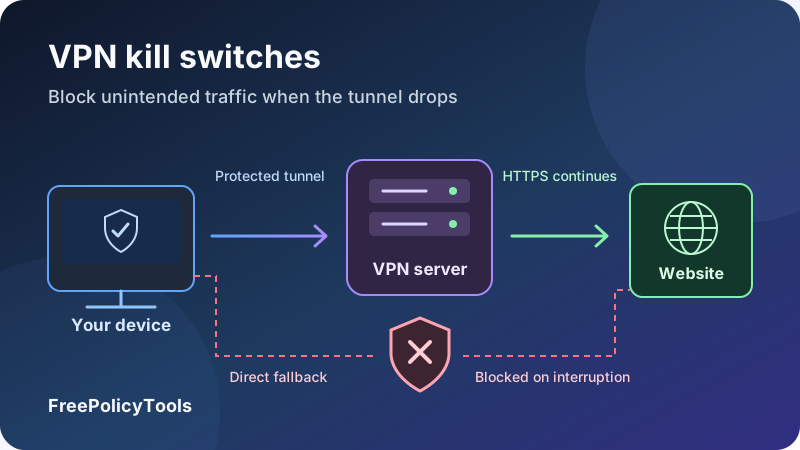
A VPN kill switch is a traffic-control feature designed to prevent an unintended direct connection when the VPN is unavailable. Instead of allowing selected apps or device traffic to fall back to your ordinary internet route, it blocks that traffic or, in some products, closes selected applications. The intended result is a temporary interruption rather than an unexpected exposure of your original public IP and network activity.
The details matter. Some switches react only to an unexpected drop; stricter modes keep traffic blocked before connection and after manual disconnect. This guide explains how VPN kill switch protection works, how implementation and platform affect coverage, and how to test the behavior you actually need. It also separates route protection from HTTPS, provider logging and complete anonymity.
Route
Define the intended VPN path
Block
Deny unintended fallback traffic
Recover
Restore the protected connection
Verify
Test actual failure behavior
What Is a VPN Kill Switch?
A kill switch enforces a decision about traffic when the intended VPN path is absent or fails. For a device-wide internet switch, the goal is usually to prevent ordinary internet traffic from leaving through an unintended non-VPN route. An app-level switch may instead stop selected programs. The feature is a policy and enforcement mechanism, not an additional encryption algorithm.
Your device normally knows how to reach the internet through Wi-Fi, Ethernet or cellular data. The VPN adds a protected route over that connection. If the tunnel disappears, an application can potentially use the underlying route unless something prevents it. A kill switch is intended to close that gap.
Blocking traffic does not usually turn off the network
The Wi-Fi radio can remain on and the device can still be associated with the router. Rules can deny application traffic while permitting the VPN client to contact its endpoint. Network configuration exchanges and explicitly permitted local traffic may also remain possible. An offline-looking browser therefore does not necessarily mean the physical connection was disabled.
Fail closed versus fail open
Fail closed means the protected traffic is denied when the intended path cannot be used. Fail open means it can use another available path. A kill switch seeks the first outcome for its defined scope. The tradeoff is availability: an interruption can stop downloads, calls and background sync until a permitted connection returns.
The decision is about a route
The feature aims to prevent unintended fallback. It does not erase cookies, change account identity or encrypt a website after traffic leaves the VPN server. Start with how VPNs work if you need the underlying traffic path explained.
What Can Be Exposed When a VPN Drops?
A dropped tunnel does not automatically mean every password becomes readable. The exposure depends on what leaves directly, what the destination sees and which encryption the application already uses. Distinguish a route change from a compromise of the application’s contents.
| Information or behavior | What can change | Important qualification |
|---|---|---|
| Public source IP | A destination may see the ordinary ISP or carrier exit instead of the VPN exit | A single direct request can link that request to the original connection. |
| Destination metadata | The local network or ISP can observe aspects of the direct path | Visibility varies with DNS, TLS features and other protections. |
| DNS lookups | Queries may use a resolver or route outside the intended tunnel | Resolver ownership and the route to it are separate questions. |
| Plain HTTP content | Relevant intermediaries may read or modify unencrypted requests | The VPN would only have protected the device-to-VPN leg anyway. |
| HTTPS content | It normally remains encrypted to the website’s TLS endpoint | The website still sees submitted content; compromised endpoints are a separate risk. |
| Session continuity | Services may observe an IP change or interrupt a connection | Some sessions stop; others retry or establish new connections. |
Small windows can still matter
A browser refresh, messaging retry or background sync can send a request in a short interval. The amount of data need not be large for a destination to observe a different source address. On the other hand, the mere possibility of fallback does not prove a particular request escaped. Evidence must show the route or source actually used.
Some existing connections fail when the address changes; applications may then open new ones. Do not assume either that every established session migrates seamlessly or that a broken session means all background traffic stopped.
Our VPN encryption guide explains the tunnel boundary. Keep HTTPS enabled regardless of kill switch status, and investigate certificate warnings instead of treating a connected VPN as permission to ignore them.
How a VPN Kill Switch Works, Step by Step
Implementations differ, but the functional sequence is similar: establish the permitted path, enforce the intended policy, handle interruption and restore usable protected traffic. Some designs apply restrictive rules before a failure occurs; others react to a detected event.
- The app prepares the connection and policy. It selects an endpoint, creates or configures the tunnel interface and applies the relevant traffic rules. A strict mode may already deny ordinary non-VPN traffic before connection.
- The device uses the intended tunnel. Application packets follow the configured route, while the encrypted outer packets still travel across the physical Wi-Fi, Ethernet or cellular interface.
- An interruption changes connection state. The tunnel, endpoint, route or underlying network can become unavailable. The system may detect this through interface events, service state or other connection checks.
- Enforcement prevents the unwanted alternative. Existing blocking rules continue denying direct traffic, or a reactive implementation applies its failure action. An app-level product may close selected processes instead.
- The client attempts recovery. Allowed control traffic can reach a VPN endpoint and establish the protected path again. The client may retry, choose another server or change a supported protocol.
- Protected application traffic resumes. The restored route is allowed according to the policy. Some apps recover automatically, while others require a retry or a new session.
Connected
Intended traffic uses the VPN route. The underlying network carries the outer tunnel packets.
Tunnel unavailable
The configured policy blocks unintended direct traffic within its scope.
Restored
The protected path returns and allowed traffic can resume.
Detection and enforcement are different jobs
A status check can tell the app that something failed. It does not, by itself, stop packets. The enforcement mechanism determines which traffic is allowed and when. A design that continuously denies unwanted routes does not need to race every application’s next retry after noticing a drop.
Nevertheless, a persistent-looking rule is not proof of complete coverage. Address families, exceptions, process failures and startup ordering must still be considered. There is no universal detection delay or guaranteed leak window that applies to every VPN.
Firewall Rules, Routing Controls and App Closing
A product can implement kill switch protection in several ways. The distinction matters because a visible app window, a background service and operating-system traffic rules can have different lifetimes.
System-level packet filtering
A client can use operating-system filtering facilities to deny packets that do not satisfy its policy. The rules may distinguish interfaces, destinations or processes and permit the traffic needed to establish the VPN. Properly scoped enforcement can prevent application traffic from using an unwanted physical-interface route even if ordinary routing would allow it.
Operating-system VPN blocking
Some platforms provide VPN-specific controls that maintain a connection and block traffic outside it. The app still needs compatible integration. Work-profile or managed-device policies can also have a narrower or different scope than a personal device setting.
Routing-based controls
Routing rules determine which path packets take. A setup may use them to send traffic into a tunnel or an unavailable path. Routes and packet filtering are different mechanisms, and network changes can introduce more specific routes. Ask what the complete implementation enforces instead of assuming that setting a VPN default route is equivalent to a persistent blocking policy.
Closing selected applications
An app switch can terminate chosen programs after a relevant event. This may stop those programs’ ordinary activity but can lose unsaved work. Helper processes, background services and other apps may not be included. Reopening the program can also have different consequences from keeping it closed.
| Approach | Intended action | What to verify |
|---|---|---|
| System filtering | Deny packets outside the permitted path | Scope, exceptions, persistence and behavior across address families. |
| OS VPN blocking | Enforce the selected VPN-only network policy | Device/profile support, configured blocking and permitted exceptions. |
| Routing controls | Direct traffic into approved routes or prevent a usable fallback | Behavior when interfaces, gateways or route priorities change. |
| App closing | Stop named programs after the relevant event | Selected processes, helpers, timing and what happens if they reopen. |
A visible “disconnected” label tells you about the client state. It does not describe every operating-system rule. Conversely, closing the app window may leave the service and blocking policy running. Test the documented behavior for the actual installation.
Standard, Strict and App-Level Kill Switches
Names such as standard, advanced, permanent, strict, internet and lockdown are not a universal standard. They describe product policies, and those policies can change across operating systems or releases. Read the exact behavior behind the label.
| Mode | Typical intended behavior | Important limit |
|---|---|---|
| Standard / reactive | Block or stop selected traffic after an unexpected tunnel interruption | Manual disconnect, startup or quitting may deliberately allow direct access. |
| Strict / advanced / permanent | Keep relevant internet traffic blocked whenever the required VPN path is absent | Verify boot-time coverage, service failures and documented exceptions. |
| Internet / system-level | Apply blocking broadly to device internet traffic | Broad coverage is still subject to platform scope and configured exclusions. |
| App-level | Close or restrict named applications | Other programs and helper processes may remain outside its scope. |
Two separate dimensions: trigger and scope
Whether a switch is strict answers when it applies. Whether it is app-level or system-level answers what it covers. A product can therefore have a system-level standard mode or a system-level strict mode. Combining the dimensions gives a clearer description than choosing one word from a feature list.
Proton VPN’s kill switch documentation distinguishes standard and advanced behavior and lists platform-specific support. Its descriptions are examples of that provider’s policy, not definitions that every other app must follow.
Lockdown can include deliberate user actions
The Mullvad app guide describes an optional Lockdown mode that also blocks internet access after Disconnect or Quit, in addition to its built-in kill switch. The guide includes platform caveats, illustrating why a strict mode should still be evaluated for the events and device you use.
Choose the policy you actually want
Strict blocking can be appropriate when you want relevant activity paused unless the VPN is available. A standard mode may suit a workflow where intentional disconnect means returning to ordinary internet access. Neither choice removes the need to know which apps, exceptions and transitions are covered.
Affiliate disclosure: we may earn a commission if you purchase through this link.
Explore NordVPN’s PlansEvents That Can Interrupt Your VPN
A VPN can lose its usable path even when the device still has internet access. The events below exercise different parts of the system, so one passing disconnect test cannot represent all of them.
| Event | What may happen | Question to verify |
|---|---|---|
| VPN endpoint becomes unreachable | The tunnel cannot deliver traffic while the physical network remains usable | Is direct fallback denied during retries? |
| Server or protocol change | The app replaces one protected connection with another | What is permitted between the two connections? |
| Wi-Fi to cellular or Ethernet change | Addresses, interfaces and available routes change | Does enforcement follow the new path? |
| Sleep and wake | Networking resumes before or during tunnel recovery | Can an app send direct traffic during wake-up? |
| Client or background service failure | A process responsible for connection or policy stops | Which rules remain active after that specific failure? |
| Boot or sign-in | The network may become ready before the VPN connects | Does the selected mode cover this startup interval? |
| Manual disconnect, pause or quit | The user intentionally changes state | Does this action allow direct access or keep it blocked? |
| Captive portal | Internet access requires a local login before the tunnel works | Is there a documented, deliberate way to complete the portal? |
Underlying network loss is a different test
If all network access disappears, no direct packet can reach the internet during that outage. The interesting interval may occur when connectivity returns before the tunnel is ready. Simply turning Wi-Fi off and seeing a failed page load does not prove that the kill switch prevented a usable alternative route.
Recovery speed is not blocking coverage
A fast reconnect shortens interruption, but it does not establish what happened during the gap. A slower reconnect can still preserve the intended route boundary if traffic remains blocked. Our VPN protocol guide explains how transport and roaming affect recovery separately from app blocking.
Windows, macOS, Linux, Android and iOS
Evaluate the exact app, installation source, operating-system version and selected mode. A provider’s general feature page may combine behavior from several platforms. A desktop label cannot be assumed to describe its mobile app, router profile or browser extension.
Windows
Supported apps can provide broad internet blocking, selected-app closing or multiple modes. Confirm startup behavior, manual disconnect and interaction with other security software. An app switch that closes your browser is a different mechanism from rules that deny that browser’s packets.
macOS
The app’s distribution and integration can affect features and behavior. Check whether the provider distinguishes App Store and direct-download versions. Review its documented boot, wake and quit behavior rather than expecting all macOS clients to implement the same policy.
NordVPN’s current support guide illustrates these differences: it describes internet and app switches on Windows, app-distribution differences on macOS, and separate behavior on its other platforms. Verify the version you install instead of transferring one description to every device.
Linux
Official clients, graphical apps, command-line tools and manually configured tunnels can have different enforcement. A WireGuard or OpenVPN configuration file does not automatically include the official app’s traffic policy. Verify which service manages rules and what happens when it stops, updates or reconnects.
Android
For compatible VPN profiles, Android exposes Always-on VPN and Block connections without VPN. Android’s VPN documentation distinguishes maintaining the VPN from blocking traffic that does not use it. Treat the blocking control as a separate setting rather than assuming automatic connection supplies the same result.
Menu paths and supported profiles vary. Managed work profiles have their own scope, and device-vendor interfaces can differ. Some combinations of per-app routing and blocking may prevent excluded apps from connecting rather than letting them go direct.
iOS and iPadOS
Consumer apps rely on platform VPN APIs and provider-specific settings. Managed-device controls are a separate deployment model. Do not assume an Android-style menu exists or that a named consumer mode offers identical boot and background behavior. Use current provider instructions and test relevant transitions.
Routers and browser extensions
A router can enforce a VPN-only path for selected connected devices if its firmware and configuration support it. That policy does not cover a phone after it switches to another connection. A browser-only extension usually has narrower scope; check whether it controls a companion device VPN.
| Setup | Verify explicitly |
|---|---|
| Desktop official app | Mode, startup ordering, service persistence and selected-app scope. |
| Manual Linux or router tunnel | Actual firewall/routing policy, DNS path and allowed fallback. |
| Android compatible profile | Both always-on and non-VPN blocking settings, plus profile scope. |
| iOS / iPadOS app | Current provider feature, documented exceptions and real transition behavior. |
| Browser extension | Browser-only coverage versus companion-app integration. |
DNS, IPv6 and Split-Tunnel Interactions
A kill switch can only enforce the traffic policy it actually implements. Name lookups, multiple address families, deliberate bypass rules and local access all need to be understood as part of that policy.
DNS requests and resolver paths
A device may use the provider’s resolver, a browser-selected encrypted resolver or another configured service. Resolver identity and packet routing are separate. A DNS query using an external resolver is not automatically a leak if it travels through the intended tunnel, while an unintended direct query can expose information outside it.
Check connected-state DNS behavior as well as relevant failure transitions. Our DNS leak guide explains why a resolver list alone needs interpretation.
IPv4, IPv6 and browser real-time features
A setup should handle both address families appropriately, whether by tunneling supported traffic or blocking an unsupported path. A rule affecting only one family can leave another usable route. Browser WebRTC behavior also needs relevant testing; a local private address is a different finding from an exposed original public address.
See WebRTC and IPv6 exposure. Do not assume that one IPv4 address check covers every application connection.
Split tunneling and direct exceptions
Some traffic may be intentionally excluded from the tunnel. The kill switch can block those apps, allow their direct access or disallow that combination, depending on the product. Define the expected behavior before calling an observed direct request a bug.
Our split versus full tunneling guide explains the routing choice. Intentional direct access remains outside the VPN protection, even when it is working exactly as configured.
Local networking and permitted control traffic
Printers, local shares, DHCP and communication with the VPN endpoint are different from ordinary internet requests. Some are explicitly allowed for functionality. Document those exceptions and keep their scope appropriate. A physical interface must carry the outer VPN connection; banning every packet on it would prevent the tunnel from operating at all.
Kill Switch Protection in Practical Charts
The following visuals describe policy outcomes and a validation plan. They deliberately do not assign a provider success rate or invent a universal detection time. The accompanying tables provide the same information in accessible text.
Illustrations, not product benchmarks
The states and request counts are chosen examples. They assume the stated policy is correctly enforced for the traffic being illustrated. Real results require observation on the actual device, version and configuration.
Stepped line chart: what is allowed during an interruption?
| Stage | Direct fallback allowed | Blocking policy enforced |
|---|---|---|
| Stable | VPN route | VPN route |
| Tunnel lost | Direct route available to illustrated requests | Illustrated non-VPN requests blocked |
| Retrying | Direct route remains available | Blocking remains active |
| Restored | VPN route returns | Protected traffic resumes |
Stacked bar chart: requests can be denied instead of exposed
| Policy | Attempts | Direct requests | Blocked requests |
|---|---|---|---|
| Fallback allowed | 100 | 100 | 0 |
| Blocking enforced | 100 | 0 | 100 |
Blocking sacrifices completion of those requests to preserve the intended route boundary. A browser error in that interval can be the correct result. A real test should count observations and attempts separately: an app can retry internally or fail before sending a packet.
Donut chart: spread checks across the lifecycle
| Group | Example count | Examples |
|---|---|---|
| Startup | 2 | Boot before connection; start the app while offline. |
| Failures | 4 | Endpoint loss; tunnel restart; supported client/service-failure checks. |
| Manual actions | 2 | Disconnect; pause or quit as documented. |
| Network changes | 4 | Wi-Fi/cellular; Ethernet change; sleep/wake; connectivity restoration. |
The purpose of the plan is coverage, not a large number for its own sake. Identify which events matter to your device and repeat relevant tests after changes. Do not infer protection of DNS or background apps merely because a web page failed once.
How to Enable and Configure a VPN Kill Switch
Use the official instructions for your app and platform. Feature names and defaults differ, and some protection is built in while other modes require activation. Before enabling strict blocking, know how to reconnect or change the setting when the tunnel is unavailable.
- Update the official client. Confirm the provider and installation source. Avoid assuming that an old manual profile includes the app’s current blocking controls.
- Locate the relevant setting. It may appear under security, connection or advanced preferences, or in the operating system’s VPN settings.
- Choose the scope. Decide whether you need broad internet blocking or a specifically selected app policy. For an app list, identify helper processes and the consequences of closing programs.
- Choose the trigger policy. Determine whether unexpected drops, manual disconnect, startup, pause and quit should leave direct access allowed or blocked.
- Review exceptions. Inspect split tunneling, local-network permissions and any trusted-network setting that disables protection or automatic connection.
- Connect and verify the route. Check the public IP and relevant DNS/address behavior before testing interruptions.
- Test the intended events. Use non-sensitive traffic and compare observations against the mode’s documentation. Keep a record of the app version and settings.
On Android, check both controls
For a supported app, open the selected VPN profile in Android settings and inspect Always-on VPN and Block connections without VPN. The menu path varies by device. Confirm the profile selected for always-on behavior and test the setting on the networks you use.
On desktops, check app and system state
Do not assume the visible window is responsible for enforcement. Review whether the app requires a background service, whether its policy survives quitting and whether boot-time blocking is documented. If another firewall or security tool is installed, follow the provider’s compatibility guidance rather than disabling it indiscriminately.
Preserve the configuration that you verified
Record mode, protocol, app version, operating-system version and exclusions. Changes can alter behavior. Our NordVPN review provides service context, but the current app documentation and your own tests should determine the settings you rely on.
Affiliate disclosure: we may earn a commission if you purchase through this link.
Explore NordVPN’s PlansHow to Test Your Kill Switch Properly
A useful test keeps the observation tied to an expected policy. Start with a harmless request and a known route, introduce one controlled event, and record whether eligible traffic is blocked, tunneled or sent directly. Avoid using sensitive accounts or live transfers as test traffic.
Prepare a baseline and a recovery path
When you deliberately allow direct access for a baseline, record the public IP seen by a test endpoint. Then connect the VPN and record the exit IP. Close unrelated sensitive apps, review exceptions and keep the provider’s recovery instructions available locally. On a managed device, use the approved testing procedure.
Observe more than the app’s indicator
Our IP Address Checker shows the source seen for a successful request, while the IP Leak Test helps investigate additional paths. These are point-in-time observations, not a continuous guarantee.
Repeated non-cached requests to an endpoint you control can provide better evidence about transitions, especially if you log timestamps and observed sources. Even repeated checks have sampling gaps. A browser page that simply shows the last successful VPN IP may conceal a later failed or direct request.
Test separate events separately
| Test | How to approach it | Expected result to define first |
|---|---|---|
| Unexpected tunnel interruption | Use a provider-supported controlled interruption while ordinary networking stays available | Eligible requests remain blocked until the protected path returns. |
| Manual Disconnect | Use the app’s ordinary Disconnect control | Standard mode may allow direct access; strict mode should match its documented blocking policy. |
| Pause or Quit | Use the documented user action rather than assuming it is a crash | Determine whether that action suspends blocking or keeps it active. |
| Server/protocol change | Change one supported connection option | No unintended direct traffic between tunnels within the expected scope. |
| Sleep and wake | Use a harmless request before and after a normal sleep cycle | Networking does not bypass the required route while recovering. |
| Interface transition | Switch between available permitted networks | The blocking policy follows the applicable new path. |
| Network loss and restoration | Disconnect then restore underlying connectivity | Pay attention to the restoration interval before the VPN reconnects. |
| Startup | Restart and observe before the first tunnel is ready | Strict coverage matches the provider’s documented boot-time scope. |
| Application/service failure | Use only an understood, supported procedure with a recovery plan | Verify whether rules persist after the particular failed process. |
| DNS and IPv6 | Observe relevant resolver and address-family paths | No unexpected direct route outside configured exceptions. |
Why pressing Disconnect is not enough
Manual disconnect can be an intentional exception in standard mode. Conversely, a strict mode blocking after Disconnect does not prove that it blocks after a background service crash or during early startup. Compare each result with the event it actually exercised.
Why turning off Wi-Fi is not enough
If Wi-Fi is the only path, requests fail because there is no network. That does not test a still-available direct route. If cellular is available, the same action becomes an interface-transition test. Record which paths exist so you can interpret the result correctly.
When stronger observation is useful
On a device and network you control, an appropriate packet capture can show traffic destinations and timing. On the physical interface, you should expect encrypted outer packets to the VPN endpoint and necessary permitted control traffic. Seeing your device’s ordinary source address on those outer packets is not itself an application leak.
The relevant finding is eligible application traffic or DNS leaving outside the intended path. Capture interpretation requires care, particularly with multiple interfaces, local traffic and encrypted DNS. Our VPN testing guide provides broader context.
How to Interpret Your Kill Switch Test Results
Evaluate observations against the defined scope and event. A failed page load is consistent with blocking, but can also come from an ordinary outage, a broken resolver or a destination failure. Combine app state with network availability and route evidence.
| Observation | Possible meaning | What it does not prove |
|---|---|---|
| Harmless requests fail while ordinary connectivity is known to exist | The selected route may be blocked as intended | That every app, address family or background process is covered. |
| A successful request shows the original public IP during a protected event | That request used a direct route or another path exposing the original address | That HTTPS content was decrypted. |
| A browser keeps showing the old VPN IP | It may be displaying a cached or previous result | That later requests stayed tunneled. |
| The tunnel reconnects quickly | Recovery works for that event | That no traffic escaped during the gap. |
| A permitted excluded app goes direct | A configured exception may be functioning | That the exception has VPN protection. |
| Physical-interface capture shows traffic to the VPN server | The outer tunnel still uses the underlying network | That inner application traffic bypassed it. |
| More than one DNS resolver appears | The test observed multiple resolver addresses | A leak solely from the count without examining ownership and routing. |
Record pass, fail and inconclusive separately
A pass means the defined behavior was observed for that test. A fail means evidence contradicts the intended policy. Inconclusive means the test could not distinguish blocking from another failure or missed the relevant interval. Treating uncertainty as a pass overstates what you learned.
Keep enough detail to reproduce the finding
Record device, OS, app version, protocol, mode, exclusions, event and timestamps. Include the evidence needed to distinguish a direct request from an intended exception. Redact public-address details where appropriate and never include private keys, account tokens or passwords in a shared report.
Repeat relevant checks after an app update, protocol change or new split-tunnel rule. Our WireGuard versus OpenVPN guide explains protocol differences, but the surrounding enforcement still needs verification in either mode.
Why Your Internet Stops and How to Recover
If strict blocking is enabled and the VPN is unavailable, loss of ordinary internet access may be the expected result. Diagnose the tunnel and the policy separately. Do not remove unrelated firewall rules or reset all networking simply because the browser is offline.
| Symptom | Possible explanation | Useful next action |
|---|---|---|
| No internet after manual disconnect | Strict, advanced or lockdown mode remains active | Reconnect, or deliberately change the documented mode if direct access is intended. |
| VPN cannot connect on hotel Wi-Fi | Captive portal must be completed first | Follow the provider’s documented portal procedure, with sensitive apps paused. |
| Browser works but another app is blocked | App routing, split-tunnel interaction or per-app policy differs | Check that application’s rule and the mode’s compatibility. |
| Local printer is unavailable | Local-network access is blocked | Use a supported, narrowly scoped local permission if appropriate. |
| Selected app closes unexpectedly | An app kill switch received its trigger | Review the process list and whether traffic blocking better fits the workflow. |
| Repeated drops make browsing unusable | Network, endpoint or protocol instability | Investigate the connection and compare a supported server or protocol. |
| Connectivity remains blocked after quitting | Persistent policy remains active, or an app/service recovery is needed | Use the official recovery procedure for that mode and installation. |
| Manual router tunnel goes direct on failure | No explicit VPN-only routing/firewall policy covers that device | Have the supported configuration enforce the intended boundary. |
Recover deliberately
If you need direct access to complete a portal or download a repair, pause sensitive activity and follow the documented procedure. Understand that disabling blocking changes the route policy. Restore the intended mode afterward and retest rather than leaving it off accidentally.
Fix instability at the appropriate layer
Check underlying Wi-Fi or cellular reliability, endpoint availability, app updates and supported protocol choices. A kill switch blocking during repeated failures is not necessarily the cause of the failures. See VPN troubleshooting and VPN speed and latency for connection investigation.
If the official client is damaged or unavailable, use its supported repair or removal guidance. On managed devices, ask the administrator to restore connectivity. Removing broad security policy without understanding its owner can create new problems.
What Kill Switches Cannot Guarantee
A kill switch addresses unintended network fallback within a defined scope. It does not certify the rest of your privacy or security setup, and implementations can have bugs, exceptions or events they do not cover.
A connected tunnel can coexist with a routing problem
Monitoring tunnel status alone is not enough to prove that application traffic follows it. Leviathan Security’s TunnelVision research describes a technique in which local-network route information can redirect traffic while the VPN remains connected. Exposure depends on the platform and enforcement; a continuously enforced filtering policy is different from merely reacting to a disconnected indicator.
This is a reason to keep software current and examine routing protections, not a claim that every present-day VPN is vulnerable. Do not generalize a specific research result to every client, version or operating system.
Startup and process failures need explicit coverage
A rule installed after login cannot be assumed to cover every earlier boot packet. A policy surviving one UI action cannot be assumed to survive every service failure. Provider documentation and relevant testing should establish the scope you depend on.
Logging and identity remain separate
The operator can still have account and connection records according to its practices. A website can identify an account, cookie or browser fingerprint while the traffic is correctly tunneled. Read VPN logging policies and VPNs and browser fingerprinting alongside route protection.
Endpoint security and application encryption still matter
A kill switch cannot remove malware, stop every phishing attempt or erase records on your device. Nor does it secure the plain HTTP leg after the VPN endpoint. Keep software updated, use strong account authentication and retain HTTPS. Our VPN limitations guide covers these boundaries.
How to Evaluate Kill Switch Protection
Choose a service and mode based on documented behavior on your actual devices. Look for clear answers about scope, manual actions, persistent enforcement and exception handling. A single “kill switch included” tick in a comparison chart does not answer those questions.
| Topic | Question |
|---|---|
| Scope | Does it block packets broadly or close only selected applications? |
| Trigger policy | What happens during unexpected failure, manual disconnect, pause and quit? |
| Startup | When is enforcement active, and are boot-time limitations documented? |
| Persistence | Which rules survive closing the interface or a supported service-failure scenario? |
| Coverage | How are DNS, IPv6, per-app traffic and local-network exceptions handled? |
| Platform support | Does this exact installation and app version provide the described mode? |
| Evidence | What public documentation, scoped audit or reproducible testing supports the claim? |
| Recovery | How can you restore intended connectivity without an undocumented workaround? |
Distinguish provider statements from independent findings
A provider’s support guide is useful for its intended behavior. An audit may review only a particular platform, build or part of the system. Your test observes your own setup and events. Use these forms of evidence together without treating any one as a permanent universal guarantee.
Our VPN Comparison Tool helps organize product choices. Check current technical details and verify your selected mode before relying on it for an important routing requirement.
Common VPN Kill Switch Mistakes
Assuming the feature is enabled by default
Defaults vary by platform and mode. Inspect the actual setting and verify behavior.
Confusing reconnect with blocking
A client can restore a tunnel while allowing traffic during the gap. Test the two functions separately.
Using manual disconnect as the only test
The action may deliberately permit direct access in standard mode. Include unexpected failure and other relevant events.
Turning off the only internet connection and declaring success
No underlying route means requests would fail even without a kill switch. Examine restoration and a controlled tunnel-only interruption.
Treating app closing as whole-device protection
Other processes, helpers and background apps may remain outside the selected list.
Ignoring split-tunnel and local exceptions
Define intentional direct traffic before evaluating what escaped unexpectedly.
Trusting a stale IP display
Use fresh observations. A previous result does not describe what happened during the next transition.
Removing protection to fix every outage
Diagnose the connection and policy separately, and restore intentional settings after any necessary temporary change.
Assuming a successful test proves permanent protection
The result applies to tested events and versions. Recheck important behavior after changes.
When a test is inconclusive, improve the observation rather than making the claim stronger. Clear scope and repeatable evidence are more useful than a generic promise of zero leaks.
Putting Kill Switch Protection into Practice
A VPN kill switch is intended to deny unintended direct traffic when the protected route cannot be used. The outcome depends on the enforcement mechanism, mode, app and operating system. Standard and strict behavior differ, and closing selected apps is not the same as broadly blocking packets.
Choose the policy you want, understand exceptions and verify the events you actually encounter. Test unexpected failure, manual actions, recovery and relevant address paths. Keep HTTPS, endpoint security and provider privacy evaluation in place because they address separate risks.
Your practical protection checklist
Update the official client → select the right blocking scope and mode → review exceptions → confirm the normal VPN route → test controlled transitions → record pass, fail or inconclusive results → repeat after material changes.
Affiliate disclosure: we may earn a commission if you purchase through this link.
Explore NordVPN’s Plans