VPN Limitations: What VPNs Don't Protect You From (And How to Stay Safe)
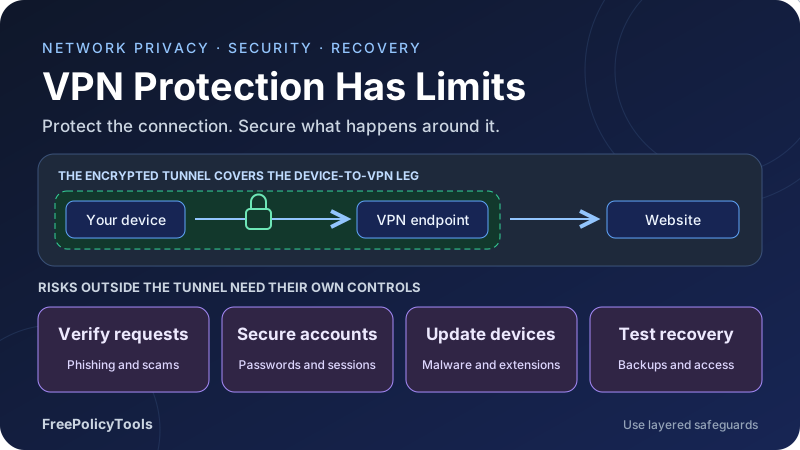
A VPN protects the traffic it carries between your device and its endpoint, and can hide your original IP address from websites. Those are useful privacy benefits. They do not make malicious links safe, prevent every form of tracking or protect an account whose password has already been stolen.
This guide explains VPN limitations, what VPNs don't protect against, and the safeguards that fill the gaps. You will learn how encryption boundaries, provider trust, cookies, device permissions and routing affect privacy, then build a practical routine for accounts, software and recovery.
Tunnel
Protect covered network traffic
Identity
Accounts and cookies remain
Trust
Evaluate devices and providers
Recover
Secure access and restore data
Affiliate disclosure: FreePolicyTools may earn a commission if you purchase through provider links. These links do not establish protection against risks outside the VPN tunnel.
What a VPN Protects—and Where That Protection Ends
A VPN creates an encrypted connection between your device and a VPN endpoint. Traffic routed through that connection is protected from ordinary observers on the local network. A website reached through the VPN generally sees the VPN exit address rather than your original public address for that connection.
That is useful on an untrusted network and when you want to reduce destination visibility to your access provider. It is also a limited promise: traffic must actually enter the tunnel, the device must be trustworthy, and the destination connection still needs its own protection. The VPN endpoint is not the end of every security question.
The two encryption boundaries
Consider the path device → VPN endpoint → website. VPN encryption covers the first leg. HTTPS, when correctly validated, protects the application exchange to the website across the route. Without HTTPS, ordinary HTTP content can be exposed after leaving the VPN tunnel, including to the VPN operator or another observer on the onward path.
Using both layers is therefore sensible. The VPN reduces exposure on the access-network leg; HTTPS protects the website exchange. Neither tells you whether the destination is honest, whether a download is safe or whether an account password has already been stolen.
Privacy, security and anonymity are different goals
A changed IP can reduce one source of tracking. Encryption can protect data in transit. Anonymity concerns whether activity can be linked to a person. Improving the first two does not guarantee the third.
Our guides to how VPNs work and VPN encryption explain the mechanics. Start with that boundary before interpreting a marketing claim such as “complete protection.”
What VPNs Don't Protect Against: A Practical Comparison
VPN limitations become clearer when you name the threat and the missing control. Some problems happen before traffic is encrypted, some at the destination, and some in systems the VPN never controls. A tunnel is one part of a safety plan.
| Threat or exposure | What a VPN can do | What you still need |
|---|---|---|
| Local network observation | Protect covered traffic inside the encrypted tunnel | HTTPS, correct routing and trustworthy endpoints. |
| Phishing and impersonation | Carry the connection securely | Verify the destination and request; use phishing-resistant sign-in where available. |
| Malware and malicious downloads | Protect transport to the VPN endpoint | Updates, security scanning, trusted downloads and limited privileges. |
| Stolen or reused passwords | Change the source IP of covered logins | Unique passwords or passkeys, strong recovery and MFA. |
| Account and cookie tracking | Mask the original IP from a site | Privacy settings, separate contexts and reduced unnecessary sign-ins. |
| Compromised device or extension | Cannot make an untrusted endpoint trustworthy | Containment, remediation and credential/session recovery. |
| Service-side breach | Cannot control the provider’s stored records | Data minimization, strong account security and breach response. |
| GPS, app permissions and voluntary disclosure | Does not generally change these sources | Permission review and careful sharing. |
| Traffic outside the tunnel | Does not protect bypassed connections | Route, DNS, IPv6 and disconnect testing. |
| VPN operator visibility | Transfers part of the trust to that operator | Provider evaluation, HTTPS and realistic logging expectations. |
Optional VPN features can add domain blocking or other protections, but evaluate those features separately. A blocklist may miss a new phishing domain, a malicious document or an attack inside a legitimate service. The tunnel itself is not an antivirus engine or an account-authentication system.
A VPN Does Not Make Phishing Links or Scams Safe
A scammer can operate a website with HTTPS and accept traffic from a VPN. The encrypted connection reliably delivers whatever you type to that site, including a password or payment information. A valid certificate normally establishes a secure connection to the displayed domain, not the honesty of the business behind it.
Check the request, not just the connection
Unexpected urgency, a request for a verification code, a payment instruction or a demand to install remote-access software deserves scrutiny. Open the known official app or a saved bookmark instead of following an unsolicited link. Verify unusual requests through a contact method you already trust.
Be particularly careful with search ads, QR codes and shortened links when the next step involves signing in or paying. The visual design of a page can be copied. Read the actual hostname and check whether the workflow makes sense before entering sensitive information.
Separate authentication from persuasion
A phishing-resistant sign-in can prevent certain credential-relay attacks, but it does not stop a person from voluntarily sending money to an impersonator. Likewise, a domain filter can block known bad sites but cannot determine whether every conversation, invoice or investment offer is legitimate.
Approve only authentication prompts you initiated. Treat requests to share recovery codes or one-time login codes as sensitive. If a caller claims a payment is required to “secure” your account, independently contact the organization before acting.
A VPN can securely connect you to the wrong place
Transport protection does not validate a seller, email sender or support agent. Verification of identity and intent remains necessary even when the VPN and HTTPS connection are both working.
Malware, Ransomware and Unsafe Downloads Remain Endpoint Risks
Malware executes on the device or exploits software processing untrusted input. A VPN does not generally prevent a malicious installer from running, stop a compromised extension from reading a page or repair an unpatched application. Encryption can carry malicious data as effectively as legitimate data.
Keep the software handling content current
Enable supported updates for the operating system, browser, document reader and other exposed applications. Remove abandoned software where practical. Obtain installers from the publisher or a trusted distribution channel, and avoid granting administrator privileges just because a download asks for them.
Built-in or reputable endpoint protection can help detect malicious files and behavior, but no scanner establishes that every file is safe. Reduce unnecessary extensions and review their permissions. An extension able to read page content can access sensitive information regardless of the network tunnel.
Backups address a different failure
Ransomware can damage local files and reach writable backups. Keep recoverable versions or copies with suitable separation from routine device access, and test restoration of a small sample. Cloud synchronization alone may synchronize deletion or encryption rather than preserve a usable recovery point.
A VPN also does not reverse exfiltration that has already occurred. If an attacker stole documents or account tokens, restoring files is only one part of recovery. Determine what was exposed and secure the affected accounts from a device you trust.
Stolen Passwords, Weak Recovery and Session Theft
Your VPN does not change a password’s strength, remove a reused password from a breach or secure an account’s recovery channel. An attacker with valid credentials can often sign in from a different network. A different source IP on your legitimate login is not a replacement for authentication.
Use unique credentials and stronger sign-in
A password manager can help generate and store unique passwords. Passkeys or security keys can provide phishing-resistant authentication where the service supports them. Protect the manager account, recovery methods and devices holding those credentials.
CISA’s phishing-resistant MFA guidance distinguishes FIDO/WebAuthn and appropriate certificate-based methods from more easily phished factors. One-time codes and push approvals can add protection, but they can be relayed or manipulated in ways a VPN does not prevent.
Protect recovery and active sessions
Your email account often controls resets for other services. Secure it early, store recovery codes appropriately and remove obsolete recovery addresses or numbers. Check account alerts and active sessions for changes you did not initiate.
Malware or a malicious extension may steal a session token after sign-in. That can create a separate risk from password theft, and changing only the password may not terminate every active session. Use the service’s session-revocation controls and review connected applications when recovering an account.
Match the control to the account risk
Unique passwords reduce reuse exposure. Phishing-resistant authentication reduces specific sign-in attacks. Session review and secure recovery address ongoing access. A network tunnel performs a separate job.
Cookies, Fingerprints and Logged-In Accounts Can Still Track You
VPN privacy limitations include identifiers that do not depend on your original IP address. A website can recognize its login, session cookie, stored identifier or information you submit. Advertisers and analytics systems may use permitted browser or app signals to associate activity across visits.
An account is a strong identifier
If you sign in to the same account from different VPN exits, the service can still associate those sessions with that account. Changing servers does not delete order history, messages or a profile. Your activity can remain linked even when the site never sees the original network address.
Cookies and browser storage can also survive server changes. Separate browser profiles can help organize different authorized contexts, but they do not guarantee that a service cannot correlate them. Similar behavior, shared account details and voluntarily supplied information may still connect the activity.
Fingerprinting uses more than an IP
Device, browser and environment properties can be combined into a fingerprint. The exact signals and reliability vary, but a VPN does not automatically normalize the browser or remove scripts from pages. Review privacy controls and unnecessary extensions rather than assuming frequent exit changes defeat every tracker.
The FTC’s website and app tracking guidance describes cookies, device fingerprinting and advertising identifiers. Those mechanisms require browser, app and account choices in addition to network routing.
Private browsing has its own boundary
Private windows can limit retained local history and separate temporary site storage from a normal session. They do not prevent a destination from receiving a login or retaining its own records. Downloads and information intentionally saved can remain on the device.
Mozilla’s private-window explanation describes local-session privacy and tracking protections. Combining private browsing with a VPN can address different exposures, but the combination still does not establish anonymous activity.
A VPN Does Not Remove Every Location Signal
A VPN changes the IP-based location a service may infer from covered connections. It does not ordinarily change GPS coordinates, nearby wireless observations or location information an app is allowed to obtain. A shipping address, phone country code or account history can also reveal where you are.
Review permissions before testing location privacy
Check which apps and sites can access device location, including whether background access is allowed. Prefer the least access needed for the feature. An app with location permission may still obtain precise location while its internet connection travels through a remote VPN exit.
Photo metadata and public posts can disclose a place even without direct location permission. Consider landmarks, workplace information and posting times before publishing. A network tool cannot undo details that you deliberately transmit to a recipient.
Geo-restriction results can be inconsistent
Services can use account country, billing region, IP reputation and other policy signals alongside exit location. Some deny known VPN ranges. A VPN does not guarantee access, an acceptable-use exception or a stable language and catalog result.
Read VPN and proxy access troubleshooting for the technical factors. Treat an access refusal as a policy or compatibility question, not evidence that every part of the tunnel is broken.
A Compromised or Managed Device Can See Data Outside the Tunnel
The device prepares data before the VPN encrypts it and processes responses after they arrive. Malware, authorized management software or a powerful browser extension can observe information at those stages. A tunnel does not make the endpoint blind to its own activity.
Employer and school management can operate locally
A managed laptop may have browser policies, monitoring agents or a trusted inspection authority. A personal VPN cannot be assumed to disable those mechanisms. Use the organization’s approved configuration and keep personal sensitive activity on an appropriate device.
Our transparent proxy guide explains the difference between encrypted pass-through and trusted TLS inspection. A valid browser connection indicator can coexist with inspection when the client trusts the intermediary.
Separate device theft from network privacy
A VPN does not prevent someone from reading an unlocked device or retrieving unprotected stored files. Use screen locks, supported device encryption and appropriate account separation. Recovery tools and remote management may help after loss, but their setup and availability should be checked in advance.
If you suspect a device is actively compromised, secure critical accounts from a different trusted device. Avoid entering fresh passwords into the suspect environment. Follow the relevant support or incident-response process before reconnecting the device to sensitive services.
A VPN Transfers Trust to Its Operator
The local access network normally sees that you are communicating with a VPN endpoint, along with timing and volume. The VPN operator handles the exit side and may observe destination metadata and resolver activity, depending on its architecture. Properly validated HTTPS limits its access to website content, but does not erase all metadata.
The FTC’s VPN-app guidance emphasizes evaluating the operator and privacy practices rather than treating the word VPN as a guarantee. Review ownership, revenue model, relevant permissions and the data the service says it collects.
Read the scope of a no-logs claim
Distinguish browsing-activity logs from connection diagnostics, account details, payment records and support conversations. An audit can provide evidence about a defined system and period; it is not proof that every future practice will remain identical. Check what was tested, what was excluded and how recent the evidence is.
Our VPN logging policies guide covers the categories. Free and paid services both need evaluation; a price alone does not establish good privacy. See free VPN safety for the business-model questions.
Multi-hop adds boundaries, not certainty
Passing traffic through several relays can change which operator sees which part of the route. It also adds dependencies, and a single organization may control every hop. Timing correlation, account identifiers and compromised endpoints remain relevant.
Read double VPN and multi-hop before treating an extra relay as proof of anonymity. VPN transport is not a guarantee against every observer with broad visibility.
DNS Leaks, IPv6, Split Tunneling and Disconnects
A VPN can protect only the traffic covered by its route and policy. A split-tunnel exception, browser-only proxy, alternate resolver or unsupported address family may take a different path. An app’s connected status is useful, but it does not prove every connection followed the tunnel.
Test DNS and both address families
A DNS request outside the expected path can expose the queried name to a different resolver or network observer. A resolver test should be interpreted alongside your actual configuration: the presence of an external resolver is not automatically proof of a leak if it is reached through the intended protected route.
Use our DNS leak guide and WebRTC and IPv6 testing guide. A local private address reported by a browser is not equivalent to exposing an original public address; check which signal the test actually reports.
Confirm the scope of split tunneling
Excluded apps and destinations intentionally bypass the VPN. Review those exclusions and remember that browser extensions typically have different coverage from a device VPN. Router-level deployment covers connected devices according to its routes, but it may not protect devices using a different connection.
Our split vs. full tunneling guide helps identify these decisions. Recheck behavior after moving between Wi-Fi and cellular networks or changing network interfaces.
Break the tunnel during a controlled test
A kill switch should stop traffic covered by its enforcement policy when the intended VPN path fails. Implementations differ in startup, reconnect and interface-change behavior. Deliberately interrupt the tunnel with non-sensitive test traffic and see whether connections continue directly.
See how kill switches work and how to test a VPN. A disconnect test verifies an operational boundary, not protection from phishing or malware.
A VPN Cannot Protect Data Stored by the Destination
Our PDF tool lifecycle investigation tests exact output links after stated deadlines without claiming to observe internal erasure. The privacy-request form study and password-checker investigation examine information sent during input handling. These are concrete reasons to assess what a recipient receives separately from whether the connection is encrypted.
Once you upload a document, send a message or complete a purchase, the service processes and may store that information. A VPN does not control its database permissions, backups, vendor relationships or breach response. The data may be exposed later even if the original connection was encrypted.
Reduce unnecessary disclosure
Provide only the information needed for the task and review account privacy controls. Limit connected applications and permissions you no longer use. Separate essential account details from optional profile information, and avoid uploading sensitive files to services whose retention you do not understand.
Encryption at rest and end-to-end encrypted services have different threat models. End-to-end encryption can reduce provider access to message contents when correctly implemented, but recipient devices, backups and metadata still require consideration. A general VPN does not turn an ordinary cloud service into an end-to-end encrypted one.
Prepare for account notifications
Keep a working recovery contact and act on credible breach notices through the official site. Change exposed or reused credentials, revoke relevant sessions and review account activity. Do not use a breach notification’s unfamiliar link as your only way to verify it.
Useful Statistics and Practical Safety Models
Fraud illustrates why a protected connection is not enough. In its March 2026 testimony summary, the FTC reported three million consumer fraud reports and $15.9 billion in reported losses for 2025. It compared that with 2.6 million consumer fraud reports in 2024.
These are reported fraud figures, not a complete count of victimization and not a measure of VPN effectiveness. They include scams beyond browsing. The relevant lesson is that verification and account safeguards address risks a network tunnel does not solve.
Consumer fraud reports in the cited FTC summary
| Reporting year | Consumer fraud reports | Scope |
|---|---|---|
| 2024 | 2.6 million | Rounded count cited in the FTC comparison. |
| 2025 | 3.0 million | Rounded count cited in the FTC testimony summary. |
Example allocation of a security review
This hypothetical twelve-item review assigns three checks each to routing, accounts, devices and data recovery. Equal slices organize the checklist; they do not imply that each category has equal risk or that passing twelve checks makes you immune to attacks.
| Category | Number of checks | Example topics |
|---|---|---|
| Routing | 3 | Exit path, resolver behavior, disconnect enforcement. |
| Accounts | 3 | Unique credentials, strong sign-in, recovery access. |
| Devices | 3 | Updates, extensions, screen lock and encryption. |
| Recovery | 3 | Backup copies, restore test, session-revocation plan. |
How an unprotected routing interval adds up
Assume a test client makes one request per second during a VPN outage and nothing blocks direct traffic. After t seconds, it makes t requests during that interval. The chart shows the count alone: HTTPS may still protect the contents, and this model does not assert that requests were maliciously intercepted.
| Outage duration | Requests at one per second | Interpretation |
|---|---|---|
| 0 seconds | 0 | No interval in the model. |
| 15 seconds | 15 | Direct route remains available by assumption. |
| 30 seconds | 30 | Traffic continues without enforcement. |
| 45 seconds | 45 | Count increases with interval length. |
| 60 seconds | 60 | Not a prediction for any particular VPN. |
How to Stay Safe: Build a Layered Routine
Focus on safeguards that address separate failure modes. A useful routine combines reliable routing with trustworthy devices, strong accounts, careful verification and recoverable data. Prefer a few controls you understand and maintain over a long list of untested features.
Protect the route
Use HTTPS, review VPN coverage and verify DNS and disconnect behavior. Treat the provider as a party you need to evaluate.
Protect access
Use unique credentials or passkeys, secure recovery and review active sessions. Verify unexpected requests independently.
Protect the device and data
Update supported software, limit extensions and privileges, lock the device and test recovery copies.
Set up the essential controls first
- Secure your primary email and password-manager accounts.
- Use phishing-resistant sign-in where supported and protect recovery codes.
- Enable supported system and application updates.
- Remove unnecessary extensions and review app permissions.
- Set screen locks and supported device encryption.
- Check backup versioning or separated copies and test a restore.
- Review the VPN provider, routes, resolver settings and disconnect behavior.
- Bookmark official sign-in pages and establish a way to verify unusual requests.
Recheck after meaningful changes
A new device, VPN update, browser extension, network interface or account-recovery change can alter the safety assumptions. Retest the affected boundary. There is no universal schedule that guarantees security; a short periodic review is useful, but an actual change deserves immediate attention.
Compare your needs with whether you need a VPN and common VPN myths. Device VPNs, browser proxies and remote-access VPNs solve different routing problems.
What to Do If Something Goes Wrong While Using a VPN
Keep the response tied to the incident. Changing VPN servers does not recover a stolen password, remove malware or reverse a payment. Use official support channels and a trusted device when the current device may be compromised.
| What happened | First practical response | Follow-up |
|---|---|---|
| Entered a password on a suspicious page | Use the official service from a trusted device to change it | Revoke sessions, check recovery and replace reused credentials. |
| Approved an unexpected sign-in prompt | Reject further prompts and secure the account | Review active sessions, recovery and connected applications. |
| Installed a suspicious app or extension | Stop sensitive activity and contain the suspect device | Use appropriate security support and recover accounts from a trusted device. |
| Sent money to an impersonator | Contact the payment provider promptly through a known channel | Preserve transaction records and use the relevant reporting process. |
| VPN disconnect allowed direct traffic | Pause the sensitive task and investigate routing | Correct policy and retest before relying on it again. |
| Received a credible service breach notice | Verify it through the official service | Follow the affected-data response, including session and credential changes. |
Preserve useful evidence such as timestamps, transaction identifiers and messages without spreading credentials or sensitive contents. For work equipment, use the organization’s incident process. A factory reset, password change or backup restore can be appropriate in some incidents, but the required scope depends on what was compromised.
After recovery, update the control that failed. If the problem was a misleading invoice, a stronger tunnel would not fix verification. If it was traffic bypass, account MFA would not fix routes. Accurate diagnosis makes the next safeguard useful.
Common Mistakes That Create False Confidence
Treating a connected icon as a complete security check
It indicates VPN state, not the safety of a file, website, account or device. Test actual coverage.
Assuming HTTPS means the page is legitimate
A scam site can have a valid certificate. Verify the domain and the request itself.
Rotating servers while keeping the same account
The account still identifies the activity. IP changes do not remove stored profile or cookie identifiers.
Disabling certificate checks to fix a connection
This removes a crucial authenticity boundary. Resolve the underlying trust or network issue instead.
Relying on a blocklist for every scam
New domains and abuse of legitimate platforms may not be blocked. Verification remains necessary.
Ignoring recovery and active sessions
A secure password is only part of account control. Review resets, tokens and connected apps.
Assuming cloud sync is a tested backup
Deletion or encryption can propagate. Verify usable versions and a recovery path.
Believing a provider audit proves permanent anonymity
Evidence has a defined scope and period. Account identity, endpoints and correlation still matter.
Use a VPN for Its Actual Job
A VPN protects covered traffic on the path to its endpoint and can mask the original source IP from destinations. It does not make a phishing page honest, a compromised device trustworthy, a reused password unique or a service database secure.
Combine HTTPS and verified routing with stronger account access, supported updates, careful permission choices and tested recovery. Evaluate provider trust and remember that logged-in activity remains attributable to the account. These boundaries make VPN privacy limitations understandable and actionable.
Keep the tool when it meets your network privacy needs, and add the controls required for the risks outside the tunnel. Knowing what VPNs do not protect against helps you make a safety plan that matches how attacks actually reach you.