VPN Myths and Misconceptions: Debunking Common Privacy Lies
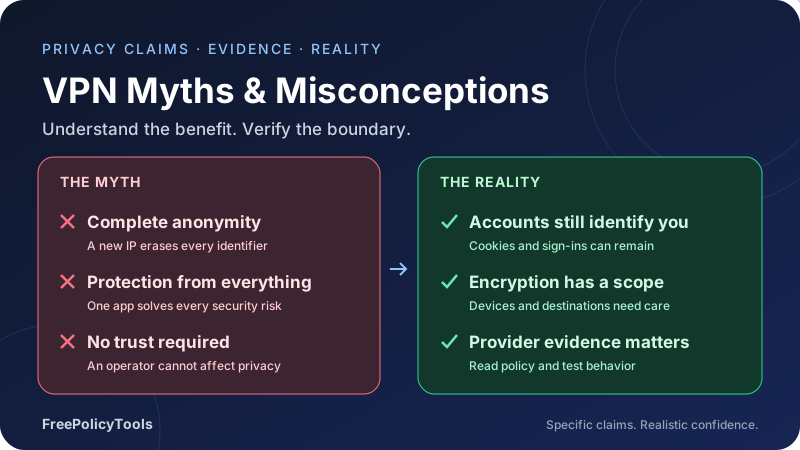
VPNs can protect covered traffic between your device and a VPN endpoint, and change the source address websites see. Advertising often stretches those benefits into promises of total anonymity, effortless security or guaranteed access. Those broader claims need careful scrutiny.
This guide examines common VPN misconceptions, explains where each promise breaks down and gives you a practical check to make. You will find VPN myths debunked with clear distinctions between encryption, account identity, tracking, provider trust and the limits of privacy tools.
Scope
Identify the protected traffic
Identity
Check what still recognizes you
Trust
Read policy and evidence
Verify
Test claims in your environment
Affiliate disclosure: FreePolicyTools may earn a commission if you purchase through provider links. These links do not establish protection against risks outside the VPN tunnel.
How to Recognize a VPN Privacy Myth
A useful VPN claim identifies a threat, a protected path and the conditions under which protection works. “Encrypts covered traffic between your device and our endpoint” is a meaningful statement. “Nobody can ever track you” leaves out the destination, your accounts, the provider and the device itself.
Common VPN misconceptions arise when a narrow capability becomes a universal promise. Changing a source IP becomes “anonymous browsing.” A secure tunnel becomes “protection from hackers.” A no-activity-logs policy becomes “no information exists.” These statements can sound similar while describing very different outcomes.
Ask four questions before accepting a promise
- Which observer or threat does the claim address?
- Which traffic, applications and devices are covered?
- What still identifies you or remains visible outside that protection?
- What evidence verifies the behavior, and what is outside that evidence?
Read how VPNs work for the basic path and VPN limitations for a broader safety plan. A VPN can be valuable without being a universal answer to online risk.
A misconception is not always an intentional lie
Some claims omit important conditions; others use ambiguous words or exaggerate a real feature. Evaluate the actual wording and evidence rather than assuming every mistaken statement proves deliberate deception.
Myth: A VPN Makes You Completely Anonymous
The reality: A VPN normally changes the source IP seen by destinations for covered traffic. It does not erase your account, browser storage, payment relationship or the information you send. Anonymity depends on the entire activity and the observers involved.
For example, logging in to the same shopping account through a different exit still tells the store which account is shopping. Using your email in a form identifies you to the recipient. A provider may also have account and connection information, depending on its architecture and policy.
Distinguish IP masking from unlinkability
IP masking reduces exposure of the original network address to a destination. Unlinkability asks whether separate actions can be associated. An account cookie can link sessions across many IPs. A change of exit might alter one network signal while leaving the strongest application identifier intact.
A local network can still see communication with the VPN endpoint and observe timing and traffic volume. Broad observers may correlate activity across parts of a route. A generic VPN subscription does not establish protection against every adversary or every form of correlation.
What to do: Define whose visibility you want to reduce, avoid unnecessary identifiers and evaluate the operator. Do not describe sensitive activity as anonymous merely because an IP checker shows another country.
Myth: You Do Not Need HTTPS When a VPN Is On
The reality: VPN encryption and HTTPS protect different boundaries. A VPN encrypts covered traffic from your device to the VPN endpoint. HTTPS protects the application exchange with the website when certificate validation is intact and TLS terminates at the intended service.
After an ordinary HTTP request leaves the VPN tunnel, its contents may be visible to the VPN operator or another observer on the onward path. A tunnel does not automatically convert an HTTP-only website into an HTTPS website. Keep HTTPS and certificate checks enabled.
HTTPS also does not make the destination honest
A phishing site can have a valid certificate for its own domain. The browser can establish an encrypted connection that securely delivers your password to the wrong recipient. Check the actual domain and request, not only the presence of an encrypted connection.
On a managed device, a trusted inspection authority may allow an intermediary to terminate TLS. Our transparent proxy guide explains why a valid connection indicator and end-to-end content privacy are different questions.
What to do: Use HTTPS, verify destinations and investigate certificate errors. Read VPN encryption explained before relying on a tunnel to secure the whole route.
Myth: Every Public Wi-Fi Visit Is Unsafe Without a VPN
The reality: Risk depends on the device, protocols and network. Properly validated HTTPS already protects website content against ordinary local-network reading and modification. It is inaccurate to say that everyone nearby can read every password sent over modern HTTPS just because the Wi-Fi is public.
A VPN can still add value by protecting covered non-HTTPS traffic on the access-network leg and reducing local visibility into destinations. It does not make a fake captive portal trustworthy, disable file sharing or secure an outdated device.
Network access and application trust are separate
Verify the expected network name and sign-in process. Do not install an unfamiliar root certificate or remote-access tool just to obtain Wi-Fi. Keep network sharing appropriate to the environment and pause sensitive work when the device or connection cannot be trusted.
The FTC’s VPN-app guidance emphasizes both the potential network benefit and the trust granted to the app operator. Its advice supports evaluating the app rather than accepting security advertising at face value.
What to do: Use HTTPS, keep software current and choose a VPN when it addresses your actual network privacy need. Avoid both blanket fear about every hotspot and blanket confidence in any VPN app.
Myth: Changing VPN Servers Stops Cookies and Fingerprinting
The reality: VPN server changes do not delete browser state or normally change every property of the browser environment. Cookies, local storage, advertising identifiers and logged-in accounts can remain associated with your activity.
Fingerprinting can combine device and browser characteristics. Its reliability varies, but replacing the network address is not the same as removing scripts or standardizing the client. A site may recognize a session without needing your original IP at all.
Clearing cookies is helpful within a limited scope
Removing stored identifiers can reduce continuity in that browser context. It does not delete server-side records or prevent recognition after you sign back in. Separate profiles can help organize distinct contexts, but using the same account or shared identifying details can reconnect them.
The FTC’s tracking explanation covers cookies, fingerprinting and app identifiers. These mechanisms require browser, account and permission choices alongside network routing.
What to do: Review tracking protections, minimize unnecessary sign-ins and understand which identifiers persist. Treat a new exit as a route change rather than a fresh identity.
Myth: Private Browsing Plus a VPN Guarantees Privacy
The reality: Private browsing and VPN routing have different purposes. Private windows can isolate temporary site storage and reduce retained local browsing history. A VPN changes covered traffic paths. Neither controls every record kept by the website or every signal collected on the device.
If you sign in inside a private window, the service still receives the account identity. Information you submit remains available to its recipient. Downloads or deliberately saved files can also remain after the private session closes.
Mozilla’s private-window guidance explains local-session cleanup and browser tracking protections. Those protections are valuable, but their existence does not mean a destination cannot recognize a login.
Consider the device owner
A managed computer may have endpoint monitoring, browser policies or inspection trust. Private mode does not necessarily disable those capabilities. A VPN cannot hide information from software that sees it before encryption or after it arrives.
What to do: Use private browsing for the local-session benefit you need, and choose a trustworthy device. Add account security and permission controls rather than treating two privacy features as a universal guarantee.
Myth: No-Logs Means No Data Exists Anywhere
The reality: Logging claims have categories and scope. A provider may say it does not retain browsing activity while still holding account details, payment records, diagnostic information or support messages. Read what the policy actually excludes and what it keeps.
| Data category | Question to ask | Why it matters |
|---|---|---|
| Browsing activity | Are destination or request records retained? | This is distinct from account administration. |
| Connection metadata | Are original addresses, timestamps or assignment records retained? | Metadata may allow activity correlation. |
| Diagnostics | What telemetry is collected, and can it identify a device? | Crash and operational records can contain additional details. |
| Account and payment | What is kept for access, billing and support? | A service relationship can identify the customer. |
| Retention and access | When is data deleted, and who can retrieve it? | Collection volume and duration change exposure. |
| Independent evidence | What systems and period were examined? | Evidence must match the actual claim. |
An audit is evidence with boundaries
An independent audit can strengthen confidence about a defined configuration or practice at a particular time. It does not prove that every system was examined, every third party follows the same practice or future changes will preserve the result. Check the report’s scope and limitations.
Physical server design and terms such as RAM-only can support a retention strategy, but they do not automatically eliminate off-box logs, control-plane data or account systems. Evaluate the full service rather than one architecture label.
What to do: Read VPN logging policies and compare policy wording with available evidence. Avoid turning “no retained browsing logs” into “no party can ever know I used the service.”
Myth: Every VPN Provider Offers the Same Privacy
The reality: Ownership, software design, infrastructure, telemetry and support practices differ. The VPN operator becomes a party in the route, so the quality of that relationship matters. A recognizable brand, app-store listing or high star rating is not a substitute for understanding the service.
Free and paid are business models, not safety ratings
A paid service can have poor practices. A free tier can have a clear subsidy model and limited usage. The relevant questions include how the operator earns revenue, which permissions the app needs, what information is collected and whether the stated purpose matches the implementation.
Unknown apps requesting unrelated sensitive permissions deserve investigation. A service advertised as unlimited and free still has operating costs; understand how they are funded instead of assuming the absence of a price removes the trust problem.
The EFF’s VPN selection guide recommends choosing according to your needs and evaluating trust. A VPN does not remove the need for a threat model or eliminate every observer.
What to do: Compare the operator, policy, evidence, app permissions and compatibility. Our free VPN safety guide expands on the business-model questions. Do not infer current product capabilities from a generic category label.
Myth: A VPN Replaces Antivirus, Updates and Strong Authentication
The reality: The tunnel can carry a malicious file or deliver a phishing page. It does not ordinarily stop a harmful installer from running, repair an unpatched browser or invalidate a stolen password. These risks occur at the application, account or device boundary.
Separate optional filters from tunnel protection
Some VPN products add blocking for known malicious domains or downloads. Evaluate the stated coverage of those features. A blocklist may miss new domains, threats hosted on legitimate services or a malicious attachment obtained elsewhere. A feature called threat protection does not establish immunity.
Use supported updates, appropriate endpoint protection and trusted downloads. Limit browser extensions and app privileges. A malicious extension can read page content while the connection is encrypted, because it runs where the content is displayed.
Account access needs its own defenses
Use unique passwords or passkeys where appropriate, protect recovery and enable strong additional authentication. A stolen session token can create access risk even without a fresh password prompt. Review active sessions and connected applications during recovery.
What to do: Keep a VPN for routing privacy when useful, and add controls suited to malware, phishing and account takeover. Our VPN safety limitations guide gives a practical checklist.
Myth: A VPN Always Makes the Internet Faster—or Always Slower
The reality: A VPN changes the route and adds processing. It often increases latency or reduces throughput, but an alternative route can perform better than a poor original path. Results depend on the access connection, destination, server load, protocol, device and time of day.
Different applications care about different measures
A video stream needs sufficient sustained throughput. A game or call may be more sensitive to latency, jitter and loss. A fast speed-test download does not establish low delay for an application hosted on a different network.
Keep destination, device and test conditions consistent when comparing. Try several samples rather than one run, and record the VPN endpoint and protocol. A geographically nearer server can still have a worse route; distance is a clue rather than a complete measurement.
A VPN cannot manufacture access-link capacity
If the physical connection or local Wi-Fi is the bottleneck, the tunnel cannot simply create more bandwidth. Protocol overhead, packet-size issues and congestion can reduce useful throughput. Some routing or traffic-management differences can improve a particular result, but that is not a universal speed upgrade.
What to do: See VPN speed and latency and WireGuard vs. OpenVPN. Measure your actual workload rather than accepting a single performance slogan.
Myth: More Encryption or More Hops Guarantees Better Privacy
The reality: Security depends on the protocol, key management, implementation and endpoints, not a simple count of impressive-sounding features. A well-configured single tunnel can meet a network privacy goal; several relays can still leave account identifiers and endpoint risks unchanged.
Multi-hop changes who sees parts of the route
A separate entry and exit can distribute visibility under specific assumptions. If one operator controls both, its systems may be able to correlate them. Broad traffic observation and identifying application behavior remain concerns regardless of hop count.
Extra hops also create more routing dependencies and potential delay. Their value should follow a clear reason to separate entry and exit trust rather than an assumption that every additional relay doubles anonymity.
Protocol labels require implementation context
Encryption strength is only one consideration. Authentication, software updates, secure defaults and disconnect behavior also matter. An old or incorrectly configured protocol is not rescued by promotional language about encryption size.
What to do: Read double VPN and multi-hop and common VPN protocols. Choose an architecture with assumptions you can explain and behavior you can verify.
Myth: A VPN Changes Every Location Signal and Unlocks Every Service
The reality: A remote exit changes the IP-based location a destination may infer for covered traffic. It does not ordinarily change GPS, app location permissions, a shipping address or an account’s stored region.
Apps can combine multiple signals. A service may also recognize shared VPN address ranges, require additional verification or apply an account-specific rule. A VPN does not guarantee catalog access or an exception to the service’s conditions.
Location can come from information you provide
Public posts, photo metadata, billing details and phone information can reveal a location independently of the route. Review permissions and sharing choices if location privacy matters. Do not assume a city shown by an IP database describes every location signal a service has.
IP geolocation itself can be inaccurate or outdated. A selected server label and a database result may differ without proving that the tunnel is leaking. Compare the observed address and route separately from the database’s interpretation.
What to do: Review device permissions and relevant account settings. Use VPN access troubleshooting to separate routing failures from service policy, and avoid guarantees based on exit location alone.
Myth: One IP Test or a Connected Icon Proves Everything Is Protected
The reality: An IP-check page reports the address seen for its own request. It does not verify all applications, resolver behavior, IPv6, exclusions or the next reconnect. The app’s connected state is evidence of a tunnel session, not complete proof of device coverage.
Test the paths you depend on
Review split-tunnel exclusions and whether you are using a device VPN or a browser-only proxy. Test the actual application and both address families where supported. A router VPN may cover one network while a phone’s separate cellular connection uses another path.
Check resolver behavior using the intended configuration. Seeing a third-party DNS service does not automatically establish a leak if queries reach it through the protected path. A local private address exposed in a browser diagnostic is different from an original public address taking an unintended route.
Test failure as well as success
Interrupt the tunnel during a controlled task and observe whether traffic continues directly. Check startup, network changes and reconnects. Kill switches vary in scope, and a manual disconnect may behave differently from an unexpected transport failure.
What to do: Use VPN testing, DNS leak prevention and WebRTC and IPv6 checks. Review kill-switch behavior before relying on it.
Useful Statistics and Clearly Labeled Models
One recurring VPN privacy myth is that unencrypted web browsing is the default everywhere. Mozilla’s 2025 study The State of HTTPS Adoption on the Web reported HTTPS shares of measured top-level loads of 91.3% on Windows, 96.6% on macOS, 86.4% on Linux and 93.8% on Android.
These are study-specific Firefox observations, not current all-browser figures. The sample includes local-address traffic; the paper’s Figure 3 lists local HTTP at 10.5% for Linux. Do not interpret the chart as an operating-system security ranking or a VPN effectiveness test.
Reported HTTPS shares in the study
| Study group | HTTPS share | Scope |
|---|---|---|
| Windows | 91.3% | Measured Firefox top-level loads. |
| macOS | 96.6% | Measured Firefox top-level loads. |
| Linux | 86.4% | Measured Firefox top-level loads. |
| Android | 93.8% | Measured Firefox top-level loads. |
An example provider review has several categories
This hypothetical ten-question review has four routing checks, three provider checks and three endpoint or account checks. The slices organize questions. They do not measure how common myths are or how much risk each category contributes.
| Category | Questions | Examples |
|---|---|---|
| Routing | 4 | Traffic scope, DNS, IPv6, failure behavior. |
| Provider | 3 | Ownership, retention, evidence scope. |
| Endpoint / accounts | 3 | Device trust, sign-in identity, stored identifiers. |
Bandwidth and transfer time are not the same as latency
For an idealized 100 MB decimal file, transfer time in seconds is 800 megabits divided by sustained megabits per second. The model ignores setup, congestion and protocol overhead. It illustrates a unit conversion, not a benchmark or a claim that a VPN improves throughput.
| Sustained rate | Modeled time | Calculation |
|---|---|---|
| 10 Mbps | 80 seconds | 800 ÷ 10 |
| 20 Mbps | 40 seconds | 800 ÷ 20 |
| 40 Mbps | 20 seconds | 800 ÷ 40 |
| 80 Mbps | 10 seconds | 800 ÷ 80 |
Turn VPN Marketing Claims into Questions You Can Verify
Avoid comparing products only by lists of features. Ask what the feature does in your environment and whether the evidence answers your concern. A feature can be real while the surrounding promise remains too broad.
| Claim | Question to ask | Evidence or check |
|---|---|---|
| Complete anonymity | Which identifiers and observers are excluded? | A defined threat model; no generic test proves this universal claim. |
| No logs | Which data categories and systems does that mean? | Policy wording and appropriately scoped independent evidence. |
| Leak protection | Which routes, resolvers and address families are covered? | Representative tests, including failures and interface changes. |
| Fastest connection | For which destination, workload and conditions? | Repeated comparable latency and throughput measurements. |
| Threat protection | Does it block domains, scan files or inspect behavior? | Specific feature documentation and remaining limitations. |
| All devices protected | Are apps, browsers, router routes and other networks included? | Actual installation and route coverage. |
| Extra hops mean extra privacy | Who operates the hops and what correlation remains? | Architecture and a reason for the chosen trust boundaries. |
Keep testing and evidence distinct
Your own tests can establish behavior you observed under a set of conditions. A privacy policy describes commitments. An audit evaluates its stated scope. None replaces the others, and none should be expanded into a stronger conclusion without supporting evidence.
If a product changes ownership, client software, routing or logging practices, revisit the relevant assumption. An old favorable review does not automatically describe the current service. Save the configuration and test conditions so you can compare changes meaningfully.
A Practical Routine That Avoids False Confidence
Use the VPN for the network exposure you want to reduce, and maintain the controls needed at other boundaries. A routine that matches the threat is more useful than expecting one privacy app to do every job.
Verify routing
Review tunnel scope, DNS, IPv6 and disconnect behavior. Keep HTTPS validation intact and use representative applications.
Evaluate trust
Understand the VPN operator, device management, app permissions and the evidence behind logging claims.
Protect accounts and devices
Use strong sign-in, supported updates and sensible permissions. Verify unusual requests and maintain recoverable data.
Start with your actual use case
Remote access to a company network, reducing local destination visibility and changing a source address are different goals. A corporate VPN can expose traffic to the organization’s controls; a consumer VPN has a different operator relationship. A proxy extension can have narrower coverage than a device tunnel.
Our do you need a VPN guide and VPN vs. proxy comparison help match the mechanism to the task. Choosing a narrower tool for a narrow need is reasonable when you understand its scope.
Recheck after meaningful changes
New extensions, network interfaces, managed-device settings and client updates can change assumptions. Retest the affected behavior. If the problem is an account takeover, recover the account; if it is malware, remediate the endpoint; if it is bypassed traffic, fix routing. Switching servers is not a universal incident response.
Keep the Benefits, Drop the Guarantees
VPN myths debunked should leave you with a clearer understanding of the tool, not a reason to dismiss every VPN. A trustworthy, correctly configured service can protect covered traffic on the access-network leg and mask an original source IP from destinations.
Those benefits coexist with account identifiers, provider trust, endpoint risks and transport limits. Use HTTPS, evaluate logging claims, test real coverage and maintain strong account and device safeguards. Treat broad privacy promises as questions requiring a defined scope and evidence.
The most useful correction to common VPN misconceptions is practical: identify the observer, locate the protection boundary and check the remaining exposure. That approach helps you choose and use a VPN with realistic confidence.