Transparent Proxies Explained: What They Are and How They Affect Privacy
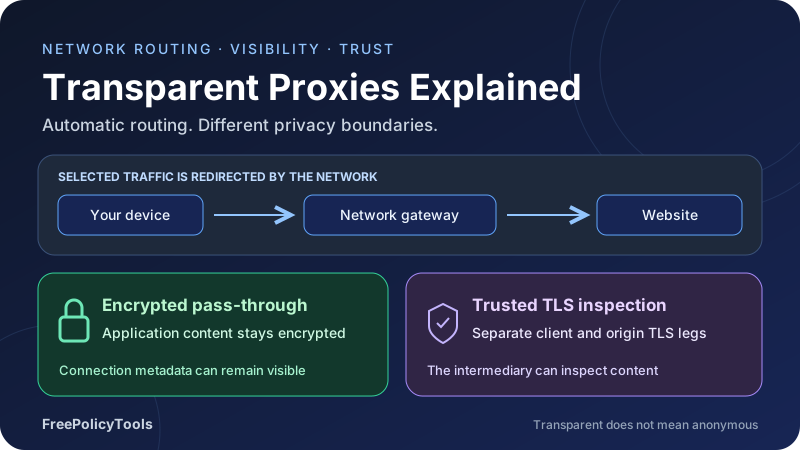
A transparent proxy sits in the path of selected network traffic without requiring you to enter a proxy address in your browser. Schools, workplaces and other network operators can use this approach for filtering, caching or inspection. The traffic can pass through an intermediary even when your manual proxy settings are empty.
What is a transparent proxy doing to your privacy? The answer depends on whether it sees plaintext, forwards encrypted traffic or performs trusted TLS inspection. This guide explains transparent proxies through practical examples, compares deployment types and shows how to assess visibility, certificates, caching and the limits of protective tools.
Route
Automatic network interception
Observe
Content and metadata differ
Trust
Inspect certificate boundaries
Measure
Check scope and performance
Disclosure: provider links may earn FreePolicyTools a commission. Product links are optional resources; they do not establish a privacy guarantee.
What Is a Transparent Proxy?
A transparent proxy is an intermediary placed in a traffic path without requiring the user to configure a proxy address in the application. A router, firewall or network gateway redirects selected connections to the service. The browser may believe it is connecting normally to the destination while the network handles the interception.
In everyday networking discussions, “transparent” usually describes this lack of client-side configuration. It does not promise anonymity, consent, encryption or invisibility. In HTTP terminology, transparent processing can also refer to preserving message semantics. Because vendors use the term differently, ask whether a product means automatic interception, source-address preservation or unmodified forwarding.
Transparent describes deployment, not privacy
A network can route traffic through an intermediary automatically and still log extensive information. Conversely, it can pass encrypted traffic through without reading the application content. The routing method and inspection policy are separate facts.
A practical example
Imagine a school routes outbound web connections through a filtering gateway. Students do not enter a proxy hostname or port. The gateway applies a destination policy and may cache eligible unencrypted responses. That is transparent deployment from the client’s perspective, even if the school clearly discloses the filtering.
An employer can similarly deploy a gateway on a managed network, but a management profile that explicitly configures browser proxy settings is a different mechanism. Both may be invisible in daily use. “I never configured it myself” does not tell you which architecture is operating.
Start with what a proxy server does and our guide to proxy server types to distinguish deployment, protocol and exit-network categories.
How Transparent Proxying Changes the Traffic Path
At a high level, your device sends traffic toward a destination; a controlled point in the network redirects selected flows; the intermediary handles or forwards them; and the response returns through the configured path. The interception point must have enough routing information to reach the original destination and keep the return path coherent.
Interception can use different network mechanisms
Deployments may use destination redirection, policy routing, a transparent socket mechanism or an appliance placed inline. Some proxies create a separate upstream connection using their own source address. Others can preserve the client address in appropriately designed networks. A changed public IP is therefore possible, but not a defining requirement.
The selected traffic matters just as much as the redirection. A rule for TCP port 80 does not automatically cover HTTPS, DNS, QUIC, email or every other application. A gateway that handles both IPv4 and IPv6 needs policies for both. Asymmetric routing can break interception when replies bypass the expected network point.
Decisions happen at different layers
A router can filter by destination address and port without acting as an HTTP proxy. An HTTP-aware proxy can examine plaintext web requests and eligible responses. A TLS-inspecting intermediary can examine HTTPS content only after establishing the necessary trusted TLS endpoints. These capabilities should not be treated as interchangeable.
| Stage | What happens | What to verify |
|---|---|---|
| Traffic selection | Network policy chooses which flows are redirected | Protocols, ports, devices, IPv4 and IPv6 scope. |
| Original destination recovery | The service determines the intended destination | Correct address handling and loop prevention. |
| Policy decision | The service allows, blocks, forwards or inspects | Decision criteria and visibility available at that stage. |
| Upstream connection | Traffic reaches the origin or an allowed upstream | Certificate validation, routing and source-address behavior. |
| Response handling | The result is returned, possibly cached or modified | Cache eligibility, integrity and failure behavior. |
A transparent proxy is not necessarily a reverse proxy. A reverse proxy sits in front of a service on behalf of its operator; an interception proxy sits in the client’s outbound path. See reverse vs. forward proxies for that distinction.
Transparent, Explicit and Anonymous Proxies Compared
Transparent and explicit describe how the application reaches the intermediary. Anonymous and elite are marketing labels about identity disclosure to a destination. These are different dimensions. An explicitly configured proxy can forward identifying headers, and a transparently intercepted flow can emerge from a different IP without granting anonymity.
| Approach | Client configuration | Privacy implication |
|---|---|---|
| Transparent interception | Network redirects selected flows | Operator visibility depends on protocol and inspection; anonymity is not implied. |
| Explicit forward proxy | App, OS, PAC file or management policy selects a proxy | Scope is easier to identify, but logging and forwarded identity still matter. |
| Anonymous proxy label | Often explicit, but product-dependent | A claim about origin-IP disclosure; cookies and accounts can still identify you. |
| Rotating proxy | A gateway or pool assigns exits over time | Changes source addresses, not account identity or transport trust. |
| Reverse proxy / CDN | The website operator directs inbound traffic to its edge | The edge commonly terminates TLS as part of serving that website. |
| VPN tunnel | Client routes selected traffic into an encrypted tunnel | Protects that leg while introducing a VPN operator and endpoint trust. |
Ordinary NAT also changes addresses, but it is not automatically an application proxy. A public-IP checker cannot reliably distinguish NAT, VPN egress, explicit proxying and transparent interception. It reports the source address seen by that service for that request.
For deliberate exit selection, read proxy chains and rotating proxies. For coverage and encryption, use our VPN vs. proxy comparison. Neither category should be chosen from the word “transparent” alone.
Why Networks Deploy Transparent Proxies
Automatic deployment can reduce the work of configuring every device, particularly on networks with many unmanaged clients. The operator gains a central place for selected policy decisions. That convenience also concentrates availability, security and privacy responsibilities at the gateway.
Destination policy
Allow or block selected destinations according to a documented network policy. Available host information varies with encryption and resolver behavior.
Shared caching
Reuse eligible responses for repeated requests. Modern encrypted and personalized traffic limits what an intermediary can safely cache.
Security inspection
Inspect supported content for malware or policy violations when the service has the required access. Inspection creates its own trust and data-handling requirements.
Network operations
Observe connection patterns and diagnose service problems. Useful telemetry should be limited, protected and kept for a defined period.
Captive portals are related, but not identical
A hotel or airport may require a login or acceptance step before granting internet access. The access-control system can use redirection or blocking, but a captive portal is not synonymous with a transparent HTTP proxy. Operating systems commonly perform dedicated connectivity checks to identify the portal.
Trying to redirect an arbitrary HTTPS request to a portal can produce a certificate error because the portal is not the requested website. Complete a clearly identified network sign-in flow; do not treat a certificate warning on an unrelated service as an ordinary login instruction.
Automatic configuration does not remove disclosure needs
An operator should explain the purpose, traffic scope and relevant logging through a usable network notice or managed-device policy. A hidden deployment mechanism does not justify hiding material monitoring practices. Clear communication also reduces support tickets when filtering, certificate handling or application compatibility changes.
Transparent Proxy Privacy: What Can the Operator See?
Transparent proxy privacy depends on the data available at the point of interception. Plain HTTP exposes request and response content to an intermediary that handles it. HTTPS with intact destination authentication protects application content from an ordinary pass-through observer, although connection metadata remains available.
| Information | Plain HTTP | HTTPS passed through | HTTPS with trusted inspection |
|---|---|---|---|
| Client address at the interception point | Normally visible | Normally visible | Normally visible |
| Destination IP, timing and traffic volume | Visible | Visible | Visible |
| Hostname | Usually in HTTP Host | May be exposed by DNS or unencrypted SNI | Available from inspected application requests |
| URL path and query | Visible to HTTP-aware proxy | Encrypted | Available after inspection |
| Cookies and authorization headers | Visible to HTTP-aware proxy | Encrypted | Available after inspection |
| Request / response body | Visible to HTTP-aware proxy | Encrypted | Available after inspection |
| Website account identity | May appear in requests | Not readable from encrypted content alone | May appear in inspected requests |
Metadata can still be sensitive
A connection log can connect a device to a destination at a particular time even without storing page content. DHCP records, Wi-Fi authentication and managed-device inventories can associate an address with a person. Shared addresses and changing assignments mean attribution needs context; an IP by itself is not a reliable universal identity.
Destination IPs may be shared by many services. An observer should not claim a specific page visit from an IP alone. Likewise, volume patterns may suggest activity without establishing exactly what was viewed. Protect metadata because it can be revealing, while describing its evidentiary limits accurately.
Retention changes the risk
A brief in-memory policy check is different from retaining full URLs, payloads and user mappings. Long retention expands the consequences of unauthorized access and creates more opportunities for later correlation. Ask what is recorded, which identifiers accompany it, who can retrieve it and when it is deleted.
HTTPS Pass-Through vs. TLS Inspection
Transparent interception of a connection and decryption of its contents are separate operations. In a pass-through design, the browser establishes destination TLS through the intermediary. In an inspection design, the intermediary terminates the client-side TLS exchange and creates a separate upstream TLS connection.
A managed client can accept the inspection certificate when it trusts an appropriate issuing authority. That authority may be installed through enterprise management or another trusted configuration. Without suitable trust, the client normally rejects the substituted certificate. The proxy cannot simply decrypt arbitrary properly validated HTTPS because it is on the network path.
The Squid inspection documentation distinguishes forwarding an encrypted connection, establishing separate TLS legs and terminating the connection. Its examples illustrate why knowing a destination name is different from reading HTTP contents.
A valid connection indicator does not prove end-to-end privacy
If a device trusts the inspection authority, the browser can display a valid connection while the gateway processes plaintext between its TLS legs. Inspecting the certificate chain can reveal an organizational issuer. It does not independently reveal what the appliance stores or which downstream systems receive inspected data.
Inspection also shifts responsibility for origin certificate validation to the appliance. Weak upstream validation, insecure signing-key storage or broad administrator access can undermine the intended security benefit. The gateway must not make a questionable upstream certificate look trustworthy to every client.
Some applications deliberately reject interception
Certificate pinning, mutual TLS and application-specific trust stores can conflict with substituted certificates. WebSockets, streaming responses and unusual TLS behavior need compatibility testing. A failure in one of these applications does not automatically mean the destination is broken.
Do not fix inspection errors by disabling validation
Keep certificate checks enabled. On a managed device, ask the administrator to explain the trust configuration and supported exception process. On a personal device, investigate unfamiliar certificates before granting additional trust.
DNS, ECH, QUIC and IPv6 Change What Is Visible
Visibility is not fixed across all web clients. Applications choose different resolvers and transports, and modern protocols can reduce the hostname information available to an on-path service. The administrator must verify actual behavior rather than assuming every flow resembles an unencrypted HTTP request.
Encrypted DNS protects one part of the path
DNS over HTTPS or DNS over TLS can protect queries from a local observer on the resolver connection, provided the connection is not itself decrypted. The chosen resolver still handles the queries, and destination addresses remain visible in subsequent traffic. Enterprise resolver policy and endpoint configuration can change the result.
Our DNS leak guide explains why an encrypted web connection does not establish how name resolution occurred. Treat resolver traffic and application traffic as separate checks.
Encrypted Client Hello reduces hostname exposure
ECH encrypts the sensitive inner TLS ClientHello, including the actual server-name information when successfully used. The Cloudflare ECH documentation explains the distinction between inner and outer handshake information. Support and successful negotiation matter; ECH is not a guarantee for every site.
Even with ECH, an observer can see destination IPs and traffic timing. Resolver choices, shared hosting and endpoint policy affect what additional inferences are possible. A security gateway may use other policy signals, and a managed endpoint may expose information before encryption.
HTTP/3 and IPv6 need their own coverage
HTTP/3 uses QUIC over UDP, so a TCP-only interception rule does not process it as ordinary TCP web traffic. A network might permit it, block it or handle it through a compatible product. Blocking may cause client fallback, but fallback behavior is application-dependent and should be tested.
IPv6 can follow a different route from IPv4. A network controlling only one family can have inconsistent policy or connectivity. See IPv6 and browser IP exposure for related testing. No single proxy check establishes complete coverage across transports and address families.
Caching Benefits and the Risk of Sharing Private Responses
A shared cache can reduce repeated origin downloads when requests are eligible for reuse. A cold cache provides no reused response yet; an eligible fresh response can avoid a full retrieval; a stale response may need validation. Dynamic, personalized and encrypted pass-through traffic can substantially reduce the eligible portion.
Cache directives have distinct meanings
The Cache-Control reference distinguishes no-store, which prohibits storage by compliant caches, from no-cache, which allows storage but requires validation before reuse. private restricts storage to private caches rather than shared ones.
Cache-Control: private, no-storeThis is an example for a response that should not be stored by caches. It does not prevent a malicious intermediary from copying data, remove an already stored response or control application logging. The site should also avoid embedding secrets in URLs where they can enter unrelated logs.
The HTTP caching standard specifies shared-cache handling, including restrictions on responses to requests containing Authorization. Explicit cache directives and correct cache keys matter; simply seeing an authentication header or a cookie is not a substitute for checking the caching rules.
Cache keys must separate responses correctly
A response can vary by language, encoding, account, geography or other request properties. A key that omits a relevant distinction may serve the wrong content to another client. Keep personalized output out of a public shared cache unless the application intentionally and correctly supports that arrangement.
Test authenticated and unauthenticated responses, logout transitions and different users. Inspect both headers and actual results. Cache poisoning and stale policy decisions are operational risks, so treat caching as a correctness boundary as well as a bandwidth optimization.
Useful Statistics and Three Practical Models
Encryption prevalence helps explain why a network intermediary cannot assume it can read web pages. Mozilla’s study The State of HTTPS Adoption on the Web, published in 2025, reports that HTTPS accounted for 96.6% of measured top-level loads on macOS and 86.4% on Linux. These are study-specific Firefox observations, not current percentages for every browser, country or organization. The paper also reports that 10.4% of Linux loads used local IP ranges; the difference should not be read as an operating-system security ranking.
The figures describe encrypted transport in that population. They do not measure transparent proxy deployment or prove that no managed client trusted a TLS-inspection certificate. Avoid turning HTTPS adoption into an unsupported estimate of monitoring prevalence.
Reported HTTPS share in two study groups
| Group | HTTPS share of top-level loads | Interpretation |
|---|---|---|
| macOS | 96.6% | HTTPS share within the measured operating-system group. |
| Linux | 86.4% | HTTPS share within the measured operating-system group. |
Hypothetical cache outcomes
Suppose a controlled test contains 1,000 requests: 600 are served from an eligible fresh cache entry, 250 require an origin retrieval and 150 are not cacheable. The request hit rate is 600 ÷ 1,000 = 60%. Those counts are invented for illustration; they are not an industry average.
| Outcome | Requests | Share |
|---|---|---|
| Fresh cache hit | 600 | 60% |
| Cacheable origin retrieval | 250 | 25% |
| Uncacheable request | 150 | 15% |
A request hit rate is not a byte hit rate. Six hundred tiny files can save fewer bytes than one large download. Validation traffic, compression and object size also affect savings. Measure upstream bytes separately before claiming a bandwidth reduction.
Hypothetical average response time
Assume cache hits take 30 milliseconds and all other requests take 180 milliseconds. The simplified average is hit rate × 30 + (1 − hit rate) × 180. This ignores queueing, validation and transport differences; use it to understand weighting rather than to predict a real gateway.
| Request hit rate | Modeled mean | Calculation |
|---|---|---|
| 0% | 180 ms | 0 × 30 + 1 × 180 |
| 25% | 142.5 ms | 0.25 × 30 + 0.75 × 180 |
| 50% | 105 ms | 0.5 × 30 + 0.5 × 180 |
| 75% | 67.5 ms | 0.75 × 30 + 0.25 × 180 |
| 100% | 30 ms | 1 × 30 + 0 × 180 |
How to Investigate a Suspected Transparent Proxy
There is no universal website that can prove the absence of interception. Combine certificate inspection, network configuration, controlled tests and administrator information. Each method answers a limited question, and several common signs also have explanations unrelated to transparent proxying.
Inspect certificates and management settings
Use the browser’s certificate viewer to inspect the issuer and chain for an HTTPS site. An organizational inspection issuer is a useful clue. Compare against a trusted independent connection while accounting for legitimate certificate rotation and different serving infrastructure.
Review device management, trusted authorities, browser policies, OS proxy settings and PAC configuration. An empty manual proxy field does not rule out network interception. An installed root certificate does not prove that every connection is inspected; it shows a trust capability that needs explanation.
Inspect responses from a controlled endpoint
Headers such as Via or Age can indicate intermediaries or caching, but they can originate from the website’s CDN or reverse proxy. Their absence does not establish a direct connection. Use a test endpoint you control to compare the received headers, body and source address with the expected request.
curl --head --verbose --max-time 20 https://example.com/This command displays connection and response details; it is not a transparent-proxy detector. Replace the address with your own diagnostic endpoint for meaningful comparisons. Avoid publishing verbose output containing authorization headers, cookies or other credentials.
| Observation | Possible explanation | What it does not prove |
|---|---|---|
| Organization-issued site certificate | Trusted TLS inspection | That all destinations are decrypted or stored. |
| Via or Age response header | Forward proxy, CDN or other intermediary | That the local network transparently intercepted the request. |
| Different public IP | NAT, proxy or VPN egress | Which mechanism changed the route. |
| No manual proxy configured | Direct routing or automatic network / management behavior | That no proxy is involved. |
| Changed response on another network | Policy, caching, regional variation or server differences | A unique cause without controlled comparison. |
Ask for the actual policy
On a managed network, ask which protocols are filtered, whether TLS is inspected, which destinations are exempt and what is logged. Traceroute and IP-check tools alone do not provide those answers. Transparent routing can be designed not to expose a distinct application-visible hop.
How to Reduce Unwanted Exposure
Prefer HTTPS with certificate validation intact and avoid sensitive activity on an unfamiliar managed device. Understand who controls the device as well as the network. A network privacy tool cannot protect content that an endpoint agent reads before encryption or after decryption.
Use an appropriate device and connection
For personal sensitive activity, a personal device and an approved independent connection can reduce reliance on a managed network’s inspection policy. Consider whether the device itself carries unfamiliar trust authorities, management profiles or monitoring software. Changing Wi-Fi alone does not change endpoint trust.
Understand what a VPN protects
A correctly routed VPN encrypts covered traffic between the device and the VPN endpoint, reducing what the local network can read inside that tunnel. The network can still observe the tunnel endpoint, timing and volume. The VPN operator becomes another party in the route, and destination accounts remain identifying.
Split tunneling, DNS configuration, disconnect behavior and routes determine coverage. Read how VPNs work, split vs. full tunneling and VPN kill switches before relying on a tunnel.
A VPN does not remove a trusted interception certificate from the device, override an endpoint agent or guarantee that every application uses the tunnel. Our VPN limitations guide covers these boundaries. Follow the network’s permitted-use rules and supported exception process.
Do not install trust casually
A root authority can enable acceptance of certificates for many destinations. Install it only when you understand the operator and scope. If an unfamiliar personal-device certificate appears, investigate its source; on an organizational device, changing managed trust without coordination can break required services.
Troubleshoot Slow Pages, Broken Apps and Certificate Errors
Interception can add connection setup, policy checks and queues. It can also improve performance for eligible repeated content. Diagnose a representative task and record where time is spent instead of attributing every slow page to the proxy.
| Symptom | Potential cause | Useful next step |
|---|---|---|
| Certificate warning | Untrusted inspection issuer, bad upstream trust or wrong hostname | Inspect the chain and contact the operator; keep validation enabled. |
| App works on one network only | Policy, transport, DNS or trust-store differences | Compare documented connectivity requirements and relevant gateway logs. |
| Stale or wrong content | Cache eligibility, keying or revalidation error | Inspect directives and compare user contexts at a controlled endpoint. |
| Streaming or WebSocket failure | Timeout, buffering or unsupported intermediary behavior | Test long-lived connections and product compatibility. |
| QUIC / HTTP/3 inconsistency | UDP policy and client fallback differences | Check supported transports rather than assuming TCP coverage. |
| Some IPv6 destinations fail | Incomplete policy or asymmetric routes | Check both address families and return paths. |
| High latency during busy periods | Resource limits or request queues | Compare queue depth, throughput and tail latency. |
Separate average performance from the worst cases
A fast median can hide a slow upper tail. Track a latency percentile such as the 95th percentile alongside error counts and cache outcomes. Keep TLS handshake time, policy lookup, upstream wait and transfer time separate when the product provides them.
Do not collect full request contents merely to diagnose timing. Use narrow, controlled test traffic and minimal identifiers. A support export should remove credentials and unnecessary personal information before it is shared.
A Privacy-Conscious Deployment Checklist
Before deployment, document the purpose and select the least intrusive capability that meets it. Destination blocking, malware scanning and bandwidth management require different inputs. A blanket content-inspection rule should not be the default answer to every network problem.
- Identify traffic scope: protocols, address families, managed devices and exceptions.
- Distinguish pass-through, metadata collection and decrypted content inspection.
- Explain monitoring and trust configuration in a notice users can find.
- Define log fields, access roles, retention and deletion.
- Protect signing keys and validate origin certificates correctly.
- Test personalized content, authentication, cache keys and revalidation.
- Test QUIC, IPv6, streaming, WebSockets and application trust stores.
- Specify failure behavior: stopping traffic and bypassing inspection have different consequences.
- Provide an exception and troubleshooting process.
- Recheck policies after client, gateway and application updates.
Make failure behavior explicit
A fail-open gateway may preserve availability but allow traffic outside the intended controls. A fail-closed gateway may preserve enforcement but interrupt essential work. Choose deliberately for each service, document it and test an actual outage. Do not assume redundancy has been verified because two appliances exist.
Avoid unnecessary inspection of sensitive categories
Consider whether the deployment should exclude sensitive services or use metadata-only policy instead. Exceptions must be maintainable and based on reliable signals; shared hosting and changing domains make simplistic lists fragile. Keep a human review path for incorrect blocking and unsupported applications.
Common Transparent Proxy Misconceptions
Transparent means anonymous
It describes an interception or processing property. Original-address visibility, headers and user identifiers are separate questions.
All HTTPS is decrypted automatically
Decryption requires a suitable TLS-inspection design and client trust, or another compromise of the endpoint or exchange.
The lock icon rules out inspection
A managed client can trust an inspection issuer and still show a valid encrypted connection to that intermediary.
No manual proxy setting means no proxy
Network interception, PAC rules and managed configuration can operate without manual entry.
A different public IP proves a transparent proxy
NAT, explicit proxies, VPNs and other gateways can produce the same observation.
No-cache means nothing is stored
It normally requires validation before reuse. No-store expresses the storage prohibition for compliant caches.
A VPN solves every monitoring problem
Endpoint software, trusted certificates, application identity and incomplete tunnel routing remain relevant.
Caching always speeds up browsing
Eligibility, object sizes, queues and origin behavior determine whether it helps a particular workload.
Evaluate Visibility, Trust and Scope
A transparent proxy routes selected traffic through an intermediary without requiring manual application configuration. Its privacy effect depends on plaintext versus encrypted traffic, TLS-inspection trust, available metadata and the operator’s logging practices.
Ask which traffic is covered, whether HTTPS is passed through or inspected, and what data is retained. Keep certificate validation enabled, verify the actual device and route, and remember that a certificate indicator or public-IP test answers only part of the question.
For operators, use a clear purpose, limited collection, correct caching and tested failure behavior. For users, choose trusted devices and connections, understand the applicable policy and investigate unfamiliar trust configuration before sharing sensitive information.
Affiliate disclosure
Provider links in this article may earn FreePolicyTools a commission. A commercial forward-proxy product is a different service from a network’s transparent interception appliance. Review current capabilities and your own use case before choosing a provider.