What Is a Proxy Server? Definition, Functions, and Benefits
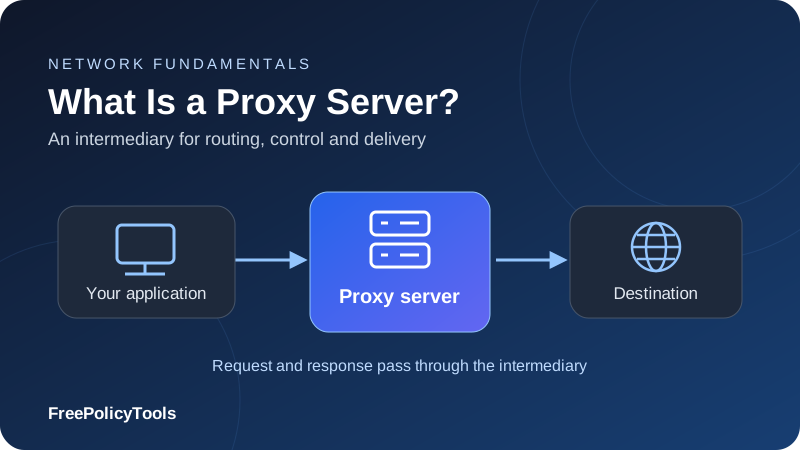
A proxy server is an intermediary that handles network requests on behalf of a client or a server. Instead of connecting directly to a destination, an application connects through the proxy, which forwards the request or relays the connection and returns the response. Depending on its configuration, it can change the visible source IP, enforce access rules, cache content or distribute traffic across backend servers.
If you are asking “what is a proxy server?”, the most useful distinction is who it serves. A forward proxy helps clients reach other services. A reverse proxy sits in front of a service and receives its visitors’ requests. This guide explains both, including the benefits they can provide and the privacy, security and performance limits that matter in practice.
Routing
Relay selected connections
Control
Apply access and traffic rules
Caching
Reuse eligible responses
Delivery
Manage backend traffic
What Is a Proxy Server?
The practical proxy server definition is a network intermediary that acts on behalf of another party. It receives a request or connection from one side, communicates with the other side and sends the result back. A proxy is usually a software service running on a server, cloud platform, gateway or local device; it does not have to be a separate physical appliance.
For example, your browser might connect to a forward proxy in another region. The proxy opens a connection to the website, so that website normally sees the proxy’s exit IP as the source of the connection. The proxy then relays the website’s response to your browser. The address you enter in settings can be a gateway hostname serving many exits, rather than the final IP the website sees.
A proxy changes the path of the traffic it handles
It does not automatically cover every app, hide every identifying signal or make the connection encrypted. Routing scope, protocol, authentication, logging and failure behavior determine the actual protection.
Proxy server explained with a reception-desk analogy
A reception desk can take a visitor’s request, check whether it is allowed and pass it to the right department. It may answer a common question itself or send the visitor onward. Similarly, a proxy can relay traffic, reject requests or return a cached response. The analogy has limits: a proxy tunneling encrypted traffic may know the destination without being able to read the message.
A proxy is different from ordinary address translation
A home router commonly uses Network Address Translation, or NAT, so several devices share a public IP. NAT changes addressing information as packets pass through. An application proxy participates in the connection or protocol exchange on behalf of its users. Both can affect the visible IP, but they have different control and configuration models.
How a Proxy Server Works
The exact process depends on the protocol and placement. In a typical explicit forward-proxy setup, the application knows the proxy address and deliberately sends traffic there. A network can also redirect connections through an interception service, while visitors to a reverse-proxied website usually need no special configuration.
- The client selects a route. Browser settings, application options or a proxy auto-configuration file decide whether a destination goes through a proxy or directly.
- The client contacts the proxy. It uses the configured hostname, port and protocol. The proxy may authenticate an account or check whether the client’s IP is allowed.
- The proxy evaluates the connection. Rules may permit it, block it, choose an exit or select a backend. An HTTP-aware cache may be able to satisfy an eligible request locally.
- The proxy communicates onward. It forwards a request or relays bytes through a tunnel. Name resolution can happen locally or at the proxy, depending on the client and protocol.
- The response returns through the proxy. The client receives the result. Logging, caching and filtering depend on what the proxy can inspect and how it is configured.
Your application
Chooses a route and connects to the configured proxy endpoint.
The intermediary
Applies its rules and forwards the request or relays the connection.
The destination
Responds to the connection arriving from the proxy’s exit.
For HTTP, the protocol distinguishes proxies, gateways and tunnels. A tunnel relays data after it is established, rather than interpreting the encrypted application exchange. These distinctions are defined in RFC 9110’s description of HTTP intermediaries.
Main Functions and Benefits of a Proxy Server
A proxy’s value comes from a specific function, not simply from adding another server to a connection. A browser proxy for regional testing and an enterprise web gateway solve different problems. A reverse proxy protecting an application operates on a different side of the exchange.
| Function | Potential benefit | Important limit |
|---|---|---|
| Outbound IP substitution | Present a selected exit IP to destinations | Accounts, cookies and forwarded information can still identify a user. |
| Access control | Apply user, destination or network rules centrally | Only covered traffic is controlled; bypass paths need separate handling. |
| Caching | Reduce repeated origin fetches and response time | Only eligible, inspectable content can be reused safely. |
| Regional routing | Test localized content from another network location | IP location does not change GPS, account region or every service rule. |
| Logging and monitoring | Investigate failures, abuse and policy violations | Logs can contain sensitive information and need retention controls. |
| Load balancing | Distribute incoming requests across healthy servers | Requires suitable health checks, capacity and session handling. |
| TLS termination | Manage website certificates at a reverse proxy | Backend transport must be protected separately where needed. |
| Filtering and rate limits | Reduce unwanted requests or outbound access | A proxy alone does not replace application security or endpoint protection. |
Centralized management
An organization can require applications to use a controlled exit point. That can simplify destination allowlists, account-based access and operational monitoring. For example, a partner API can permit a small set of company egress IPs instead of tracking the changing addresses of employees and cloud workers.
More efficient delivery
For a website operator, a reverse proxy can keep public traffic away from backend servers, reuse connections and serve cacheable resources. This can reduce origin work. The benefits depend on request patterns, cache rules and topology; adding a distant or overloaded intermediary can make delivery slower.
Forward Proxy vs Reverse Proxy
A forward proxy acts for the requesting client. A reverse proxy acts for the destination service. Both sit between communicating parties, but their owners, configuration and security responsibilities differ.
| Question | Forward proxy | Reverse proxy |
|---|---|---|
| Who does it serve? | A client or group of clients | A website, application or group of servers |
| Who configures it? | The user, application or network administrator | The service owner or hosting operator |
| Typical path | Client → forward proxy → destination | Visitor → reverse proxy → backend |
| Main uses | Outbound policy, egress IPs and application routing | Incoming routing, caching, TLS and load balancing |
| What address is visible? | Destination normally sees an exit IP | Visitors connect to the public proxy address |
| Does it provide user anonymity? | Sometimes limits direct-IP exposure; no general guarantee | Usually not; it handles visitors for the service |
Our guide to reverse proxies versus forward proxies compares their placement and responsibilities in more depth.
Reverse proxies, CDNs and load balancers
A content delivery network often operates geographically distributed reverse proxies that cache and deliver a website’s resources. A load balancer selects a backend for incoming traffic and may operate at the transport or application layer. These roles can overlap within one product, but a single reverse proxy is not automatically a global CDN.
Original client information may be passed to backends in forwarding headers. Backends should trust such information only from known intermediaries, because arbitrary clients can send misleading headers. MDN’s proxy and tunneling guide explains the placements and common forwarding mechanisms.
A reverse proxy needs a protected origin
If an origin remains openly reachable through another address, visitors may bypass the proxy’s filtering and rate limits. Restrict backend access appropriately and make health checks, trusted headers and certificate handling part of the deployment.
HTTP, HTTPS and SOCKS5 Proxies
Proxy protocol describes how an application communicates with the intermediary. It is separate from the origin of the exit IP. A residential service might support HTTP, SOCKS5 or both; a datacenter service can do the same.
HTTP proxies
An HTTP proxy understands HTTP requests and responses. It can apply web-specific routing and caching where content is accessible. For an HTTPS destination, many clients use the HTTP CONNECT method to request a tunnel. The browser then negotiates destination TLS through that tunnel, keeping the application content encrypted unless inspection is deliberately configured.
For application compatibility and DNS differences, read our HTTP versus SOCKS proxy comparison.
What “HTTPS proxy” can mean
The phrase can describe a proxy that supports HTTPS destinations or a proxy reached over a TLS-encrypted connection. Those are separate capabilities. Ask whether the client-to-proxy hop uses TLS and whether the service simply tunnels destination traffic or decrypts it for inspection.
SOCKS5 proxies
SOCKS5 relays connections without being limited to HTTP requests. It defines authentication negotiation, destination addressing and UDP association, although actual support varies by client and provider. The protocol is specified in RFC 1928. Standard SOCKS5 does not automatically encrypt the application payload.
| Option | Useful for | Check before use |
|---|---|---|
| HTTP proxy | Web requests, CONNECT tunnels and HTTP policy | Authentication, allowed ports and HTTPS tunnel support |
| TLS connection to a proxy | Protecting the client-to-proxy hop | Client support and valid proxy certificates |
| SOCKS5 | Compatible web and non-web applications | Remote DNS, authentication and actual UDP support |
| PAC routing | Selecting proxies by destination or network conditions | DIRECT fallbacks and trust in the configuration file |
A proxy auto-configuration, or PAC, file is a routing script rather than another transport protocol. It can send some destinations through a proxy and others directly. That flexibility is useful, but a DIRECT fallback can expose a direct connection if the proxy is unavailable.
Datacenter, Residential, ISP and Mobile Proxy IPs
Commercial providers categorize proxies by the networks associated with their exit addresses. These categories influence location choices, cost, consistency and how destinations evaluate traffic. They do not establish permission to access a service or guarantee that requests will be accepted.
| Type | Typical source | Useful tradeoff |
|---|---|---|
| Datacenter | Hosting or cloud networks | Often economical and consistent; hosting ranges may face additional scrutiny. |
| Residential | Consumer internet connections | Broad location coverage; sourcing, availability and bandwidth costs matter. |
| ISP / static residential | ISP-associated addresses, often hosted on server infrastructure | May offer stable addresses; ask how the provider defines the product. |
| Mobile | Cellular carrier networks | Useful for mobile-network testing; exits can be shared or change unexpectedly. |
Our residential versus datacenter proxy guide explains how network origin affects practical selection.
Network origin is not an anonymity rating
A residential IP can still be linked to a provider account and recognized by a website through cookies, behavior or previous abuse. A dedicated datacenter IP can be more suitable for a legitimate partner integration than a changing residential exit. Match the IP type to the task rather than assuming the most expensive category is best.
Ask how access to the network is obtained
For residential and mobile networks, review how participating devices are enrolled, what their owners understand and how abuse is handled. Also distinguish a promised pool size from the addresses available for your requested location and session. An advertised network total is not a guarantee of unique usable exits for your workload.
When you need a commercial service, our proxy provider comparison helps examine product differences. Confirm the provider’s current documentation and run a small, authorized trial before committing to a large workload.
Affiliate link: FreePolicyTools may earn a commission if you purchase through this link.
Static, Rotating, Shared and Dedicated Proxies
IP origin, rotation and sharing describe different properties. A residential proxy can rotate, remain sticky for a session or provide a longer-lived address. A datacenter IP can be shared among customers or assigned exclusively to one account.
Static and sticky sessions
A static proxy aims to keep the same exit address. A sticky session usually asks a gateway to preserve an exit for a defined period or session identifier. Sticky does not necessarily mean permanent: device availability, provider limits or reconnects may change the exit before your workflow ends.
Stable exits suit allowlisted APIs and workflows where changing IPs interrupts a session. Cookies and authentication still need to be maintained by your application. Keeping an IP consistent does not, by itself, preserve a login or shopping session.
See proxy chains and rotating proxies for more on routing multiple intermediaries and managing changing exits.
Rotating exits
A rotating service changes exits per request, connection or interval, depending on the product. With connection reuse, multiple HTTP requests may share one connection and exit. Ask what actually triggers rotation. Frequent changes can disrupt stateful tasks and create unusual account activity.
Shared versus dedicated access
Shared proxies let multiple customers use an address. Dedicated products reserve specified access for one customer, but the exact promise should be checked. Exclusivity does not erase an address’s history or guarantee exclusive ownership of an entire network range. Shared capacity and other users’ traffic can affect reliability and reputation.
Privacy, Encryption and What Each Party Can See
Using a proxy moves trust to an intermediary. The provider usually knows which account or source connection used its service. A destination sees traffic from an exit, but may still identify the visitor through login details, cookies and browser signals.
| Connection model | What the proxy can generally inspect | What to consider |
|---|---|---|
| Unencrypted HTTP | Request paths, headers and content passing through it | Intermediaries can read or modify content. |
| HTTPS through a normal CONNECT tunnel | Requested tunnel host/port, timing and traffic volume | Encrypted application content remains hidden from the tunnel operator. |
| Managed TLS inspection | Decrypted content where trusted interception succeeds | The device trusts an inspection authority; pinned apps may reject it. |
| Reverse proxy terminating TLS | Requests decrypted at the service’s front end | Protection of the backend hop is a separate configuration choice. |
| Browser-only proxy | Connections routed by that browser | Other apps and excluded destinations may connect directly. |
IP masking is only one privacy layer
A site can associate the same account with several different IPs. Persistent cookies and local storage can recognize return visits, while browser characteristics can contribute to fingerprinting. Read our explanation of browser fingerprinting to understand why an IP change does not create an entirely new identity.
DNS, WebRTC and direct connections
If an application resolves names locally, its DNS queries may take a different path from the proxied connection. Some SOCKS clients can instead send the hostname for the proxy to resolve. Browser real-time communication can also use routes that are not covered by a simple web proxy. Our guide to WebRTC leaks explains the relevant browser behavior.
For additional routing checks, our guide to DNS leaks and how to prevent them explains why name resolution deserves its own verification.
Logging and inspection settings
Review what the operator records, whether logs contain account identifiers or destination details and how long records are retained. A “no logs” phrase needs a defined scope. On a managed device, an employer may operate inspection and monitoring; changing the apparent IP does not override those device controls.
Treat unexpected certificate changes seriously
A normal HTTPS tunnel should not require you to disable certificate verification. If a service asks you to install a root certificate, understand whether it enables TLS inspection and who controls that authority before proceeding.
Proxy vs VPN vs Firewall
A proxy relays traffic for a configured client or service. A VPN establishes a tunnel that can carry selected network traffic according to its routing rules. A firewall allows or blocks traffic using policy. These tools can be combined, but they have different jobs.
| Tool | Primary role | Typical scope | Encryption |
|---|---|---|---|
| Forward proxy | Relay outbound connections | Configured apps or managed network paths | Depends on proxy transport and application TLS |
| VPN | Tunnel routed network traffic | Device, network or selected apps/routes | Secure VPN protocols encrypt the tunnel |
| Firewall | Permit or deny traffic | Host, network or application rules | Does not inherently encrypt allowed traffic |
| Reverse proxy | Receive requests for a backend service | Incoming application traffic | Can terminate TLS and protect backend hops separately |
For an application that needs a specific egress IP, a proxy can be a practical fit. For protecting routed device traffic over an untrusted local network, a properly configured secure VPN may offer broader coverage. Split tunneling and app exclusions can limit VPN coverage, so neither product label substitutes for checking routes and failure behavior.
Both a remote proxy and a VPN can cause destinations to see an intermediary’s IP. Neither removes cookies, account associations or all endpoint risks. Decide whether your main requirement is a particular route, encrypted transport, access control or service delivery, then choose the corresponding tool.
Our detailed VPN versus proxy comparison helps match routing scope and encryption requirements to the task.
Practical Proxy Server Use Cases
Company egress and web access policies
A managed forward proxy can authenticate staff, restrict destinations and provide predictable outbound addresses. This supports partner allowlists and troubleshooting. Effective deployment also needs coverage for non-browser apps, exceptions, remote workers and direct routes.
Website and application delivery
A reverse proxy can route requests by hostname or path, distribute traffic to healthy backends and centralize certificate management. Cacheable static files can be served without repeating backend work. Personalized pages and account responses require careful cache separation to avoid exposing one user’s data to another.
Regional quality assurance
Developers and analysts can test localized pages, language defaults and delivery behavior from selected exit regions. Keep device settings and account region in mind. Test results describe the chosen connection and service response, rather than every person in that country.
Authorized automation and data collection
A proxy can route permitted crawlers and integration jobs through a controlled network. Prefer an official API where available, respect access controls and agreed limits, and reduce load through caching and appropriate request rates. Rotating IPs does not supply authorization or resolve privacy and contractual requirements.
Development and debugging
Local debugging proxies help developers inspect their own applications’ traffic and reproduce failures. HTTPS inspection may require a test device to trust a local certificate. Keep that trust limited to the intended environment and remove it when the debugging task ends.
Caching and Performance: When a Proxy Helps or Hurts
An extra hop adds connection overhead, routing distance and potential queueing. A proxy can nevertheless improve delivery when it serves a nearby cache hit, reuses connections effectively or reduces backend work. Measure the whole task: latency, throughput, timeouts and successful responses matter more than one headline speed number.
A transparent numerical example
The charts below use a hypothetical cacheable workload, not provider measurements. Assume a direct response takes 180 ms, a proxy cache miss takes 220 ms and a cache hit takes 40 ms. If 60% of 1,000 requests are hits, the modeled average is (0.60 × 40) + (0.40 × 220) = 112 ms. A workload with no hits would instead average 220 ms under these assumptions.
Response time by path
Example request distribution
Origin payload falls as the hit ratio increases
At a 60% hit ratio, this equal-size model fetches 400 MB of payload from the origin. Clients still receive 1,000 MB in total from the delivery layer. Reducing origin payload does not necessarily reduce what a commercial provider bills; billing can count traffic at a different point.
What can actually be cached?
HTTP cache rules govern storage and reuse. Shared caches must respect private responses and applicable authorization restrictions; no-cache requires validation before reuse rather than forbidding storage. No-store generally prevents storage, subject to the standard’s defined exceptions. See RFC 9111’s HTTP caching rules.
A normal forward proxy cannot cache individual pages inside an opaque HTTPS tunnel. A reverse proxy terminating HTTPS can inspect responses and apply cache rules. That distinction matters when evaluating claims that any browser proxy will speed up modern encrypted websites.
How to Choose a Proxy Server
Start with your application and the task it needs to complete. A stable allowlisted API connection has different requirements from regional page testing. A reverse proxy for a public website requires a deployment plan, rather than a retail rotating-IP subscription.
- Define coverage. Identify the applications, destinations and protocols that must use the proxy, including DNS and any UDP requirement.
- Choose the session model. Decide whether exits must stay stable, rotate or be exclusive, and establish what happens on reconnection.
- Check authentication and transport. Confirm supported credentials, allowlisting, TLS to the proxy and certificate verification.
- Review operator practices. Check IP sourcing, logging, retention, abuse handling and access restrictions.
- Test representative work. Measure success rate, latency, throughput and location accuracy using permitted destinations and realistic concurrency.
- Calculate the actual cost. Include bandwidth, IP rental, retries, concurrency limits, minimum commitments and any managed-service charges.
- Verify failure behavior. Decide whether applications should stop when the proxy fails or use another approved route.
Our proxy comparison tool can help organize alternatives. Read each plan’s definitions: unlimited traffic can still be subject to fair use or concurrency restrictions, and per-gigabyte costs depend on how requests and responses are counted.
Judge usable results, not just advertised capacity
If an illustrative $10 trial yields 8,000 successful authorized requests, the cost is $1.25 per 1,000 successes. Record retries and failed requests as well. This calculation is a method for comparing your results, not a provider price or performance benchmark.
Affiliate link: FreePolicyTools may earn a commission if you purchase through this link.
How to Set Up and Verify a Proxy Server
Get the endpoint hostname, port, protocol and authentication details from your administrator or provider. Confirm whether the credentials include region or session options. Keep passwords out of source files, screenshots and shared logs.
For platform-specific steps, use our guide to setting up a proxy on Windows and Mac.
Configure the application or system
Enter the settings at the level that matches your goal: an individual application, a browser with its own proxy options or the operating system. Some applications follow system settings; others require explicit configuration or ignore them. Add bypass rules only for destinations that should intentionally connect directly.
If an organization supplies a PAC file, use the trusted URL and understand its fallback routes. For scripts, consult the client library’s own proxy and DNS options rather than assuming all HTTP libraries use the same environment variables.
A minimal command-line example
The commands below use a reserved example hostname and will not work unchanged. Replace the endpoint with your actual service and use an approved test destination. Add authentication through an appropriate secret-handling method for your environment.
# HTTP proxy; the HTTPS destination uses a CONNECT tunnel
curl --proxy http://proxy.example:8080 https://example.com/

# SOCKS5 with destination hostname resolution at the proxy
curl --proxy socks5h://proxy.example:1080 https://example.com/
The distinction between local SOCKS hostname resolution and socks5h remote resolution is documented in the official curl proxy options. It describes curl’s behavior; other clients can use different option names.
Verify the route and the limits
- Record your direct public IP, enable the proxy and compare the IP visible from the same application.
- Check an approved destination’s connection logs where available to confirm the expected source.
- Confirm DNS behavior, certificate validity and whether browser communication uses additional routes.
- Test an excluded destination and an unrelated application to understand coverage.
- Temporarily use an invalid endpoint in a controlled test to see whether the client fails or connects directly.
- Restore the working configuration and remove any temporary credentials or debugging certificates.
Our What Is My IP tool can show the public address visible to that browser request. A changed result verifies that request’s apparent source, rather than proving every connection on the device uses the proxy.
Common Proxy Errors and How to Fix Them
Separate connectivity, authentication, destination responses and session problems. A failure caused by the proxy is different from a website rejecting a request that reached it. Keep diagnostic logs useful while redacting passwords, tokens and private response content.
| Symptom | Possible cause | Useful next step |
|---|---|---|
| 407 Proxy Authentication Required | Missing, rejected or unsupported proxy credentials | Check account access, authentication format and source-IP allowlists. |
| Connection refused or timed out | Wrong endpoint/port, unreachable service or local firewall | Confirm protocol and port, then test reachability and provider status. |
| Certificate verification failure | Expired certificate, wrong hostname or unexpected inspection | Check the certificate chain and clock; keep verification enabled. |
| 403 response | Proxy policy or destination access restriction | Identify who generated the response and review permitted access. |
| 429 response | A rate limit at the proxy or destination | Honor Retry-After when supplied and reduce request rate/concurrency. |
| 502 or 504 response | An intermediary cannot reach or get a timely backend response | Identify the responding gateway and inspect upstream health and timeouts. |
| Public IP does not change | App ignores settings, bypass rule or direct fallback | Check that exact application’s route and exclusions. |
| Login keeps resetting | Exit changes, cookie handling or session expiry | Use an appropriate stable session and preserve application state. |
| Very slow responses | Distant exit, overloaded service, retries or destination slowness | Compare direct and proxied paths under the same workload. |
Avoid fixes that hide the real problem
Disabling certificate checks conceals authentication and interception issues. Increasing concurrency can worsen rate limits and queueing. Repeatedly changing exits can destabilize account sessions. Fix the relevant configuration or workload behavior before adding complexity.
For reverse proxies, inspect both sides
Check public DNS, front-end TLS, upstream DNS, backend connectivity and health checks separately. Confirm host headers and forwarding rules, and align timeouts with the application’s expected response time. Restrict diagnostics and administrative endpoints rather than exposing them to visitors.
Putting a Proxy Server to Work
A proxy server provides an intermediary point for routing, policy and delivery. Forward proxies serve requesting clients; reverse proxies serve destination applications. Protocol, IP origin, rotation, sharing and encryption are separate choices that should match the actual task.
Choose a trusted operator or a controlled deployment, configure the intended applications and verify the route. Measure successful work and failure behavior. With those details in place, a proxy can provide predictable egress, useful access controls or more efficient delivery without relying on broad anonymity or speed promises.
Start with one verified connection
Confirm your application’s visible IP with our IP checking tool, then test routing scope, DNS, session stability and failure behavior before expanding the setup.
Affiliate link: FreePolicyTools may earn a commission if you purchase through this link.