VPN vs. Proxy: Key Differences and Which One You Should Use
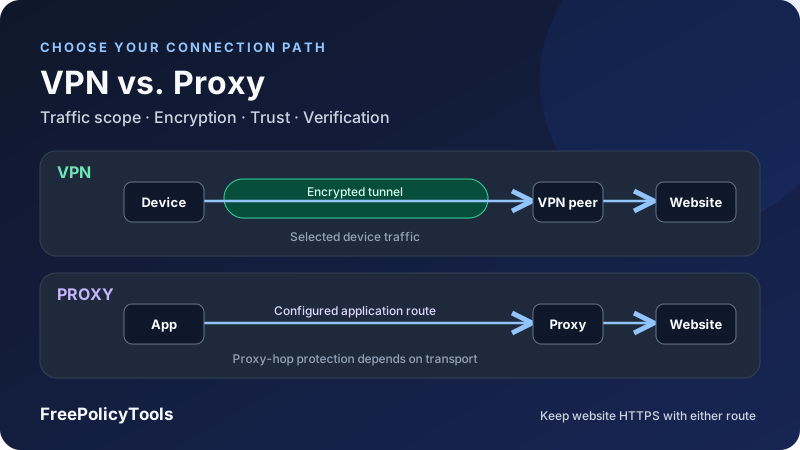
The main difference between a VPN and a proxy is how they route traffic and where protection applies. A modern security-focused VPN establishes an encrypted tunnel for traffic selected by its routing rules. A forward proxy relays connections made by applications configured to use it. Both can change the IP address a website sees, but a changed IP alone does not establish encryption, device-wide coverage or anonymity.
Should you use a VPN or proxy? A reputable VPN is usually the more suitable starting point when you want an encrypted route for several applications on a device. A proxy is often the more precise tool when a supported browser, development client or authorized workflow needs a particular intermediary. This detailed VPN vs. proxy guide explains the exceptions, what each operator can observe and how to verify the setup you choose.
Scope
Which traffic uses the route?
Transport
Which hop is encrypted?
Trust
Who can observe metadata?
Evidence
Test behavior, not labels
VPN vs. Proxy: The Practical Answer
Choose from the problem you need to solve rather than the tool’s marketing name. If the requirement is protected routing for a browser, mail client and other internet apps together, look at a VPN with the necessary platform coverage and failure controls. If the requirement is forwarding one compatible application through a specified endpoint, a proxy can fit without changing every other application’s route.
| Question | VPN | Forward proxy |
|---|---|---|
| What is routed? | Packets selected by tunnel routes, platform rules and exclusions | Connections made by proxy-aware or appropriately redirected clients |
| Is the first hop encrypted? | Yes for the modern secure VPN tunnel discussed here | Only if the proxy transport or another enclosing channel provides it |
| Can the visible IP change? | For traffic exiting through the VPN server | For traffic exiting through the proxy server |
| Does website HTTPS still matter? | Yes; the VPN tunnel ends at its peer | Yes; forwarding is not a substitute for website TLS |
| Is every app automatically covered? | No; inspect routes, split rules and platform limitations | No; inspect client support, overrides and bypasses |
| Does the label prove no logging? | No | No |
| What is a common fit? | Protected routing across selected device traffic | A specific app, gateway or endpoint-based workflow |
These comparisons concern a consumer or remote-access security VPN and an outbound forward proxy. A reverse proxy serving a website is a different role, and some enterprise networks called VPNs are private connectivity services rather than encrypted consumer tunnels. Naming alone is not a technical specification.
Affiliate disclosure: we may earn a commission if you purchase through these links. Choose according to your traffic and protection requirements.
How a VPN Works
A VPN client establishes a tunnel to a peer, commonly a provider’s server or an organization’s gateway. Routing rules decide which traffic enters that tunnel. The peer receives the protected packets and forwards the appropriate traffic toward its destination or into a private network.
The tunnel protects a defined segment
For internet access, the encrypted segment normally runs from your device to the VPN server. That server is not the final website. Website HTTPS supplies its own protection between the application and the website, continuing across the VPN exit. Without application encryption, data can be exposed after it leaves the protected tunnel.
For a concrete protocol example, WireGuard’s protocol documentation describes authenticated encryption and its handshake, with packets transported over UDP. That outer transport does not mean the applications inside the tunnel must also use UDP. A VPN can carry different kinds of supported IP traffic.
Full and split routing serve different goals
A full-tunnel configuration aims to send the intended general internet traffic through the VPN. A split configuration deliberately sends only selected apps, destinations or networks through it. Local-network exceptions, operating-system traffic and DNS rules can add further boundaries. Verify what the client actually implements on your device.
Explore how VPNs work, common VPN protocols and split tunneling vs. full tunneling for the underlying mechanisms. A consumer VPN that changes your internet exit and a corporate VPN that grants access to internal resources may use similar tunnel technology but have different purposes and policies.
How a Proxy Works
A forward proxy accepts a client’s request or connection and communicates with a destination on its behalf. The client may receive its endpoint from an administrator, provider, configuration script or local application. The proxy’s outward connection can make the destination see the proxy exit rather than the client’s direct address.
HTTP forwarding and CONNECT
An HTTP proxy can forward HTTP requests. For an HTTPS destination, a supported CONNECT request asks it to establish a tunnel to a named host and port. After that tunnel is established, the client normally negotiates website TLS through it. The HTTP Semantics standard’s CONNECT section defines this tunneling behavior.
Relaying the tunnel does not automatically give an ordinary proxy the ability to read correctly protected HTTPS application contents. It can still see the tunnel destination and connection metadata. A trusted interception proxy changes that model, as discussed below.
SOCKS provides another client interface
SOCKS can relay compatible application connections without requiring them to be ordinary HTTP requests. Support for features such as UDP depends on the version, endpoint and client. SOCKS5 is not itself a promise that traffic between the client and proxy is encrypted.
The server’s role matters
A forward proxy helps clients reach destinations. A reverse proxy receives connections for a service it fronts. Transparent interception and explicit client configuration are also different deployment choices. Read types of proxy servers and reverse vs. forward proxies before treating every proxy product as interchangeable.
Encryption: Separate the VPN Tunnel, Proxy Hop and Website
Ask “which segment is encrypted?” rather than “is this connection secure?” There can be several independent layers. A website’s HTTPS, a protected proxy transport and a VPN tunnel can coexist, but they do not terminate at the same place.
| Layer | Typical endpoints | What it does not establish |
|---|---|---|
| Website HTTPS | Application and website, absent trusted interception | Device-wide coverage or absence of connection metadata |
| Modern secure VPN tunnel | VPN client and tunnel peer | Encryption of plaintext traffic beyond that peer |
| TLS connection to a proxy | Compatible client and proxy endpoint | End-to-end protection of a plaintext destination request |
| Ordinary HTTP proxy transport | Client and proxy without TLS on that hop | Encryption of forwarded plaintext or proxy-hop credentials |
| SOCKS without an enclosing protected channel | Client and SOCKS endpoint | A built-in encrypted transport guarantee |
“HTTPS proxy” can be ambiguous
A product may use that phrase to mean it supports HTTPS destinations through CONNECT, or to mean the client reaches the proxy over TLS. Those are different capabilities. An operating-system secure-web checkbox may select the traffic category rather than establish a protected proxy hop. Confirm the endpoint scheme and client support.
Trusted inspection creates an additional trust boundary
On a managed device, an organization can install a trusted certificate and inspect HTTPS according to its documented policy. An ordinary VPN or forwarding proxy does not automatically perform this interception. Unexpected certificate-installation requests on a personal device need investigation; bypassing a certificate warning is not a sound way to make a proxy work.
Keep website HTTPS enabled with either tool
See VPN encryption explained and HTTP vs. SOCKS proxies when comparing these transport layers.
Traffic Coverage: Device Routes vs. Application Connections
The most useful operational difference is often scope. A VPN can capture traffic from several applications through operating-system routing. A proxy commonly depends on an application choosing to connect to it. Neither arrangement should be treated as an unconditional all-traffic guarantee.
System proxy settings have limits
Some browsers and apps honor the system proxy, while other programs use their own network libraries or settings. A proxy configured for a browser can leave a game, updater or backup client direct. An application may also have exceptions for certain destinations or a configuration script that selects different routes.
Mozilla’s Firefox connection-settings guide documents system, manual and automatic proxy options. This is a practical example of why a browser’s effective configuration can differ from the operating system panel.
VPN coverage also needs inspection
A VPN may include app exclusions, local-network permissions or routes for only a corporate subnet. Some clients support one address family differently from another. Browser extensions marketed as VPNs can be browser-focused proxies rather than the equivalent of a device tunnel. Inspect the documented platform behavior.
| Traffic | VPN question | Proxy question |
|---|---|---|
| Browser requests | Is the browser included in tunnel rules? | Which system or browser setting is effective? |
| Mail, messaging and games | Are these apps included, and are their protocols supported? | Does each client support the proxy and required features? |
| Internal resources | Is the private network reachable through the approved tunnel? | Can the gateway reach it, or is a deliberate bypass required? |
| DNS | Which resolvers and routes apply? | Which names resolve locally or at the proxy? |
| IPv6 | Is IPv6 carried, blocked or deliberately outside scope? | Does the relevant client connection use the intended intermediary? |
| Network transitions | Do routes and blocking survive the change? | Do endpoint access and per-service settings still apply? |
Privacy and Logging: Who Can See What?
Both tools introduce an intermediary. You are deciding which observer sees particular information, not removing every observer. Your local network, access provider, chosen operator and destination each have different visibility.
| Observer | Through a secure VPN tunnel | Through an ordinary explicit proxy |
|---|---|---|
| Local network or ISP | VPN endpoint, timing and outer traffic volume; outside-tunnel traffic differs | Proxy endpoint and metadata; unprotected proxy requests can reveal destinations |
| VPN or proxy operator | Connecting address and destination/connection metadata, subject to design | Connecting address and forwarded-request or tunnel metadata |
| HTTPS website | VPN exit address and the application information you provide | Proxy exit address and the application information you provide |
| Signed-in service | Account identity remains available | Account identity remains available |
HTTPS contents and metadata are different
An ordinary intermediary cannot simply decrypt correctly validated website HTTPS because it forwards the connection. However, destination information, timestamps, connection sizes and account records can still matter. Unencrypted application traffic and a compromised endpoint have different exposure.
No-logs claims need a defined scope
Look for the fields collected, retention periods, purpose, recipients and whether records can be linked to an account or source address. Billing and support records can exist separately from browsing activity. A leak test cannot prove the absence of backend logs, and a privacy-friendly slogan cannot substitute for a specific policy.
Independent assessments are useful when their subject and period match the claim you care about. They do not guarantee unchanged future behavior. Read VPN logging policies to distinguish activity records, connection metadata and account administration.
Changing the IP does not reset identity
Logins, cookies, browser characteristics and information you submit can identify you with either tool. A proxy chain or extra VPN hop also cannot erase those identifiers. Evaluate what VPNs do not protect before using an IP change as an anonymity claim.
DNS, IPv6 and Failure Behavior
A website-facing IP test answers only part of the routing question. Hostname resolution, other address families and what happens during an outage can produce different results.
DNS is a separate configuration decision
A VPN may set tunnel DNS, honor platform policy or leave some names to a local resolver under split rules. An HTTP proxy commonly receives destination hostnames for forwarded connections. With SOCKS, local versus remote lookup depends on the client. Browser prefetching and secure DNS can add other lookup paths.
The official curl manual makes this distinction explicit: its SOCKS5 option can use local lookup, while the SOCKS5-hostname option delegates the destination lookup to the proxy. This is a client choice, not a universal characteristic of every SOCKS connection.
IPv6 needs its own check
A successful IPv4 request does not establish what happens to IPv6. Check the client’s documented support and observe both families where available. An intentionally direct exception should be distinguished from an unintended route outside the promised scope.
A proxy is not automatically a kill switch
An unavailable fixed proxy often causes a supported application’s request to fail, but another app can remain direct. A PAC script may permit direct fallback. A VPN kill switch can block specified traffic outside the tunnel, depending on platform and mode; disconnect, startup and network-change behavior should be tested.
Failure protection must match the intended scope
Use DNS leak guidance, WebRTC and IPv6 checks and VPN kill switches explained to extend your test plan.
Speed and Latency: Neither Tool Is Always Faster
It is misleading to claim proxies are always faster because they do not encrypt, or VPNs are always faster because they use newer protocols. Server distance, congestion, capacity, routing, client overhead, destination behavior and connection reuse all influence the result.
Latency and throughput measure different things
Latency matters for interactive requests, games and calls. Throughput matters for sustained transfers. A route can provide strong download throughput while adding delay to each interactive exchange. A speed test against a nearby server may not describe performance to the website you actually use.
Extra routing can cost time, but the result is not fixed
A distant intermediary can increase the path length. An alternative network route may perform better than a congested direct route. An HTTP proxy may cache eligible content, but an ordinary opaque HTTPS tunnel does not automatically expose response contents for caching. Modern tunnel encryption does not imply the same overhead on every device.
| Variable | Keep consistent or record | Avoid concluding |
|---|---|---|
| Destination | The same site or controlled test endpoint | One server’s result describes the whole internet |
| Workload | The same request size or transfer | A small page measures sustained download capacity |
| Timing | Repeated samples under comparable load | One slow response proves the tool is slow |
| Connection state | DNS cache, TLS setup and connection reuse | Warm and cold requests are directly equivalent |
| Location | Your network and intermediary exit location | Different distant exits isolate protocol overhead |
| Measurement | Latency, throughput, errors and completion | A single composite speed number answers every question |
Choose a configuration that meets the workload’s needs rather than the highest isolated download result. See VPN speed and latency for interpreting the measurements.
Comparison Charts and a Relevant HTTPS Statistic
The first chart uses a sourced adoption statistic. The other two are explicitly chosen teaching examples, not provider benchmarks or measured security scores.
HTTPS adoption helps explain the encryption comparison
As checked on October 6, 2026, W3Techs reports HTTPS by default on 90.2% of websites in its survey. The metric concerns redirecting HTTP visitors to HTTPS. It does not measure the share of all network requests encrypted, and the other sites do not necessarily lack HTTPS support. This prevalence helps explain why a proxied website connection can already have application encryption, while the proxy hop and broader device traffic remain separate questions.
| Default behavior | Share | Meaning |
|---|---|---|
| HTTPS by default | 90.2% | The survey’s reported redirect behavior |
| Other default behavior | 9.8% | Calculated remainder; HTTPS availability is not determined by this value |
Scope depends on the configuration you choose
Imagine six active apps: a browser, mail client, messenger, game, updater and backup client. In this example, only the browser uses a proxy; a split VPN includes the first three; a full VPN includes all six. These are declared routing choices, not fixed limits of the technologies.
| Chosen configuration | Apps through intermediary | Remaining direct apps |
|---|---|---|
| Browser-only proxy | Browser: 1 | Mail, messenger, game, updater and backup: 5 |
| Split VPN for three apps | Browser, mail and messenger: 3 | Game, updater and backup: 3 |
| Full VPN for all six apps | All six: 6 | None in this defined example |
Repeated timing samples make comparisons clearer
| Trial | Direct | Proxy | VPN |
|---|---|---|---|
| First | 41 ms | 62 ms | 59 ms |
| Second | 43 ms | 68 ms | 61 ms |
| Third | 42 ms | 65 ms | 60 ms |
These invented values deliberately do not support an “unencrypted always wins” rule. Real results can differ in either direction. Measure the same destination and workload repeatedly, documenting connection setup and caching.
Should You Use a VPN or Proxy? Common Scenarios
The right choice depends on your intended traffic, the intermediary you trust and the controls you need. In some situations neither tool addresses the actual problem.
| Scenario | Useful starting point | What to verify |
|---|---|---|
| Protected routing for several personal apps | A reputable secure VPN client | Included apps, DNS, IPv6 and outage protection |
| One browser needs an authorized exit endpoint | A compatible forward proxy | Effective browser settings, HTTPS and auth |
| Development client must use a specified gateway | The proxy supported by that client | Protocol, credentials, destination rules and logs |
| Company internal network access | The organization’s approved VPN or access gateway | Identity, device policy and resource permissions |
| Public Wi-Fi with several apps | HTTPS plus a suitable VPN if protected routing is needed | Tunnel coverage and trustworthy provider; account security still matters |
| Authorized geographically varied website checks | A proxy or VPN with the required exits | Location accuracy, session behavior and site rules |
| Serving a website behind a gateway | A reverse proxy or service architecture | Inbound service requirements, not desktop browsing settings |
| Stopping phishing or securing a password | Account and application security controls | Authenticity, MFA, updates and credential handling |
Public Wi-Fi
Correctly validated HTTPS already protects website contents from ordinary local eavesdropping. A VPN can add protected routing for included traffic and reduce the local network’s visibility into those destinations. It cannot authenticate a fraudulent website for you, fix a compromised device or protect traffic that is outside its scope. Finish any required captive-portal access and then verify the tunnel.
Authorized testing and app-specific routing
A proxy can be convenient when a tool accepts an endpoint for each request or session. That can make selected routes explicit without affecting the whole device. Check the destination’s permitted use, rate limits and access controls. A different exit address does not grant permission to access restricted resources.
Streaming and location-dependent services
Both tools can influence a service’s IP-based location signal, but the service can also use account region, device location or other indicators. Exit addresses may be rejected, and availability can change. Neither technology promises universal access or overrides a service’s rules.
Affiliate disclosure: we may earn a commission if you purchase through these links. Choose according to your traffic and protection requirements.
Free vs. Paid: Price Is Not a Privacy Guarantee
A paid service can fund capacity, maintenance and support, but payment does not prove careful data handling. A legitimate free tier may be subsidized by paid plans. An unknown free endpoint can have uncertain ownership, access controls or incentives. Judge the operator and implementation rather than using price as a security rating.
Compare the billing unit to your workload
Consumer VPN plans commonly bundle access over a subscription period, while proxy offerings may charge for data, endpoints, sessions or other capacity. Those are commercial choices rather than inherent protocol properties. Read the actual plan’s limits, expiration, renewal and overage behavior before comparing costs.
| Question | Why it matters | Evidence to find |
|---|---|---|
| Who operates and funds it? | The intermediary becomes part of your trust model | Identifiable publisher, ownership and business model |
| What is included? | Traffic, devices, locations and features can be restricted | Current plan and platform documentation |
| What happens at a limit? | Traffic may stop, change behavior or require payment | Quota and failure-policy details |
| What renews automatically? | A trial and an ongoing free tier are different | Billing authorization, cancellation and renewal terms |
| What data is collected? | Price does not establish privacy | Specific policy and relevant assessment evidence |
Review free VPN risks and inspect free proxies with the same attention to ownership, software, authorization and data handling. Do not test an unknown intermediary with sensitive information simply because it connects successfully.
Can You Use a VPN and Proxy Together?
Yes, when the client, routes and endpoints support the arrangement. Adding both introduces more configuration and trust relationships. It is useful only if the combination satisfies a defined requirement that a simpler route does not.
Proxy over VPN
If the proxy-aware app’s connection to the proxy is included in the VPN, the path can be device → VPN server → proxy → website. The local network sees the VPN connection. The proxy normally sees a connection arriving from the VPN exit, while the website sees the proxy exit. Application encryption remains important across the path.
The VPN operator can observe the connection to the proxy; what else is exposed depends on whether the proxy hop is protected. The proxy can still observe its own connection and destination metadata. These separate vantage points do not prove that no one can correlate traffic or account activity.
The opposite order is not a default checkbox
Connecting a VPN transport through a proxy requires explicit compatibility in the VPN client and proxy. An HTTP-only endpoint cannot be assumed to carry every VPN transport. Check the documented design instead of entering the same endpoint into several unrelated panels.
Expect authorization and recovery interactions
A source-IP allowlist may need the address that actually reaches the proxy, which can be the VPN exit. If the VPN fails and traffic goes direct, the proxy may reject the new source—or accept it if its rules permit. Test this behavior rather than treating an authentication error as a privacy control.
See double VPN and multi-hop for a related but distinct arrangement. Two intermediaries do not automatically double security or remove the need for normal account protections.
Set Up the Option You Choose
For a VPN
- Define the apps and networks that need the tunnel, including any deliberate direct exceptions.
- Install the official client for your device and confirm the operator and publisher.
- Choose a supported modern protocol and an exit appropriate to the task.
- Review DNS, IPv6, split routing and the available kill-switch mode.
- Connect and test included apps, reconnection and network changes.
For a proxy
- Obtain the authorized host, port, protocol and authentication method.
- Choose the application setting or system panel that the intended client actually honors.
- Configure required authorization and narrow exceptions, or use the supplied trusted PAC script.
- Confirm whether the proxy hop is protected and how destination DNS is handled.
- Open a fresh connection and verify the exit, destination access and outage behavior.
Use the full Windows and Mac proxy setup guide for platform steps. Those panels configure clients to use an existing server; they do not install or start a proxy listener.
Keep a rollback path
Record the original settings and restore the values you changed if the setup does not meet your requirements. System settings, browser overrides and explicit command-line options can be independent. On a managed device, use the organization’s approved configuration instead of removing required policy.
A Verification Checklist for VPNs and Proxies
Our original research provides three distinct examples to inspect: application proxy routing, proxy authentication transport and reporting-service access through VPN and proxy routes. Keep their environments and denominators separate; none is a universal provider ranking.
Test the tool as you will use it. A diagnostic app configured differently from your browser can prove that an endpoint works while leaving the browser’s route unverified.
| Check | Action | What the result can establish |
|---|---|---|
| Baseline | Record app, network, outward address and destination access | A comparable starting point |
| Actual exit | Inspect outward address through the intended app | The observed request’s exit, not universal coverage |
| Application scope | Test browser and relevant non-browser clients | Whether the selected apps use the intended route |
| DNS | Observe lookup behavior under the actual client policy | Resolver behavior for tested names and conditions |
| Address families | Test IPv4 and IPv6 where available | Observed coverage of each tested family |
| Exceptions | Test deliberate direct destinations separately | Whether exclusions match the intended design |
| Interruption | Observe a controlled endpoint or tunnel failure | Blocking or fallback for the tested traffic |
| Recovery | Reconnect and change networks when applicable | Whether settings and authorization still work |
| Rollback | Restore original settings and repeat access checks | Successful return to the original configuration |
Keep observations separate from claims. A changed IP does not prove encrypted transport. A browser error does not prove all traffic stopped. A clean DNS result does not establish absence of logs. Document the app, platform, settings and conditions so the evidence remains interpretable.
Read how to test your VPN and VPN troubleshooting when a result differs from the intended scope. Change one setting at a time during diagnosis.
Common VPN vs. Proxy Myths
| Claim | More accurate explanation | Question to ask |
|---|---|---|
| A proxy never encrypts anything | A compatible proxy hop can use TLS, and websites can use HTTPS | Which hop and application contents are protected? |
| A VPN encrypts the entire internet journey | The tunnel ends at its peer; destination protection is separate | Does the destination use validated application encryption? |
| A VPN always covers the whole device | Routes, exclusions and platform behavior determine scope | Which apps, DNS and address families are included? |
| A new IP makes me anonymous | Accounts, cookies and other identifiers still exist | Which observers and identifiers matter for my task? |
| Proxies are always faster | Routing, capacity, workload and client overhead vary | What do comparable repeated measurements show? |
| Paid means no logs | Funding and retention policy are separate questions | Which fields are retained, linked and shared? |
| Using both doubles protection | It creates a particular route with additional complexity | Which concrete requirement does the combination satisfy? |
A useful requirement
Route my browser and mail through a protected tunnel, keep one approved local resource direct, and block included traffic if the tunnel fails.
An untestable promise
Changing my IP will protect every app, stop all tracking and make any service trust the connection.
Precise requirements let you compare documented features and observed behavior. Broad slogans leave important boundaries unanswered.
A Simple Decision Framework
Write down the requirement in terms of traffic, protection and evidence. This turns “should I use a VPN or proxy?” into a set of questions that a product or configuration can actually answer.
- List the traffic. One browser, several apps or a private company network are different scopes.
- Define the protected segment. Do you need website HTTPS, protected routing to an intermediary or an approved internal access path?
- Identify the operator. Review ownership, data handling, authorization and relevant evidence.
- Specify failure behavior. Decide whether included traffic must block or whether a documented direct fallback is acceptable.
- Test the workload. Check actual compatibility, coverage and performance before committing to the arrangement.
You may not need either tool
For an exit-network requirement, compare residential vs. datacenter proxies. For broader personal browsing decisions, see whether you need a VPN. Choose only the complexity that serves the stated goal.
Choose the Route That Matches Your Requirements
A VPN is usually a strong starting point for an encrypted tunnel carrying selected traffic from several device applications. A proxy is often the more direct fit for a supported app that needs an explicit forwarding endpoint. Both can change an outward IP; neither label guarantees anonymity, no logging, unrestricted access or complete coverage.
Keep website HTTPS, inspect the intermediary’s policy and verify the actual scope, DNS and failure behavior. The best choice is the configuration that meets your requirements with understandable boundaries and repeatable evidence.
Affiliate disclosure: we may earn a commission if you purchase through these links. Choose according to your traffic and protection requirements.