Types of Proxy Servers: A Complete Guide to Proxy Networks
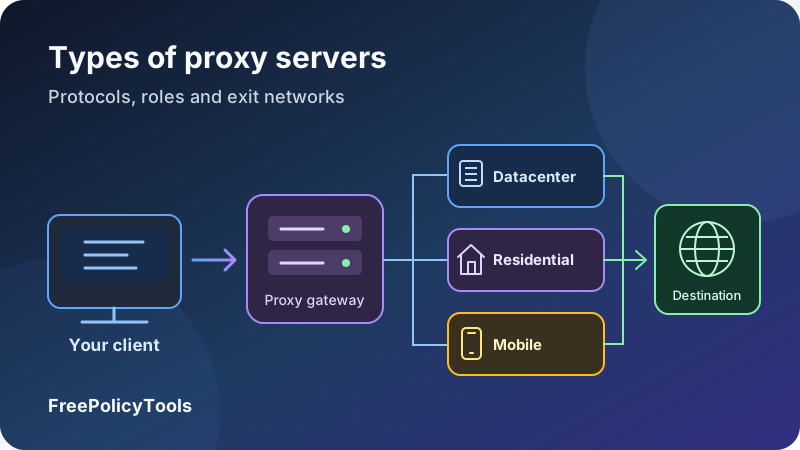
A proxy server is an intermediary that handles connections or requests between a client and another service. Different types of proxies solve different problems: routing an application through another public IP, controlling company web access, testing regional content, caching responses or distributing requests across website backends.
The names can be confusing because they describe different properties. “Residential” describes an exit network, “SOCKS5” describes a protocol, “dedicated” describes allocation, and “rotating” describes address behavior. One proxy can carry several labels at once. This complete guide explains how those categories fit together, their practical tradeoffs and how to choose and verify a setup.
Role
Forward or reverse traffic
Protocol
HTTP, HTTPS or SOCKS
IP source
Hosting, home or carrier network
Session
Static, rotating or sticky
What Is a Proxy Server?
A proxy receives traffic from one party and communicates with another party on its behalf. In an ordinary forward-proxy setup, your application connects to the proxy, the proxy opens or forwards the connection to the destination, and the response returns through the proxy. The destination normally sees the proxy’s exit IP for that connection, although headers, application behavior or separate network paths can disclose additional information.
The proxy endpoint you configure and the exit address a website sees are not necessarily the same. A commercial gateway can authenticate your account and select an exit from a larger pool. You may keep connecting to one gateway hostname while the outgoing IP changes between sessions.
How a typical request travels
- Your application selects a route. Its settings, an operating-system configuration or an automatic configuration script determine whether a destination should use the proxy.
- The client reaches the proxy endpoint. It uses the configured hostname, port and protocol. If required, it authenticates with credentials or through an approved source IP.
- The proxy handles the destination connection. Depending on the protocol, it forwards an HTTP request or relays a connection. A provider gateway may choose a particular exit region or session.
- The response returns through the intermediary. The application receives the data, subject to the proxy’s rules, timeout limits and any relevant encryption.
A proxy does not replace your internet connection, and a browser setting does not automatically route every other application. If you want a simpler introduction before comparing the categories, read what is a proxy server?
Gateway address and exit address are different concepts
The gateway is where your client connects. The exit is where the destination sees the traffic originate. Ask which address is stable, which is shared and which can rotate when comparing products.
How Proxy Server Types Fit Together
There is no universal list in which every proxy belongs to exactly one category. Architecture, protocol, address source, sharing and session behavior answer different questions. A useful comparison describes each dimension instead of treating a long list of names as competing technologies.
| Dimension | Common labels | The question it answers |
|---|---|---|
| Role in the connection | Forward, reverse | Does it act for outbound clients or an inbound service? |
| Client protocol | HTTP, TLS-protected HTTP proxy, SOCKS4, SOCKS5 | How does the client talk to the intermediary? |
| Exit network or IP source | Datacenter, residential, ISP, mobile | Which network supplies the outgoing address? |
| Disclosure behavior | Transparent, anonymous, elite | What identifying information does it deliberately forward? |
| Allocation | Shared, dedicated, public/open | Who can use the endpoint or exit allocation? |
| Address behavior | Static, rotating, sticky | When does the selected exit change? |
| Operational purpose | Caching, filtering, load balancing, application gateway | What additional job does it perform? |
Read a product description as a combination
A “dedicated static datacenter SOCKS5 proxy” combines exclusive allocation, a stable exit, hosting-network address space and a client protocol. A “shared rotating residential HTTP proxy” combines a pool used by multiple customers, changing residential exits and HTTP access. Neither phrase tells you everything about logging, DNS handling, bandwidth limits or encryption.
Similarly, an enterprise forward proxy can cache eligible responses and apply filtering. A reverse proxy can terminate TLS and balance load. Those functions are additions to its role, rather than evidence that it belongs to a completely different architecture.
Separate technical terms from marketing language
Labels such as “premium,” “clean,” “private” or “undetectable” have no universal operational meaning. Ask for measurable properties: supported protocols, actual exit networks, allocation terms, timeout behavior, documented geographic targeting and permitted uses. An IP can have a favorable reputation for one destination and be restricted by another.
Forward Proxies vs Reverse Proxies
A forward proxy serves clients making outbound connections. A reverse proxy is placed in front of a website or application to serve incoming traffic. The distinction concerns whose side of the connection the intermediary is organized to serve, rather than whether packets physically travel forward or backward.
Forward proxy
Configured client → proxy → selected destination. The client or its administrator chooses the proxy and sends outbound traffic through it.
Reverse proxy
Visitor → website’s proxy → application backend. The service owner deploys the proxy, and ordinary visitors use the website address.
Forward proxies: application routing and outbound control
A browser, testing tool or business network can use a forward proxy to route selected traffic through another endpoint. Administrators can apply access rules or authentication. Commercial proxy products generally sell this kind of outbound access, often with a choice of exit regions and network categories.
Reverse proxies: the public entry point for a service
A reverse proxy can distribute requests to backends and centralize parts of request handling. TLS termination and caching are common optional functions. Cloudflare’s reverse-proxy explanation illustrates the architectural distinction.
Routing through a reverse proxy does not automatically make the origin unreachable. Service operators still need appropriate network access rules and correct configuration. A reverse proxy is also not automatically a complete web application firewall or a guarantee of protection from outages.
| Question | Forward proxy | Reverse proxy |
|---|---|---|
| Who selects it? | The client or client-network administrator | The website or application operator |
| Which destinations does it serve? | Allowed destinations selected by clients | Configured backend services |
| Do visitors configure a proxy setting? | Usually yes for explicit client use | Usually no; they use the service’s normal hostname |
| Typical goal | Outbound routing, filtering or controlled exit access | Inbound routing, backend distribution or centralized request handling |
Our reverse proxy versus forward proxy guide expands on deployment choices. Buying a residential exit pool for a browser is a different decision from placing a reverse proxy in front of your application.
HTTP, HTTPS and SOCKS Proxies
The client protocol determines what the proxy understands and how the application requests a connection. It is independent of the exit network: a datacenter or residential product may support HTTP, SOCKS5 or both. Confirm compatibility with your exact client instead of assuming every advertised protocol feature is implemented.
HTTP proxies: handling web requests
An HTTP forward proxy understands HTTP request semantics. For ordinary unencrypted HTTP, it can inspect requests and responses, apply rules or modify headers. For an HTTPS destination, the client commonly asks the proxy to create a CONNECT tunnel and then performs TLS with the destination through that tunnel.
RFC 9110’s CONNECT definition specifies this tunnel mechanism. Establishing a tunnel is different from decrypting the TLS session inside it. Connection reuse can also mean that several website requests share a single tunnel.
“HTTPS proxy” can describe two different protections
Some providers use that label for an HTTP proxy capable of tunneling HTTPS sites. Others mean an endpoint you connect to over TLS. In the first case, destination contents can be protected while the outer proxy connection remains unencrypted. In the second, TLS also protects communication with the proxy endpoint. Ask about both legs, including how proxy credentials are transmitted.
SOCKS5: relaying supported connections
SOCKS works below HTTP’s application semantics. RFC 1928 defines SOCKS5, including address forms, connection commands, authentication negotiation and UDP association. Real services and clients may expose only part of that functionality.
SOCKS5 does not, by itself, encrypt application payloads. HTTPS or SSH can provide their own protection over the relayed connection. A username and password establish access control, not general transport secrecy. DNS can be resolved locally or delegated through the proxy depending on client behavior; a hostname-capable protocol does not force remote DNS in every app.
SOCKS4 and specialized web interfaces
Older SOCKS4 supports a narrower feature set; SOCKS4a adds a way to pass domain names. Prefer a supported modern configuration unless an established system requires an older protocol. A website with a box where you paste a URL is a different interface again: it may fetch or rewrite pages on your behalf rather than provide a reusable proxy endpoint.
| Client option | Common scope | Encryption and compatibility check |
|---|---|---|
| HTTP proxy | HTTP requests and permitted CONNECT tunnels | Destination HTTPS is separate from protection of the proxy connection. |
| TLS-protected HTTP proxy | HTTP proxy access over TLS | Confirm that the client supports TLS to the proxy, not only HTTPS destinations. |
| SOCKS5 | Supported TCP connections; optional UDP features | No general payload encryption by default; verify UDP, DNS and authentication support. |
| SOCKS4 / SOCKS4a | Legacy connection relaying | Narrower capabilities; client and server must agree on address handling. |
| Web-based proxy page | Traffic handled through that website’s interface | Page rewriting, scripts, downloads and account flows may behave differently. |
The HTTP versus SOCKS proxy guide covers protocol selection in more detail. Choose based on the application and required transport, then evaluate the exit network separately.
Datacenter, Residential, ISP and Mobile Proxies
These categories describe where an outgoing address comes from or how a provider packages it. They are widely used commercial labels, with some variation between vendors. Network registration, physical exit location and a destination’s classification database can disagree, so inspect the actual product rather than relying on its name alone.
Datacenter proxies
Datacenter proxies use hosting or datacenter-associated address space. They often run on controlled server infrastructure and can suit predictable, sustained workloads or a stable outbound address. Many products offer fixed addresses, but datacenter pools can also rotate.
Hosting networks may be readily recognizable to destination services. That does not make a datacenter address intrinsically unsafe or unusable; acceptance depends on the destination, reputation and activity. Performance depends on the actual route, capacity and sharing rules rather than a category-wide speed guarantee.
Residential proxies
Residential proxies generally exit through consumer internet connections or residential-associated addresses. Device-based pools can provide a range of locations, but peer availability, last-mile conditions and changing connectivity can affect consistency. Country or city targeting is only as useful as the available exits and the destination’s location classification.
A residential network appearance does not prove that a request came from a human or that the provider has appropriate consent to use the connection. Ask how devices participate, what users are told and how participation ends. Evaluate sourcing alongside reliability.
ISP proxies and static residential products
ISP proxy products commonly use ISP-associated address space on stable infrastructure, often hosted in a datacenter. Providers frequently call them “static residential.” Their attraction is address continuity with an ISP-associated classification, but the name does not guarantee a live household device or universal acceptance as residential.
Confirm the hosting arrangement, ownership or authorization of the address space, allocation policy and replacement terms. A product’s registered network organization is one signal, not definitive proof of its physical location or how every destination classifies it.
Mobile proxies
Mobile proxies typically exit through a cellular carrier connection or carrier-associated network. They can support permitted testing where mobile-network context matters. The exit may involve a modem or participating device; simply using a proxy from a smartphone does not make the exit mobile.
Carriers can share public addresses across subscribers using carrier-grade address translation. A dedicated modem or access lease therefore does not necessarily mean exclusive ownership of a public IP. Radio conditions, network load and reconnection can affect delay and address stability.
| IP source | Potential fit | What to investigate |
|---|---|---|
| Datacenter | Controlled infrastructure, sustained traffic and fixed outbound routing | Destination acceptance, subnet diversity, allocation and capacity. |
| Residential | Permitted regional or consumer-network testing | Informed participation, availability, targeting accuracy and bandwidth accounting. |
| ISP / static residential | Sessions that need a stable ISP-associated exit | Actual topology, exclusive allocation and replacement policy. |
| Mobile | Carrier-network-specific testing and verification | Carrier identity, shared public addressing, session behavior and latency. |
See residential versus datacenter proxies for a focused comparison. A practical choice starts with the network context you need, not a universal ranking from cheapest to “most anonymous.”
Affiliate disclosure: we may earn a commission if you purchase through this link.
Explore IPRoyal’s Proxy OptionsTransparent, Anonymous and Elite Proxies
Traditional anonymity labels usually describe what a forward proxy deliberately discloses to the destination, especially client-address and proxy-related headers. They are informal categories rather than a comprehensive security standard. Different testing tools can use different criteria.
| Label | Typical intended meaning | What it does not establish |
|---|---|---|
| Transparent | The original client address or forwarding information may be disclosed | Whether traffic is encrypted or interception is happening. |
| Anonymous | The original client IP is not deliberately forwarded, but proxy use may be signaled | Protection from account, cookie or fingerprint identification. |
| Elite / high-anonymity | Neither original-IP headers nor obvious proxy markers are deliberately exposed | Invisibility to reputation checks, traffic analysis or the operator. |
Transparent can also describe deployment
In network administration, “transparent” or “intercepting” can describe traffic redirected without a manual proxy setting in the client. That is a different question from whether the proxy forwards identifying headers. Interception does not automatically imply HTTPS decryption; inspection requires additional mechanisms and configuration.
Our transparent proxy guide separates these meanings. When someone claims a proxy is transparent, ask whether they mean client configuration, identity disclosure, or both.
“Elite” does not remove other identifiers
A destination can recognize a logged-in account, a persistent cookie, unusual request patterns or browser properties even when the proxy forwards no original-IP header. The operator can also know your source connection and account. Our article on why changing your IP does not change your browser fingerprint explains this boundary.
An anonymity label is not a protection score
Inspect header behavior, test routing and evaluate the operator. A proxy can hide an original address from a destination while leaving unrelated apps direct or exposing plain HTTP to the intermediary.
Static, Rotating and Sticky Proxy Sessions
Address behavior determines how long a selected exit remains associated with your traffic. Choose it according to the workflow. A permitted regional spot check may need different locations between tests; a stateful account session may need continuity throughout the session.
Static proxies: stable addressing
A static product is intended to retain the same exit over the agreed allocation period. That helps with allowlists and long-running sessions. It does not necessarily mean dedicated use, and a provider may reserve the right to replace an address after failure or maintenance. Read the stability promise and replacement policy together.
Rotating proxies: changes according to a rule
Rotation can happen per request, per new connection, after a timer or through a session parameter. Those are different behaviors. Several HTTP requests may reuse one connection, and several HTTPS requests may reuse one CONNECT tunnel, so “every request” needs a precise definition in the service documentation.
A gateway may select from a finite pool and reuse an address; rotating does not mean each request gets an address never used before. Rotation also does not remove cookies, reset server-side accounts or authorize additional traffic.
Sticky sessions: temporary continuity within a pool
A sticky session asks the gateway to keep a chosen exit associated with a session identifier for a stated interval. This can balance continuity with access to a rotating pool. It may fail to preserve the address if the underlying peer disconnects or the provider changes the allocation.
| Behavior | Useful when | Important question |
|---|---|---|
| Static | An allowlist or workflow needs predictable address continuity | What replacement events and allocation terms apply? |
| Rotating | Independent authorized tests need different exit contexts | Does rotation occur per request, connection, timer or session? |
| Sticky | A multi-step workflow needs one exit for a limited interval | How long is the session retained, and what happens if the exit disappears? |
Proxy chains add intermediaries
A chain sends traffic through multiple proxies. Each hop adds routing dependencies and may add latency or create another trust boundary. Encryption coverage and destination visibility depend on the protocols between hops. A longer chain is not automatically a stronger privacy design. See proxy chains and rotating proxies.
Caching, Filtering and Other Specialized Proxies
Many proxies do more than relay traffic. These functions can exist in forward or reverse deployments, and several can run in the same service. Specify the function you need before selecting a product or architecture.
Caching proxies
A caching proxy can store eligible responses and reuse them for later requests, subject to freshness and cache rules. MDN’s HTTP caching guide distinguishes private caches from shared caches. A reverse-proxy or CDN cache can serve many visitors, making correct separation of public and personalized content essential.
A fresh hit can avoid contacting the origin. A stale entry may require validation, and a conditional response still involves an origin request. A plain CONNECT relay cannot inspect the encrypted HTTP responses inside the tunnel to cache them as ordinary web content.
Filtering and security gateways
A managed gateway can apply destination rules, authentication or content controls. The visibility required for a rule matters: domain filtering and full inspection of an encrypted response are different operations. If an organization uses TLS interception, administrators must manage trusted certificates and understand where decryption occurs.
Load-balancing and application gateways
A reverse proxy can select a backend based on route, availability or capacity. An application gateway may also enforce authentication or translate request paths. Health checks, timeout choices and trusted forwarding headers matter because the application is no longer communicating directly with every external visitor.
CDNs, service meshes and API-based fetching
A content delivery network often includes reverse-proxy and caching functions distributed across locations. Service-mesh proxies operate between services for traffic management or observability. A fetching API may retrieve content for you through an HTTP API rather than supply a conventional proxy endpoint. Their client interfaces and responsibilities differ even when they use proxy components internally.
Distinguish an exit network from a complete data-collection product. If you need rendering, parsing or scheduled jobs, those are separate capabilities; our guide to web scraping tools describes workflow features beyond proxy routing.
Encryption, DNS and Privacy Boundaries
A proxy changes a traffic path, but the privacy result depends on which application uses it, which protocols are protected and what the intermediary can inspect. An IP check is useful evidence about one connection; it does not establish device-wide coverage or the operator’s data practices.
Evaluate the client-to-proxy and proxy-to-destination legs
Plain HTTP content can be visible to intermediaries along its path. With an ordinary CONNECT tunnel, correctly validated HTTPS remains protected between the client and the destination’s TLS endpoint. A separate TLS connection to the proxy can protect the outer proxy exchange, including relevant authentication information.
An inspecting forward proxy is different: with an appropriately trusted interception certificate, it may terminate one TLS connection and establish another to the destination. A reverse proxy can also be the website’s intended public TLS endpoint. Ask where TLS terminates rather than treating every encrypted-looking connection as having the same boundary.
| Arrangement | Typical protection | Remaining concern |
|---|---|---|
| Plain HTTP through a forward proxy | No inherent application-content encryption | The proxy and relevant network observers may read or modify content. |
| HTTPS through a normal CONNECT relay | TLS protects application content to the destination endpoint | Proxy authentication and outer connection metadata need separate evaluation. |
| TLS-protected proxy access plus destination HTTPS | Outer proxy exchange and inner website connection have separate protection | The operator still has routing metadata and account information. |
| Managed TLS inspection | Separate protected connections on either side of the inspecting proxy | The inspecting system can access decrypted contents. |
| SOCKS relay with an encrypted application | Application encryption protects its own contents | SOCKS alone does not establish encryption or whole-device coverage. |
DNS and traffic outside the configured application
If the client resolves a destination locally before using the proxy, the name lookup may take a different path. Clients that delegate lookup can behave differently. In tools that recognize it, a setting such as socks5h commonly requests hostname resolution through the SOCKS proxy, but syntax and support vary. Verify the application’s documentation and test actual routing.
Other apps, IPv6 connections, real-time browser features or unsupported transports can also use routes outside the intended proxy configuration. A browser proxy is not a blanket promise about every browser-related network feature. Our WebRTC and IPv6 guide and DNS leak guide explain relevant test concepts.
Trust and logging remain separate questions
The operator may know your source IP, proxy account, destinations, timing and volume. It may be able to read unencrypted payloads. A different exit does not prevent the destination from recognizing your account or browser. Ask what records are retained and who can access them.
A VPN generally creates an encrypted tunnel for selected device or network traffic, while ordinary proxy settings often apply at the application level. Both can have exclusions and different trust boundaries. See VPN versus proxy and how VPNs work before choosing a tool for broad device coverage.
Proxy Networks in Practical Charts
Performance and workload measurements are more useful than a universal ranking of proxy categories. The following examples demonstrate three questions: how caching affects origin requests, how concurrency can affect response time, and how a team might allocate work across exit networks.
These are teaching examples, not measured benchmarks
Every chart uses invented or explicitly calculated values. None represents market share, provider performance, a typical success rate or a recommendation to use a particular traffic volume. The tables provide the same values in accessible text.
Bar chart: fresh cache hits reduce origin requests
| Fresh cache hit share | Served without an origin request | Origin requests |
|---|---|---|
| 0% | 0 | 1,000 |
| 30% | 300 | 700 |
| 60% | 600 | 400 |
This illustrates a caching function, not the advantage of a residential or datacenter exit. Real request counts can differ when stale responses require validation, requests fail or the system refreshes content in the background.
Line chart: concurrency can expose queueing
| Concurrent requests | Median response time | Interpretation |
|---|---|---|
| 1 | 120 ms | Baseline in this example. |
| 5 | 135 ms | Small additional delay. |
| 10 | 170 ms | More delay under the assumed load. |
| 20 | 230 ms | A reason to inspect capacity and queueing. |
| 40 | 340 ms | Higher concurrency is not automatically more efficient. |
For an authorized performance test, keep the destination, request type, response size and time window comparable. Record errors, successful completion and tail latency alongside the median. A fast average can conceal slow requests or a rising failure rate. Stay within the agreed test limits.
Donut chart: a workload can use several exit types
| Exit category | Example tasks | Example reason |
|---|---|---|
| Datacenter | 600 (60%) | Controlled infrastructure tests that do not require consumer-network context. |
| Residential | 250 (25%) | Location and consumer-network presentation checks. |
| Mobile | 150 (15%) | Carrier-network-specific presentation checks. |
Measure cost per useful result
Proxy plans can charge by bandwidth, allocation, time or successful API output. Those units are not directly comparable. Estimate the traffic and session duration your workflow needs, then account for retries, unusable responses and operational effort. A low headline price can be poor value if the product does not meet the required session or location behavior.
Which Proxy Type Fits Your Use Case?
Choose the least complex setup that meets the actual requirement. If you need to publish a service, start with inbound architecture. If you need to route a client, start with protocol compatibility and exit context. Then decide allocation and session behavior.
| Requirement | Starting point | Confirm before use |
|---|---|---|
| Route visitors to your application backends | Reverse proxy or application gateway | Backend health, TLS boundaries, trusted headers and direct-origin access rules. |
| Control company outbound web access | Managed forward proxy or security gateway | Application coverage, authentication, inspection scope and documented policies. |
| Use a stable address for an authorized allowlist | Static allocation, dedicated if exclusivity matters | Replacement terms and compatibility with the destination allowlist. |
| Test regional content presentation | Documented geographic exits with suitable sessions | Location accuracy, session continuity and the service’s testing permission. |
| Check consumer-network or carrier behavior | Residential or mobile exits as specifically required | Actual network sourcing, availability and the signals the test uses. |
| Reduce eligible origin fetches | A correctly configured caching layer | Cache keys, freshness and separation of personalized responses. |
| Route a non-HTTP application | A supported SOCKS or application-specific relay | Required transports, DNS behavior and application encryption. |
| Protect broader device traffic in transit | A suitable VPN or managed network tunnel | Routing scope, exclusions and reconnection behavior. |
Stateful and independent tasks need different sessions
Use continuity when a permitted multi-step workflow expects one network context. Use separate exits when independent tests deliberately compare network contexts. Rotation in the middle of a session can trigger security checks or invalidate assumptions; a static address can be unnecessary for a one-off regional check.
Automation needs more than addresses
For authorized data collection or quality assurance, schedule responsibly, reuse results when appropriate and honor applicable access restrictions. A proxy does not supply permission or solve parsing, browser execution and data quality by itself. Prefer a supported API when it meets the need.
Our Proxy Comparison Tool can help organize product dimensions, while the proxy provider guide gives additional options to investigate. Verify current product terms rather than treating a category label as a purchasing decision.
How to Evaluate a Proxy Provider
Compare a provider’s actual network, operational terms and support against your requirements. Published pool totals do not establish how many exits are online in your target region at the moment you need them. A small relevant test is often more informative than a large headline inventory.
| Topic | What to ask | Why it matters |
|---|---|---|
| Network sourcing | How are devices and addresses authorized, and how can participants leave? | Address labels do not establish informed participation or rights to use the infrastructure. |
| Protocol support | Are CONNECT, SOCKS5, remote DNS and needed transports supported by this plan? | Standards support and product support can differ. |
| Allocation and sessions | What is shared, what is dedicated, and when can an exit change? | Your workflow may need continuity or exclusivity. |
| Location controls | Which locations are available, and what happens if a requested exit is unavailable? | Fallback can invalidate a regional test. |
| Limits and billing | How are bandwidth, retries, concurrent connections and session duration counted? | The billing unit should match your workload estimate. |
| Privacy and security | What metadata is retained, and how are credentials and access keys protected? | The intermediary becomes part of your trust model. |
| Support and replacements | What happens during an outage or unwanted address replacement? | A failed exit can interrupt allowlists and active sessions. |
| Permitted uses | Which destinations, workloads or categories require approval or are restricted? | Technical reachability does not establish allowed access. |
Inspect residential sourcing claims
Ask for a clear description of participation, the consent experience, compensation where relevant and an effective opt-out. Determine whether the provider sources directly or through partners, and how it monitors those arrangements. A claim of ethical sourcing is useful to investigate, but is not an independent audit.
For example, IPRoyal’s sourcing page states that it uses Pawns.app and IP service-provider partnerships. This is the provider’s own description of its supply model; assess the supporting details rather than treating it as independent certification.
Run a representative trial
Test the actual region, protocol, session duration and authorized destination you need. Record useful responses, failures, latency and billable usage. If you need a stable allocation, verify continuity across reconnects and ask how maintenance or address replacement is handled.
Our IPRoyal review provides one provider-specific starting point. The IPRoyal versus Webshare comparison can help frame alternatives, with current details to be checked against each provider’s documentation.
Affiliate disclosure: we may earn a commission if you purchase through this link.
Explore IPRoyal’s Proxy OptionsHow to Configure and Test a Proxy
A working setup requires agreement between the client and endpoint on protocol, address, port and authentication. Configure the smallest scope you need first, then verify that scope. Do not assume that a system-wide proxy switch creates the same coverage as a device-level VPN.
- Collect the connection details. Obtain the official gateway hostname, port, supported protocol and authentication method. Confirm any region or session parameters and keep credentials private.
- Choose the correct configuration location. A browser, operating system, command-line tool or application library may each have its own settings. Some apps inherit system configuration; others ignore it.
- Set the protocol and endpoint. Do not assume a familiar port number guarantees the protocol. Confirm whether the endpoint expects plain HTTP, TLS-protected HTTP proxy access or SOCKS.
- Configure authentication. Enter account credentials through supported secure mechanisms or allowlist your current source IP. A changing home or mobile address may require an allowlist update.
- Review bypass rules. Automatic configuration scripts and exclusion lists can send selected destinations directly. Local-network exceptions may be intentional, but should be understood.
- Test the routed application. Compare the public IP before and after setup using that exact app. Test HTTP and HTTPS as relevant, and confirm region and continuity where required.
- Inspect DNS and unsupported paths. Check the client’s hostname-resolution behavior and relevant IPv6 or real-time connection paths. A successful web request says nothing about a separate app that does not use the proxy.
- Verify the workflow. Run a small permitted sequence and observe timeouts, retries, exit changes and usage accounting. Test failure behavior so you know whether the client stops or connects directly.
Manual settings and PAC files
A Proxy Auto-Configuration, or PAC, file is a script that selects a route for a URL and host. It can return a proxy or a direct connection and may specify fallbacks. Treat the file as trusted configuration: its logic controls where relevant traffic goes, and its behavior may differ between clients.
See how to set up a proxy on Windows and Mac for platform-specific guidance. Use our IP Address Checker for a public-address check, then inspect the particular application’s routes and settings.
Keep secrets out of screenshots and shared configuration
Proxy URLs can contain usernames, passwords or tokens. Use a protected credential mechanism where supported, redact diagnostic material before sharing it and replace exposed credentials. Avoid putting production secrets into example files.
Test a failure as well as a success
A client may fail closed, meaning it stops when the proxy is unavailable, or fall back to a direct connection. Automatic scripts and app settings can influence this result. Verify it with non-sensitive traffic if the routing boundary matters to your use case.
Common Proxy Problems and Fixes
Separate endpoint connectivity, proxy authentication, destination access and session continuity. Changing addresses repeatedly before identifying the error can obscure a simple configuration problem and create unnecessary retries.
| Symptom | Possible explanation | Useful next check |
|---|---|---|
| Connection refused or timeout | Wrong host/port, blocked transport, unavailable endpoint or exhausted capacity | Verify official connection details and test the supported protocol. |
| HTTP 407 | Proxy authentication is required or not accepted | Check credentials, authentication method and source-IP allowlist. |
| HTTP 401 | Destination authentication failed | Check the destination account or token rather than only the proxy credentials. |
| HTTP 403 or 429 | Destination or proxy policy, access denial or rate limiting | Identify which service generated the response; review permission and reduce retries. |
| HTTP 502 or 504 | An intermediary had an upstream failure or timeout | Inspect the responsible hop, destination availability and configured timeouts. |
| TLS certificate warning | Interception, wrong hostname, a trust issue or a device-clock problem | Investigate the certificate and route; do not disable validation as a routine fix. |
| Original IP appears | App ignored the setting, bypass rule applied or a separate path connected directly | Retest the exact application and inspect routing scope. |
| Exit changes unexpectedly | Rotation setting, expired sticky session, disconnected peer or replacement | Verify session syntax and the provider’s continuity policy. |
| Only one application fails | Unsupported protocol, separate settings or transport requirements | Check that application’s proxy and DNS documentation. |
Distinguish a destination block from a broken proxy
If ordinary permitted sites work but one destination rejects access, the proxy may be functioning correctly. The destination can enforce network, account or workload rules. Review the response and relevant access requirements rather than assuming a different category of IP guarantees acceptance.
Check retries and connection reuse
Automatic retries can multiply usage and worsen throttling. Reused connections can make exits appear sticky even when new connections would rotate. Inspect the client’s retry, timeout and pool behavior before concluding the gateway ignored your settings.
Support is easier to use when you provide the client version, protocol, approximate time, non-sensitive error output and whether the issue affects all destinations. Keep passwords, tokens and private response data out of the report.
Proxy Myths and Common Mistakes
The most expensive proxy is not automatically the most appropriate, and the longest feature list is not proof of a useful setup. Avoid the following assumptions when comparing different types of proxies.
Treating categories as mutually exclusive
Describe role, protocol, IP source, allocation and session behavior separately. A residential proxy can also be HTTP, shared and rotating.
Assuming every proxy encrypts traffic
Check application encryption and protection of the client-to-proxy exchange. Address forwarding alone supplies neither.
Equating dedicated with static
Exclusive allocation and address continuity answer different questions. Ask about both.
Assuming residential means undetectable
Destinations can consider IP history, account state, fingerprints and request behavior. No exit category guarantees acceptance.
Counting rotation as a new identity
Changing an address does not erase cookies, account records or identifiers carried in the request.
Using one IP test as proof of whole-device routing
Test the specific apps and connection paths you intend to cover. Other traffic may remain direct.
Comparing only advertised pool size
Relevant availability, session stability and geographic accuracy matter more than an aggregate count.
Solving certificate problems by disabling validation
Investigate interception, hostname and trust configuration. Removing validation can expose the connection to impersonation.
Ignoring address sourcing and access terms
Evaluate authorization of the infrastructure and the workload. Technical access does not establish permission.
Keep the decision tied to a defined requirement. A stable address for an allowlist, a carrier-specific test and an inbound cache are three different problems, even though proxies can participate in all of them.
Putting the Proxy Types Together
The most useful way to understand proxy server types is to describe the whole connection: who the proxy serves, how the client reaches it, where traffic exits, who shares that exit and how long the address remains stable. Then evaluate encryption, DNS handling, logs, sourcing and operational limits.
Start with the architecture and application protocol, choose the network context you need, and decide whether the workflow requires a static allocation, rotation or a sticky session. Test actual behavior before expanding use. That process is more reliable than choosing from a flat list of labels or assuming one category is best for every task.
A practical first decision sequence
Define the job → select forward or reverse architecture → check protocol support → choose exit context → confirm allocation and sessions → test security and performance. Record the configuration that meets your needs.
Affiliate disclosure: we may earn a commission if you purchase through this link.
Explore IPRoyal’s Proxy Options