DNS Leaks Explained: How to Prevent and Fix Them in Your VPN
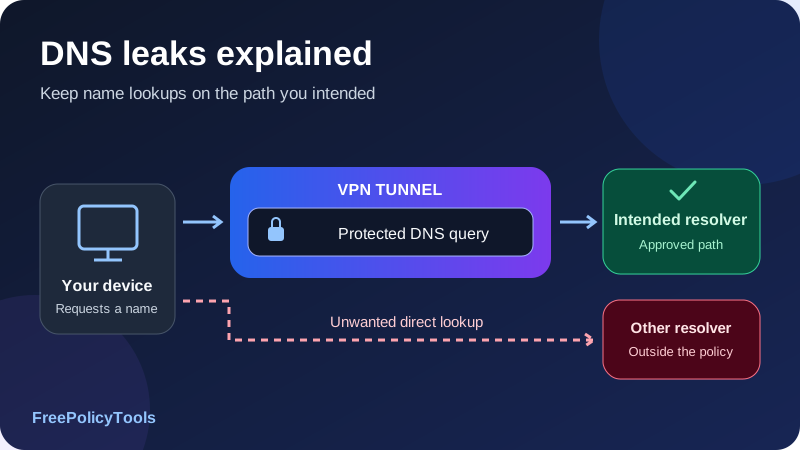
A DNS leak happens when a name lookup escapes the privacy or routing policy you intended to enforce. In a VPN setup, the usual concern is that website traffic travels through the encrypted tunnel while DNS queries take an unintended direct path to a local or ISP resolver. That separate path can reveal requested domain names even though the VPN appears connected.
To prevent DNS leaks, use a supported VPN DNS configuration, review browser and device overrides, verify both address families, and test what happens when the tunnel fails or the network changes. To fix a VPN DNS leak, first confirm the unexpected path rather than judging only a resolver’s location. This guide explains how resolution works, how to interpret tests, and how to make changes you can verify.
Resolve
Names become network addresses
Route
Queries need the intended path
Protect
Check failure and fallback
Verify
Test fresh lookups and recovery
What Is a DNS Leak?
The Domain Name System, or DNS, lets software look up information associated with names such as example.com. A common lookup asks for an address the application can connect to. Your VPN tunnel and the DNS lookup are related parts of using a website, but they are not automatically the same connection.
The common VPN leak scenario
Imagine your browser’s connection to a website uses the VPN exit, but the device sends a plain DNS query to the router, which forwards it through the ordinary ISP connection. The website connection may still be properly encrypted and tunneled. The lookup has nevertheless crossed a different boundary and can reveal the requested name to observers of that direct path.
A VPN client should implement the DNS behavior it documents for its covered traffic. That may involve assigning a resolver, routing queries through the tunnel and blocking unwanted fallback. A connected indicator confirms the tunnel’s status; it does not prove that every application lookup follows the intended policy.
Two questions that should stay separate
| Question | What you are checking | Why it matters |
|---|---|---|
| Where did the query travel? | Inside the VPN, directly, or through another approved path | Determines which network intermediaries can observe it. |
| Who received the query? | VPN resolver, ISP resolver, corporate resolver or chosen third party | Determines which resolver processes the requested name. |
| Was the DNS transport encrypted? | VPN encapsulation, encrypted DNS, or plain DNS on each relevant leg | Changes what observers can read on that leg. |
| What was intended? | The policy for this app, name and connection state | Distinguishes an allowed exception from a failure. |
A third-party resolver reached through the VPN is not automatically an outside-the-tunnel leak. It can still violate a policy that requires only the VPN’s resolver. Conversely, a resolver with a reassuring brand name can be reached directly. Both the path and the resolver matter.
Start with how VPNs work if you need the underlying tunnel model. DNS privacy is one part of that model, not a replacement for it.
How DNS Resolution Works with a VPN
An application can ask the operating system to resolve a name, or it can use its own resolver implementation. The operating system may have per-interface settings, namespace rules and cached answers. A router or local service can also act as a forwarding resolver. More than one component can therefore influence the result.
A typical lookup sequence
- The application needs a name resolved. It may check its own cache or ask a system resolver.
- A resolver is selected. Device policy, the active interface, a VPN setting or an application override can determine the choice.
- The query takes a network path. The selected resolver’s address must be reachable through some interface or tunnel.
- The recursive resolver answers. It can use its cache or obtain information from other DNS servers.
- The application connects separately. The resulting website or service connection follows its own applicable routing policy.
The recursive resolver is the service doing the lookup on your behalf. An authoritative server publishes information for a domain. A browser leak test often observes the recursive resolver or its forwarding infrastructure that reaches the test’s authoritative server, rather than seeing the first DNS address configured on your device.
Why the displayed address can differ
Your device might query a private VPN DNS address while the recursive service uses a different public address upstream. A local router address may likewise be only the first hop in a chain. The address in a DNS test need not match either your device’s DNS setting or your VPN exit exactly.
Caches can hide the lookup you expect
A cached answer can let a site load without generating a new external DNS query. Browser, operating-system and recursive caches operate at different points. Testing only a previously visited name can therefore miss the path used by a fresh lookup. Use a test that generates new names and follow supported restart or cache-refresh steps when needed.
Our DNS checker helps inspect public domain records and resolver responses. It is a different tool from a client DNS leak test and does not, by itself, reveal the route taken by your device’s queries.
What a DNS Leak Can Reveal—and What It Does Not
A visible DNS query can reveal a requested hostname, the record type and timing. That can disclose interest in a service or activity associated with an application. Plain queries sent on a direct network path may be observable by the resolver and intermediaries on that path.
Domain names are not complete page contents
DNS normally does not contain an HTTPS page’s full URL path, form contents, messages or passwords. Looking up a hostname is different from downloading a page over an encrypted application connection. The hostname can still be sensitive, and information placed in a name can itself be revealing.
A lookup also does not prove that a human visited a page. Background updates, prefetching, embedded resources and applications can request names. An observer may infer activity from those signals, but the inference is not the same as seeing the complete browsing session.
Identity depends on the observation point
A resolver receiving a direct query can see information available on that connection, often including the ordinary outward source address. A resolver reached through the VPN normally sees the VPN-side source for that leg. Local network observers, resolver operators and websites have different views; a DNS test result should not be described as proving that every website knows your home IP.
Fixing DNS does not eliminate other identifiers
Accounts, cookies, destination addresses and other network or application signals can still reveal information. DNS protection does not repair a compromised device or prevent phishing. See what VPNs do not protect against and VPN logging policies for those separate concerns.
Use a precise definition of the problem
Record the app, resolver, suspected route and connection state. “My browser used an unexpected resolver while the VPN was connected” is a useful observation. “The resolver is in my country, so all VPN traffic leaked” is a conclusion the result alone does not establish.
Common Causes of VPN DNS Leaks
Leaks often arise when DNS settings, routing and failure handling do not agree. A resolver assignment without the correct route can be ineffective. A protected route without rules for an interruption can fail during a transition. An application with its own DNS configuration can behave differently from the rest of the device.
| Cause | Possible behavior | First useful check |
|---|---|---|
| Manual device DNS | A retained address overrides the intended VPN resolver policy | Inspect physical and VPN interface settings |
| Browser secure DNS | Browser chooses a separate encrypted resolver | Check the browser’s provider and fallback mode |
| Split tunneling | Excluded apps or names use a deliberate direct path | Compare the observed result with the intended split policy |
| IPv6 coverage gap | Some queries or related connections use an uncovered address family | Verify both families and the client’s documented handling |
| VPN interruption | The ordinary resolver becomes reachable during fallback | Test DNS during drop, disconnect and recovery |
| Competing networking software | A DNS app, proxy, security agent or second VPN changes policy | Identify which component owns resolution |
| Manual profile or router setup | Tunnel works but DNS integration is incomplete | Check platform-specific DNS and gateway configuration |
| Network or sleep transition | Interface or resolver state changes after a previously passing test | Repeat fresh lookups after the transition |
Outdated advice can create a second problem
Randomly changing public DNS addresses, disabling IPv6 everywhere or installing another DNS-changing VPN interface may alter the symptom without correcting the intended path. A working repair should be supported by the actual client and should preserve required internal names, local resources and failure protection.
A DNS failure is not automatically a leak
If a resolver cannot be reached and lookups stop, the result may be an availability problem or intentional fail-closed behavior. If the device silently switches to an unintended reachable resolver, that is a different outcome. Diagnose which happened before loosening protective rules to restore connectivity.
DNS over HTTPS, DNS over TLS and VPN DNS
DNS over HTTPS, or DoH, carries DNS exchanges over HTTPS. DNS over TLS, or DoT, uses a TLS-protected DNS connection. Cloudflare’s encrypted DNS documentation explains these transport options. They protect the client-to-resolver exchange; they do not automatically place it inside your VPN.
| Arrangement | Local-path observation | Resolver consideration |
|---|---|---|
| Plain DNS inside the VPN | The local network normally sees the outer tunnel | The VPN-side resolver or onward leg still matters |
| DoH or DoT inside the VPN | The DNS exchange is also protected by its own encrypted transport | The chosen resolver still receives the query |
| DoH or DoT sent directly | Contents are encrypted, but this is a separate direct connection | Can violate a VPN-only routing or resolver policy |
| Plain DNS sent directly | Query contents may be visible on the direct path | Often the classic unintended VPN DNS leak |
Third-party encrypted DNS can be intentional
A custom resolver reached through the tunnel may be a deliberate choice for filtering or another feature. Check whether the VPN supports it and what happens if it becomes unavailable. A recognizable resolver name is not evidence of safe routing, and an unfamiliar name is not evidence of exposure.
Browser fallback needs its own review
Mozilla’s Firefox DoH protection-level guide distinguishes default behavior, fallback and stricter choices. It describes conditions where default protection may use the system resolver, including detected VPN or enterprise policy. The practical point is to check the active mode and observed behavior rather than treating “secure DNS” as a permanent guarantee.
Use the configuration your VPN and managed-network policy support. If the VPN expects to control resolution, let the browser use that supported system policy unless a compatible override is intended. If you deliberately retain DoH, verify its route and fallback. There is no universal instruction to turn encrypted DNS off or on for every VPN.
Read HTTPS, secure DNS and DNS over HTTPS for a broader explanation of these separate protection layers.
How to Run a Useful DNS Leak Test
A browser DNS leak test typically makes the browser trigger lookups for test-controlled names and observes which recursive infrastructure asks for them. It can reveal unexpected resolver use for that tested browser. It usually cannot show the entire client-to-resolver route directly.
- Write down the expected policy. Note whether you intend VPN-only resolution, an approved custom resolver or a split corporate namespace policy.
- Record a baseline. On a network you can safely test, note the ordinary public addresses and resolver results before connecting. Use non-sensitive test traffic.
- Connect with the supported VPN configuration. Confirm the endpoint, app version and protocol. Restart the browser if the client’s instructions require it.
- Run a test that generates fresh names. Use a reputable DNS leak testing service rather than checking only a familiar cached site. Record resolver addresses and labels.
- Compare with expected resolvers. Check the VPN’s documentation or ask support about unknown addresses. Treat geographic labels as clues, not verdicts.
- Review browser overrides. Repeat under the intended secure-DNS configuration and note any difference. Do not assume a test in one browser represents another.
- Check transitions and other apps. Test reconnect, network switching and failure behavior with non-sensitive traffic and supported diagnostics.
- Retest after a repair. Use fresh sessions and the same conditions so you can tell whether the changed setting explains the result.
Proton VPN’s DNS leak troubleshooting guide gives a provider-specific example of DNS tests and configuration conflicts. Its advice about custom resolvers applies to its own supported setup; use your provider’s equivalent documentation when deciding which addresses and settings are expected.
Test the actual scope you rely on
A browser test does not cover every game, messaging app, work profile, container or router client. If the concern is another app, use its diagnostics or observe fresh name lookups from that app where practical. An extension-only VPN can have a narrower scope than a device-wide client.
A pass is evidence for the tested conditions
A clean result supports the tested browser, network, settings and moment. It does not prove that every future lookup, IPv6 connection or tunnel interruption is protected. Retest the situations that actually matter to your use.
Affiliate disclosure: we may earn a commission if you purchase through this link.
Explore NordVPN’s PlansHow to Interpret Resolver Names, Addresses and Locations
The most common mistake is treating the country displayed beside a resolver as a direct measurement of your physical location or query route. DNS infrastructure can be distributed, forwarded or labeled using imperfect geographic databases. A resolver can also belong to hosting infrastructure rather than display your VPN provider’s brand.
| Observation | Reasonable interpretation | What to do next |
|---|---|---|
| Expected VPN-associated resolver | Consistent with the documented resolver choice for this test | Also test failure handling and other relevant apps |
| Third-party resolver with browser DoH enabled | The browser may be choosing its own resolver | Verify intended provider, tunnel route and fallback |
| ISP-associated resolver while VPN is active | A warning sign if your policy requires different resolution | Check overrides, split rules and actual path |
| Several resolver addresses | Could reflect forwarding, distributed service or multiple policies | Compare ownership and client settings before judging |
| Resolver country differs from VPN exit | Geographic labels alone do not establish a leak | Ask the provider about the infrastructure and path |
| No resolver results | The test may be blocked, incomplete or unable to trigger queries | Confirm a fresh test and expected connectivity |
The test’s DNS view differs from its IP view
A test page may display your browser’s public connection address and a list of recursive resolver addresses. The first describes the browser’s website connection; the second describes infrastructure involved in resolving the test names. A VPN exit matching the expected country does not settle DNS, and a DNS mismatch does not prove the browser’s website payload bypassed the tunnel.
When stronger confirmation is useful
If results remain ambiguous, inspect effective resolver and routing settings, use client logs, or ask support to identify the observed infrastructure. On your own device or network, authorized packet observation can help detect direct plain DNS. Encrypted DNS requires identifying its connection path; its contents will not appear as ordinary readable DNS queries.
Keep diagnostic evidence narrow. Resolver IPs, test times, app version and non-sensitive test names are usually more useful than publishing a complete browsing or packet log. State what you observed and what remains uncertain.
How to Fix a VPN DNS Leak Step by Step
Make one controlled change at a time. Preserve the current settings or record them before editing so you can reverse a change that breaks resolution. For a managed work device, use the administrator’s approved configuration instead of replacing internal DNS with a public service.
- Confirm the symptom. Record the browser or app, resolver addresses and connection state. Check that a test actually generated fresh lookups and that the result conflicts with the intended policy.
- Update and reconnect the official VPN client. Use the provider’s supported app and current configuration. A manual tunnel profile may not include the same DNS integration or protection features.
- Restore the supported VPN DNS mode. If you added custom DNS, review whether it is supported. Remove an unintended override or configure an approved custom resolver inside the client as documented.
- Review browser DNS separately. Check secure-DNS provider choice and fallback. Use the intended system resolver policy or a deliberately compatible encrypted-DNS setup, then start a fresh browser session.
- Inspect split rules and address families. Confirm the affected app is covered and that IPv4 and IPv6 both follow the documented policy.
- Check competing network tools. Identify DNS changers, proxy clients, security agents, local filters and second VPN interfaces. Change only a component you control and understand.
- Enable compatible failure protection. Verify that the supported kill switch prevents unintended direct lookups during the failure states you rely on.
- Retest the original conditions. Repeat fresh lookups, then test reconnect, sleep or network switching as relevant. Confirm that required internal and local resources still work.
Do not mistake a different resolver for a completed repair
Changing from an ISP resolver to a public resolver can change the test’s displayed name while leaving the same direct network path in place. That can alter who receives your queries without restoring VPN routing. The repair should satisfy both the intended resolver choice and the intended path.
Escalate with a reproducible report
If the client’s documented setup still produces unexpected queries, send support the operating system, VPN app version, protocol, relevant DNS overrides, split mode, test time and observed resolver addresses. Include the smallest repeatable steps. A concise report is easier to investigate than a claim that every connection is exposed.
Our VPN troubleshooting guide helps separate DNS failures from route, endpoint and application problems.
Platform Checks: Windows, macOS, Linux and Mobile
The goal is consistent across platforms: identify the active resolver policy and how its traffic is routed. The controls and resolver architecture differ. Menu names can also vary by version, so use the current device and client documentation rather than copying a fix from another operating system.
Windows
Review DNS assignments on the physical connection and the VPN interface, along with browser secure DNS and any work-managed policies. An address retained on an adapter is a configuration clue, not proof that every application actually queries it.
Microsoft’s VPN name-resolution documentation explains namespace policies through the Name Resolution Policy Table, or NRPT. These rules can direct particular names to particular resolution behavior. An internal corporate name and a public name can therefore legitimately resolve differently; inspect the effective policy before removing it.
macOS
Review the active network service’s DNS settings, the VPN client’s configuration and any installed networking or managed profiles. A manually added resolver can remain after the problem that motivated it disappears. If your provider recommends returning a personal interface to its default settings, record the existing values and remove only the unintended override.
Linux
Determine which resolver manager your distribution uses and how the VPN integrates with it. A local stub address can be normal: the local service receives requests and forwards them according to its policy. Editing a generated resolver file without understanding that manager may be overwritten or break split DNS.
Check the distribution and client’s supported integration, including per-link DNS and routing domains where relevant. A configuration that works in one distribution or app package is not a universal repair for every Linux desktop.
Android
Review the VPN app’s DNS mode, any device Private DNS setting, browser overrides and work-profile scope. Google’s Android network-settings guide describes Private DNS choices and notes that the feature protects DNS questions and answers rather than all traffic. Its interaction with your VPN must still be checked against that client’s support and observed route.
Do not install an additional DNS-changing app simply to fix a VPN problem without checking how it implements networking. Some tools use a VPN-style interface, which can conflict with another VPN configuration or change which traffic is covered.
iPhone and iPad
Review Wi-Fi DNS settings, VPN configuration, installed DNS or network profiles and application-specific behavior. A device VPN, managed per-app VPN and other privacy relay features can have different scopes. Compare the actual browser and app setup rather than assuming every privacy feature controls the same lookups.
| Question | Where to look | Why it matters |
|---|---|---|
| Who manages system resolution? | OS network settings, resolver manager or managed profile | Changes must be made at the effective control point. |
| Does the app bypass system DNS? | Browser or application secure-DNS settings | System settings alone may not explain its queries. |
| What scope does the VPN cover? | Device, browser, profile, app list or router policy | Uncovered traffic needs a separate expectation. |
| What happens during failure? | Kill switch and resolver fallback policy | A passing connected test does not cover transitions. |
IPv6, Split Tunneling and Corporate Split DNS
DNS transport and returned addresses are different
A query asking for an IPv6 address can travel over an IPv4 connection, and a query asking for an IPv4 address can travel over IPv6. The DNS record type does not tell you which network path carried the query. Check transport routing and address-family coverage separately from the answers returned.
If the VPN supports IPv6, verify that support is active and consistent with your intended scope. If it documents blocking IPv6 instead, verify that policy rather than assuming it is implemented. Prefer the client’s supported behavior to disabling IPv6 system-wide without diagnosing the issue.
Split apps can have different DNS expectations
An excluded app may deliberately connect directly. Depending on the implementation, its DNS can still use the VPN resolver or a separate policy. An app-level routing rule does not prove which component performs its lookups. Decide whether the direct path and its resolution behavior are both acceptable.
See split tunneling versus full tunneling and IP leaks, WebRTC and IPv6 for those separate checks.
Split DNS can be the intended design
A corporate VPN can send internal namespaces to a company resolver while leaving public names to another approved resolver. That arrangement is not automatically a leak. It should be explicit, and internal queries should not escape to a public resolver that cannot answer them or should not receive those names.
A strict browser DoH override can interfere with internal resolution if it ignores the supported namespace policy. If an internal site fails, involve the administrator rather than forcing every lookup through a public provider. The correct configuration depends on the organization’s design.
Kill Switches, Reconnects and Network Changes
DNS protection should cover the states where the intended tunnel is unavailable, not just a stable connected session. Without effective blocking, a device can return to its ordinary resolver during a drop. A brief interval can matter even if the client reconnects shortly afterward.
Test different transitions separately
| Transition | Question to test | Expected result must come from your policy |
|---|---|---|
| Unexpected tunnel loss | Can a fresh lookup escape before reconnection? | Protected DNS should remain blocked or use an approved path. |
| Manual disconnect | Does the protection persist or permit ordinary DNS? | Standard and stricter modes can differ. |
| Sleep and wake | Are resolver and blocking rules restored in time? | Fresh lookups should match the intended resumed state. |
| Wi-Fi to cellular or another network | Does the new interface introduce a direct resolver path? | Covered queries should keep the intended policy. |
| Startup before connection | Can apps resolve names before protection is established? | Depends on auto-connect and persistent blocking support. |
Auto-reconnect is not the same as blocking
Auto-reconnect tries to restore the tunnel. A kill switch constrains what traffic may leave while the path is unavailable. Both can be useful, but a quick reconnect alone does not show whether DNS escaped in the gap.
Respect feature compatibility
Split tunneling and strict non-VPN blocking can conflict or have platform-specific behavior. Confirm the supported combination before relying on it. An excluded app losing connectivity may reflect intentional blocking rather than a DNS malfunction.
Read how VPN kill switches work. Use harmless test names for failure checks and avoid interrupting a work or remote-access session you depend on.
Router VPNs, Local DNS Filters and Shared Connections
A router VPN can cover several devices, but their DNS behavior still needs review. A device may query the router, the router may forward to another service, and that upstream connection may or may not follow the router’s VPN policy. The device’s first-hop DNS address alone does not reveal the onward path.
Forwarding DNS needs an explicit route
If a router advertises itself as DNS, verify which upstream resolver it uses while the tunnel is connected and disconnected. Also verify how the router handles IPv6 announcements and selected devices. A rule covering one client subnet may not automatically cover DNS queries generated by the router itself.
Local filtering adds another component
A local filtering resolver can provide useful domain controls, but it introduces another DNS policy owner. Confirm its upstream settings, whether its traffic is routed through the intended gateway and what it does if that gateway fails. A filter that reaches a public resolver directly can bypass a VPN-only expectation even if the household’s browsing traffic is tunneled.
One connected device does not prove coverage for others
A VPN on a laptop or phone does not automatically establish the same policy for tethered, virtualized or other household devices. Test each relevant client path. Guest networks, containers and virtual machines may have separate routing or resolver settings.
| Setup | First hop | Additional path to verify |
|---|---|---|
| Device-wide VPN | VPN or device-selected resolver | Client routing and browser overrides |
| VPN router | Often the router’s LAN DNS address | Router-generated upstream DNS and tunnel failure |
| Local filtering service | Local filtering host | Filter’s upstream resolver connection |
| Guest or selected-device policy | Network-specific DNS service | Whether that client and its DNS are covered |
Our VPN server types guide explains the gateway role. Keep routing, resolver forwarding and filtering as separate configuration decisions you can test.
Affiliate disclosure: we may earn a commission if you purchase through this link.
Explore NordVPN’s PlansDNS Protection and Performance: Practical Charts
A useful DNS test plan measures the behavior you intend rather than assigning a vague privacy score. The following examples illustrate path accounting, lookup timing and coverage of a checklist. They are not statistics about VPN providers.
All values are chosen teaching examples
The chart values are invented, not measurements, prevalence estimates or security rankings. Matching text tables make the examples readable without relying on the canvases.
Stacked bar chart: account for each test lookup
| State | Protected path | Unintended direct | Blocked |
|---|---|---|---|
| Initial example | 8 | 4 | 0 |
| After hypothetical repair | 12 | 0 | 0 |
| Tunnel unavailable | 0 | 0 | 12 |
| After recovery | 12 | 0 | 0 |
Each state accounts for twelve chosen attempts. In the unavailable state, zero successful queries is the intended protection result. It is an availability cost, not proof of an accidental leak. Real diagnosis must also account for retries, caching and how the observation method counts attempts.
Line chart: repeat fresh lookup measurements
| Trial | Configuration A | Configuration B |
|---|---|---|
| A | 26 milliseconds | 34 milliseconds |
| B | 24 milliseconds | 31 milliseconds |
| C | 27 milliseconds | 33 milliseconds |
Compare performance without weakening the policy
DNS response time can affect the start of a connection, but it is not the same as download throughput or page-load time. Caches, resolver reachability, upstream work and connection reuse all matter. Compare equivalent fresh lookups under similar conditions, and do not treat a faster response as evidence of better privacy.
Doughnut chart: cover the main policy layers
| Layer | Items | Examples |
|---|---|---|
| Operating system | 3 | Active resolver, manual overrides, namespace policy |
| Browser | 2 | Secure-DNS provider and fallback |
| Routing | 3 | VPN scope, IPv4, IPv6 |
| Failure and recovery | 4 | Drop, disconnect, network change, reconnect |
For the wider performance picture, read VPN speed and latency. DNS lookup timing is one component, not a complete connection benchmark.
How to Prevent DNS Leaks Over Time
Prevention works best as a small, repeatable review process. Keep the resolver policy understandable, avoid unnecessary competing overrides, and retest when the components that own networking change.
- Use the supported client: Keep it updated and confirm its documented DNS protection for your platform.
- Choose a resolver policy deliberately: VPN DNS, compatible custom DNS or corporate split DNS should be an explicit decision.
- Review application overrides: Browser secure DNS and standalone app resolvers can differ from system settings.
- Keep split rules narrow: Record which apps may use direct connections and what DNS behavior is acceptable for them.
- Check both address families: Verify documented IPv4 and IPv6 handling rather than relying on one result.
- Verify failure blocking: Confirm DNS does not escape during the interruption states covered by your policy.
- Test network changes: Recheck after moving between Wi-Fi, Ethernet, cellular or a managed network.
- Remove stale overrides: Review old manual DNS entries, profiles and DNS-changing tools you no longer need.
Keep a compact verification record
DNS VERIFICATION RECORD
Scope: [device, browser, app, work profile or router]
VPN: [client version, endpoint and protocol]
Expected resolver: [VPN, compatible custom or namespace policy]
Expected path: [covered queries through the VPN]
Overrides: [browser secure DNS, device DNS and local filters]
Address families: [documented IPv4 and IPv6 handling]
Connected test: [fresh-name resolver observations]
Failure test: [drop and disconnect behavior]
Recovery test: [network change and reconnect observations]
Follow-up: [one setting changed, result and review trigger]
This record helps explain changes without collecting unnecessary personal browsing data. A passing result is useful evidence, but future app updates or a new interface can justify retesting.
Our VPN testing guide adds checks for outward addresses, routing and recovery beyond DNS.
When DNS Protection Breaks Connectivity
A secure configuration should be usable, but some failures are intentional consequences of refusing an unsafe fallback. Diagnose the failed layer before disabling protection. A lookup failure, an internal-name failure and an unexpected resolver result need different fixes.
| Symptom | Possible cause | Focused next step |
|---|---|---|
| Nothing resolves while VPN is connected | Configured resolver is unreachable or an override conflicts | Restore the supported resolver policy and reconnect |
| Only internal company names fail | Public resolver cannot serve the internal namespace | Check the approved split-DNS or managed policy |
| One browser differs from another | Browser-specific DoH, proxy or cached state | Compare active browser settings and fresh tests |
| Queries stop during a tunnel drop | Kill switch intentionally blocks fallback | Confirm this matches the required failure policy |
| Unexpected resolver appears after network change | New interface settings or stale resolver state | Recheck effective settings and repeat after reconnect |
| DNS test returns no results | Test, script or lookup path is blocked | Confirm test completion; do not assume a pass |
| Router clients differ from a device VPN | Router upstream DNS follows another route | Inspect the forwarding chain and router-generated traffic |
| Known site works but fresh sites fail | Cached answers conceal a resolver reachability problem | Test fresh names and resolver connectivity |
Prefer a supported repair to a broad reset
A complete network reset can remove useful configuration without identifying the fault. Start with the specific override, rule or resolver that changed. Save a working baseline and verify one change at a time. For managed devices, preserve required profiles and ask the administrator to resolve the conflict.
Do not confuse DNS with censorship or exit blocking
A site can resolve normally but reject a VPN exit or fail at the connection layer. A DNS repair will not necessarily change that. See VPN obfuscation explained for a separate discussion of traffic recognition, and VPN protocols explained for transport choices.
Common DNS Leak Myths
“The VPN is connected, so DNS must be protected.”
Tunnel status does not establish every application’s resolver choice, query route or fallback behavior.
“Any public resolver in the result is a leak.”
A deliberately chosen public resolver can be reached through the VPN. Confirm the policy and path.
“A resolver in my country proves my home IP leaked.”
Location labels describe infrastructure imperfectly. They do not directly identify the client route or home address.
“Changing DNS addresses always fixes the problem.”
It can replace one direct resolver with another. The routing failure may remain.
“DNS encryption and a VPN are interchangeable.”
Encrypted DNS protects its own exchange; a VPN has a broader routing scope for covered traffic.
“One clean browser test proves every device is safe.”
Applications, profiles, routers and transitions can use different policies. Test the scope you actually rely on.
A VPN’s price, brand or protocol name is not a substitute for the relevant DNS tests. Evaluate documented behavior and verify your actual configuration. Our guide to free VPN safety considers the wider trust questions.
Keep DNS on the Path You Intended
DNS leaks are best understood as a mismatch between intended and observed resolution behavior. A classic leak sends queries outside the VPN to an unintended resolver, but resolver choice and transport route are separate questions. An unfamiliar resolver label is a reason to investigate, not an automatic verdict.
Use a supported VPN DNS setup, review browser and device overrides, and verify IPv4, IPv6, split rules and failure handling. Repair one layer at a time and repeat fresh-name tests under the original conditions. For routers and work networks, include the forwarding or namespace policy rather than treating one browser result as the whole picture.
A practical standard for a completed fix
You can explain which resolver should receive the tested app’s queries, which path should carry them, and what should happen when the tunnel is unavailable. Your observations support each part under the conditions you checked.
Affiliate disclosure: we may earn a commission if you purchase through this link.
Explore NordVPN’s Plans