How to Unblock Websites: Using VPNs and Proxies to Bypass Restrictions
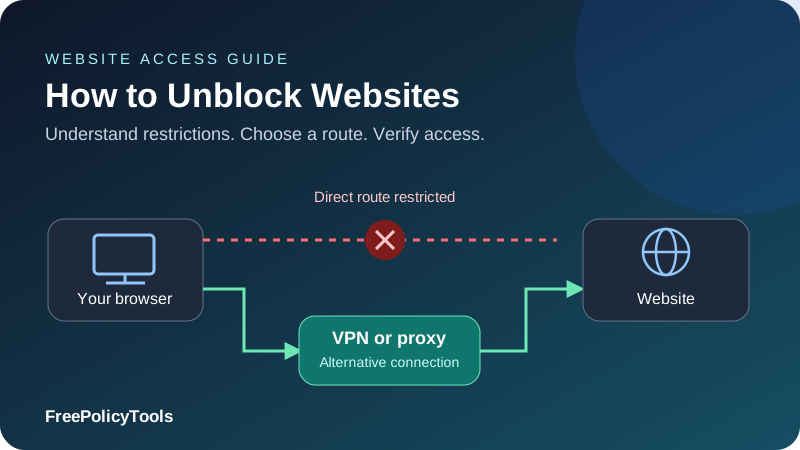
A blocked website does not always mean the website is offline. Your network may filter its address, the service may restrict a region, or the account may lack access. VPNs and proxies can help with some restrictions by sending requests through a different connection and exit IP, but the right approach depends on where the block occurs.
This detailed guide explains how to unblock websites with VPNs and proxies, choose between them, configure supported devices and verify the route. It also covers DNS changes, common errors, privacy limits and the reasons a site can remain unavailable after the apparent IP changes.
Diagnose
Identify the blocking layer
Route
Choose a suitable connection
Verify
Test the intended feature
Protect
Keep transport checks active
How to Unblock Websites: Start with the Cause
To unblock a website with a VPN, install a trusted VPN app, connect to a suitable server and open the site through the connected application. To use a proxy, configure a trusted proxy endpoint in a compatible browser or app, authenticate if needed and verify that the request uses its exit IP. Both approaches change the route your traffic takes, which can help with some network and IP-based restrictions.
Before changing settings, check what is actually failing. A website can be unavailable because of a network filter, a regional rule, an account restriction, a security challenge, a broken DNS response or an outage. These problems need different remedies. A VPN cannot repair a suspended account, make a deleted page reappear or supply a paid subscription.
| What you see | Possible explanation | First step |
|---|---|---|
| Network-branded block page | Local network filtering | Confirm the URL and ask for an exception when appropriate. |
| Unavailable in your region | IP location or account entitlement | Check service availability and account requirements. |
| DNS or name-resolution error | Resolver failure or DNS filtering | Verify the spelling and test name resolution. |
| 403 or access denied | Site policy, permissions or exit-IP reputation | Identify the responding service and check account access. |
| 429 or too many requests | Rate limiting | Pause and follow any Retry-After instruction. |
| Certificate warning | Wrong hostname, clock issue or interception | Investigate the certificate; keep verification enabled. |
| Page fails on every connection | Site outage or application problem | Check service status or contact the site owner. |
A useful first test is to compare the same public page on two connections you are permitted to use, such as home Wi-Fi and your mobile connection. If only one fails, the difference points toward the route or network. If both fail while logged into the same account, investigate the account and website as well. One test rarely proves the exact cause.
Why Websites Are Blocked
DNS filtering
DNS translates a hostname into the addresses needed to connect. A filtering resolver may return no usable answer, a substitute address or a block page. A different permitted resolver can help when that resolver is the source of the problem. It does not fix a separate IP block or a restriction enforced by the destination.
IP and network filtering
A network may deny connections to certain destination addresses. A VPN creates an encrypted route to another server, which then connects onward for covered traffic. A reachable proxy may also connect from an address outside that filter. Neither helps if its own endpoint is blocked or the application continues using the original direct route.
Hostname and connection inspection
Networks can make decisions using visible metadata, managed-device controls or inspection systems. HTTPS protects application content in normal connections, but it does not make all routing information invisible. A VPN can conceal inner destination information from the local network for tunneled traffic, while still revealing that a connection to the VPN endpoint exists.
Regional rules and account-based restrictions
A destination may classify your connection by IP location, but it can also consider account country, billing information, device location permissions or content entitlements. Changing the exit IP affects only part of that decision. A service can deny known intermediary addresses even when they appear to be in an accepted country.
Device and browser controls
Managed browsers, endpoint agents, extensions and parental controls can block access before a request reaches the network. Changing an exit IP may not affect these controls. On a managed device, an approved exception or administrator help is often the appropriate solution.
Identify the layer before choosing a tool
Ask whether the problem happens before name resolution, during the connection, at the website or after login. That distinction prevents unnecessary subscriptions and repeated settings changes.
VPN vs Proxy: Which Method Should You Use?
A VPN and a proxy can both make a destination see an intermediary’s IP address. Their coverage and transport properties differ. A VPN app can route device traffic through an encrypted tunnel, subject to its exclusions. A proxy generally handles traffic from applications configured to use it. A browser extension marketed as a VPN may provide only browser proxying.
| Method | Typical scope | Best fit | Limit |
|---|---|---|---|
| VPN application | Device routes or selected apps | Encrypted routing and regional connection testing | Exclusions and destination blocks can still prevent access. |
| Configured forward proxy | Compatible browser or application | A specific application or selected egress IP | Encryption and DNS behavior depend on the setup. |
| Web proxy page | Pages retrieved through a separate website | Limited public-page access | Logins, scripts and file downloads may fail; operator trust matters. |
| Encrypted DNS | Name-resolution requests | Resolver privacy or a DNS-specific issue | Does not change the IP seen by a website. |
| Tor Browser | Browsing within Tor Browser | Privacy-oriented browsing over the Tor network | Exits can be blocked and performance varies. |
| Administrator exception | Approved managed access | Incorrect workplace or school filtering | Requires the relevant owner to permit access. |
Choose a VPN when you need several supported applications to share a protected route. Choose a proxy when you need deliberate application-level routing or a specific stable exit. Neither can guarantee access to every destination. Our VPN versus proxy comparison examines those tradeoffs in more depth.
For a basic explanation of the intermediary itself, see what a proxy server is. The word proxy describes a role, rather than a blanket anonymity or encryption guarantee.
How to Unblock Websites with a VPN
A reliable VPN setup starts with the actual application you will use, rather than only a successful connection indicator. The steps below apply broadly; server labels and setting names vary by provider and device.
- Choose a service compatible with your device. Check official app availability, supported protocols, routing controls and the provider’s documentation. Download from its official site or the platform’s trusted app store.
- Install and sign in. Apply the required operating-system VPN permission. Keep your app and system current so certificate and protocol behavior is supported.
- Select an appropriate exit. For a regional test, choose a supported location relevant to the content. For a route-specific network block, a nearby available exit may offer better performance.
- Connect before opening the website. Wait for the app to confirm a tunnel. Close or reload an existing connection so the next request uses the new route.
- Check routing exclusions. Make sure the browser or application is covered. A split-tunneling exclusion can leave that app on the direct connection.
- Verify the visible IP. Compare a browser IP check before and after connecting. Investigate DNS and IPv6 handling if routing privacy is part of your goal.
- Open the intended site and test the actual feature. A home page loading does not prove that login, media playback or file delivery will work.
- Keep protection active for the session. Avoid unnecessary exit changes during logins or payments, because a sudden location change can trigger account verification.
Pick a server for the restriction, not simply the longest distance
A faraway server is not automatically more useful. It can increase round-trip time and reduce throughput. If a website blocks one shared exit, a different permitted exit in the same relevant region may behave differently. Repeatedly hopping between countries can confuse troubleshooting and interrupt stateful sessions.
Understand full and split tunneling
Full tunneling aims to send covered traffic through the VPN; split tunneling intentionally routes selected traffic differently. Coverage still depends on app and platform behavior. Read our guide to split tunneling versus full tunneling before assuming every application shares the same exit.
Check failure behavior
A kill switch is intended to prevent certain direct connections when the VPN route drops. Its scope can differ between apps, reconnect states and platforms. Test the feature in a controlled situation with a public page. Our explanation of how VPN kill switches work covers the settings and limitations.
Explore VPN and Proxy Options
Check device support, routing options and plan terms before choosing a service. Access depends on the destination and configuration.
Affiliate links: FreePolicyTools may earn a commission if you purchase through these links.
How to Bypass Website Restrictions with a Proxy
A forward proxy can help when it is reachable from your network and its onward connection is accepted by the destination. The right setup needs an endpoint hostname, port, supported protocol and authentication details. Get these from a trusted provider or administrator; a public list of unknown open proxies supplies little assurance about operation or logging.
- Choose the application and protocol. Confirm whether it supports an HTTP proxy, HTTPS connections to a proxy or SOCKS5. Destination HTTPS support and an encrypted connection to the proxy are separate capabilities.
- Get the endpoint and account settings. Check the port, credential format, region options and any source-IP allowlist. A provider’s gateway address may differ from the final exit IP.
- Configure the browser, operating system or application. Enter the supplied values at the level your app actually follows. Some browsers use system settings; other clients need their own configuration.
- Review exclusions and fallback rules. Local hosts or specified domains may connect directly. A proxy auto-configuration file can also contain a DIRECT fallback.
- Authenticate and test a public page. Confirm the visible exit from the same browser or client that will open the target site.
- Open the intended destination. Keep a stable exit for account sessions where possible, and verify that redirects and related domains also use the intended route.
- Restore settings when finished if appropriate. A forgotten or expired proxy configuration can break later browsing even on an otherwise healthy connection.
HTTP and SOCKS5 are different options
An HTTP proxy can forward web requests or establish a CONNECT tunnel for HTTPS. SOCKS5 relays supported connections more generally, but client support for authentication, remote DNS and UDP varies. See HTTP versus SOCKS proxies before choosing a protocol based only on a product label.
MDN’s proxy and tunneling guide explains forward proxies, HTTPS tunneling and routing configuration. A reverse proxy belongs on the destination-service side and is not something a visitor selects in browser settings to change their own exit.
Keep DNS behavior in view
A client may resolve a hostname locally and pass an address to the proxy, or send the hostname for remote resolution. That choice can determine whether a local DNS failure still prevents the connection. Verify your client’s options; configuring a proxy does not automatically redirect every DNS query.
Our Windows and Mac proxy setup guide provides platform-focused instructions. For location and network-origin tradeoffs, read residential versus datacenter proxies.
Use a trusted route for sensitive sessions
Keep HTTPS and certificate verification enabled. An unknown web proxy that fetches pages on your behalf can handle the page content, including information you submit through it. A normal CONNECT tunnel has a different visibility model.
Explore VPN and Proxy Options
Check device support, routing options and plan terms before choosing a service. Access depends on the destination and configuration.
Affiliate links: FreePolicyTools may earn a commission if you purchase through these links.
Browser, Desktop and Mobile Setup Considerations
Windows and macOS
Official VPN applications generally manage their own connection profiles. System proxy settings are separate and may affect only applications that use them. Record existing settings before changing them so you can restore a working configuration. Avoid running several competing VPN clients while diagnosing the route.
Android and iPhone
Use a supported app and confirm its operating-system connection status. Per-app exclusions, managed-device rules and local VPN-based filtering apps can affect behavior. An HTTP proxy configured for one Wi-Fi network may not carry over to mobile data or another Wi-Fi network.
Browser extensions
Check whether an extension routes just browser traffic and what permissions it requests. It can be useful for a browser-specific test, but another application’s downloads or video calls may use a different path. Do not infer system-wide VPN protection from an extension’s toolbar icon.
Captive portals and hotel Wi-Fi
Some networks require a sign-in or terms page before external connections work. Complete that network’s legitimate connection process first, then connect the VPN. A tunnel cannot establish successfully if the network is still withholding basic internet access. Recheck the route after the network reconnects.
Smart TVs and consoles
These devices may lack a native VPN app or proxy support. A supported router configuration can route network traffic, but it needs compatible firmware, capacity and carefully chosen exclusions. Smart DNS products are different: they may alter resolution or delivery paths for selected services and should not be assumed to provide an encrypted VPN tunnel.
When Changing DNS Helps—and When It Does Not
Changing DNS can help when the configured resolver returns a filtered or incorrect response and another permitted resolver returns the correct one. Encrypted DNS can protect queries between a client and its resolver. It leaves the subsequent website connection as a separate part of the route.
Cloudflare’s encrypted DNS documentation distinguishes DNS over HTTPS and DNS over TLS. Neither changes the public source IP used for an ordinary direct website request. DNS encryption also does not guarantee that a network will permit the resolver endpoint.
Check fallback and policy behavior
A browser’s secure DNS setting may use fallback logic or respond to network and enterprise policies. A setting appearing enabled is not always proof that each lookup uses it. Mozilla’s DNS over HTTPS protection-level guide explains Firefox’s behavior and exceptions.
Do not treat an IP-address URL as a universal workaround
Modern websites commonly serve multiple hostnames from shared infrastructure. Entering a bare IP can request the wrong site, fail certificate validation or omit hostname routing information. Keep the correct HTTPS hostname and investigate the resolver or route instead of ignoring certificate errors.
If DNS is the suspected failure point, compare resolver results and the browser’s own connection behavior. Our DNS leak guide explains the difference between resolving successfully and keeping resolution on the intended protected path.
How to Verify That the Website Uses the New Route
A connection indicator shows the client’s state, while a website test shows whether that particular task works. Use both. Start with a public page and then test the feature you actually need, without putting sensitive information into an unverified intermediary.
| Check | What it establishes | What it does not establish |
|---|---|---|
| Compare the browser’s public IP | That request appears from a different exit | Every app and every protocol uses that exit. |
| Check IP location | How one database classifies the exit | The target uses the same database or ignores account location. |
| Inspect DNS behavior | Which resolver path the test exercises | Every application uses the same DNS configuration. |
| Test the actual page and feature | The selected task works in this session | All pages, downloads and future sessions will work. |
| Test a controlled connection failure | Whether that setup falls back or stops | All future failure modes have identical behavior. |
| Review routing exclusions | Which routes are intentionally direct | No separate browser or device feature can create other connections. |
Use our What Is My IP tool to compare the address visible to that browser request. Our IP geolocation tool adds another classification check, but location databases can disagree.
Test leaks separately
DNS, IPv6 and WebRTC can create additional paths depending on the client and application. Our guide to WebRTC and IPv6 IP leaks explains why a successful IPv4 check is only one part of verification. Use a structured process such as how to test your VPN rather than repeatedly changing settings without recording results.
Cookies and location permissions still matter
A website can remember an earlier session through cookies or account settings. A fresh browser session can distinguish session state from route behavior, but private browsing does not itself change the IP or create a VPN tunnel. Review location permissions if the site uses device location; do not assume an exit location overrides them.
Why a Website Is Still Blocked with a VPN or Proxy
When access still fails, identify which part changed. If the public IP is unchanged, first fix routing. If it changed and the website responds with a denial, inspect the destination’s rule, account state and session instead. If nothing connects, inspect the intermediary endpoint and local network.
| Symptom | Likely area to investigate | Useful response |
|---|---|---|
| VPN says connected; browser IP is unchanged | App exclusion or incomplete route | Check split tunneling and the exact application. |
| Proxy returns 407 | Authentication | Check credentials, supported methods and allowlists. |
| Tunnel cannot connect | Endpoint reachability or protocol incompatibility | Use the provider’s documented troubleshooting options. |
| Region error despite a changed IP | Exit classification or account entitlement | Check actual location and the service’s access requirements. |
| 403 or repeated CAPTCHA | Destination security or intermediary reputation | Use permitted access and contact support if needed. |
| 429 after retries | Rate limit | Wait and reduce retry frequency. |
| Login loop | Session, cookies, redirects or changing exits | Keep a stable route and inspect session handling. |
| Page loads but media fails | Separate media host, app route or entitlement | Test the full feature and check related routes. |
| Certificate warning | TLS validation or unexpected inspection | Inspect the chain and hostname without disabling checks. |
If the VPN protocol cannot connect
A network may handle UDP and TCP differently or restrict particular endpoints. If your service documents alternative supported protocols, test one change at a time and compare the result. An option that uses a familiar port is not guaranteed to be indistinguishable from ordinary browsing. See common VPN protocols explained for the design differences.
Obfuscation has a specific role
Some services offer transport features intended to make VPN traffic harder to classify on the path to the VPN server. This addresses a connection problem; it does not automatically make the destination stop recognizing the exit as a VPN IP. Our guide to VPN obfuscation separates those two observations.
Do not retry indefinitely
Rapid retries can trigger more rate limiting and account checks. Record the error, time, exit and application state, then test a clear hypothesis. If a destination explicitly refuses intermediary traffic or an account lacks permission, use its supported access route or contact its operator.
Speed, Latency and Successful Access
Unblocking is useful only if the task works reliably. A nearby exit can reduce delay, while a distant server, congestion or extra routing hops can slow interactive pages. Throughput matters for large downloads; round-trip time and repeated connection setup matter for pages made of many smaller requests.
The charts below show a hypothetical testing worksheet, not provider benchmarks. Assume three available routes produce median page-load times of 0.9, 1.2 and 2.4 seconds on an accessible test page. Separately, assume ten attempts at the desired feature result in eight successes, one access denial and one timeout. These values illustrate how to record results; they do not predict success on any real blocked site.
Illustrative page-load comparison
Illustrative attempt outcomes
Illustrative download-time model
Measure consistently
Use the same device, connection, destination feature and approximate time window. Repeat several attempts and record median time, failures and the exit region. Avoid comparing an idle connection to a busy household network or a cached page to a first-time load without noting the difference.
For a real task, record successful results per unit of time as well as speed. A route that loads quickly but fails most logins is a poor fit. Our guide to VPN speed and latency explains why a bandwidth test and website responsiveness measure different things.
Other Ways to Restore Access
Use the website’s official alternative
A service may provide a supported mobile app, an accessibility page or an official mirror. Confirm alternative URLs through the site owner’s own channels. A lookalike domain offering an unblocked version of a familiar service can be a phishing page.
Request an approved network exception
For a misclassified work or study resource, send the administrator the exact URL, the task and the block message. Category filters can make mistakes. An exception provides a more predictable solution than changing device settings repeatedly and may preserve the security controls the organization needs.
Use another connection you are permitted to use
A mobile connection can help distinguish a local filter from a destination issue. It also uses data and may have its own restrictions. Do not assume all connections in the same region behave identically, or that a page working on one network proves the other is deliberately censoring it.
Consider Tor Browser for an appropriate browsing task
Tor Browser routes its browsing traffic through the Tor network and includes privacy-oriented browser changes. The Tor Project’s explanation of Tor Browser describes the model. It is different from adding an ordinary proxy extension to your existing browser. Some websites deny Tor exits or show more challenges, and performance can vary.
For public information, find the original publisher’s other formats
An official downloadable document, newsletter or authorized syndication may provide the same public material. Cached or archived copies can be outdated and may omit interactive features. They are not a substitute for current account information or a way to obtain paid access without entitlement.
Privacy and Account Limits While Unblocking
Changing the route does not make you anonymous to a service you log into. The website can associate requests with your account, cookies, device information and activity. A VPN provider becomes an intermediary you must trust; a proxy operator can also associate its service use with your account or source connection.
Keep HTTPS separate from the routing decision
HTTPS protects application content between the TLS endpoints. A VPN protects the covered tunnel to its server, and the onward connection remains a separate leg. A normal HTTPS CONNECT tunnel through a proxy does not give that proxy access to the encrypted page content. A web proxy retrieving and rewriting pages, or a trusted inspection proxy, has a different role.
Free services need the same evaluation
A free plan from an identified operator and an anonymous open-proxy list have different trust models. Review the operator’s logging, monetization, supported transport and app permissions. Avoid assuming that a paid subscription proves better privacy, or that a free product has no tradeoffs. Our guide to free VPN safety describes the questions to ask.
Unblocking does not create access rights
A different IP does not replace account permissions, subscriptions or the website’s rules. Use the network and service access available to you, and follow applicable requirements where you connect. No universal legal conclusion can be drawn from a VPN connection alone; local rules and particular uses differ.
Keep the goal specific
Decide whether you need a public page, a permitted regional test, a stable application route or encrypted transport. The narrower goal makes it easier to verify the result and choose an appropriate tool.
A Practical Plan for Unblocking Websites
The most reliable approach is to diagnose the restriction, choose a tool that changes the relevant part of the route and verify the intended task. A VPN can provide encrypted routing for covered applications. A proxy can provide a chosen exit for a compatible client. DNS changes address only the resolution layer, while device policies, account rules and site outages need other solutions.
Start with a public test page, confirm the visible IP and routing scope, then test the actual feature. Keep certificate validation enabled, use a stable route for account sessions and record failures instead of guessing. If the service or network requires a supported exception, pursue that route.
Explore VPN and Proxy Options
Check device support, routing options and plan terms before choosing a service. Access depends on the destination and configuration.
Affiliate links: FreePolicyTools may earn a commission if you purchase through these links.