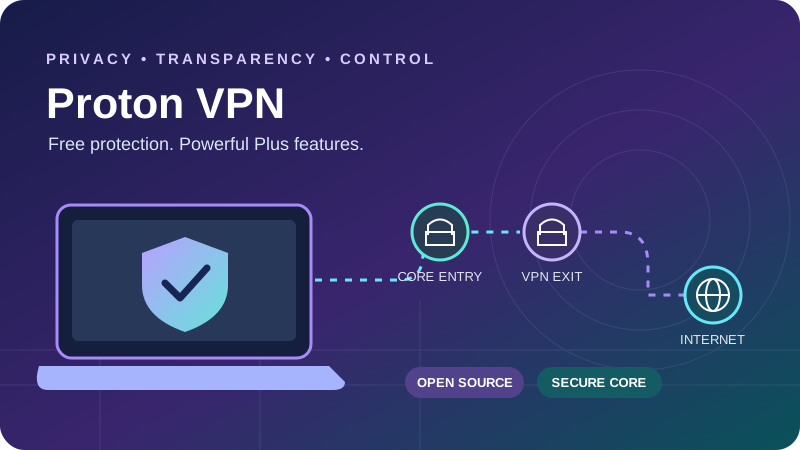
A detailed guide to what Free and Plus actually include, how prepaid prices compare with renewal, and where Proton’s privacy tools help in everyday use.
Quick verdict: a strong choice for privacy and practical control
Proton VPN is especially compelling if your priorities are transparent software, a usable free tier and advanced routing features. Its free service provides unlimited data without advertising, while VPN Plus adds country selection, ten simultaneous connections, streaming support, NetShield filtering and P2P tools. Secure Core and Stealth give the paid service more depth than a simple location-switching app.
The strongest reason to consider Proton is the combination of inspectable apps, public privacy assessments and useful features across desktop and mobile. The main compromises are a more involved settings menu, platform differences and paid-plan requirements for several everyday conveniences. Unlimited free data is excellent for routine browsing, but Free is a poor fit when you need a particular country, supported streaming or inbound P2P connections.
Our recommendation
Choose Free for basic protection; choose Plus for deliberate routing.
Plus is the better fit for travelers, privacy enthusiasts and people who want legitimate torrenting with port forwarding. A household with more than ten active connections should compare device limits before committing.
Check Proton VPN’s current offerWhat this review establishes
This is a researched feature and purchasing assessment, based on official documentation and previously reviewed checkout and server-directory figures. We did not run new controlled speed, leak or streaming-unblocking tests.
Charts show documented prices, published bandwidth recommendations and an illustrative device allocation. They do not imply measured performance or a guaranteed streaming success rate.
| Area | Current position | Practical implication |
|---|---|---|
| Provider and jurisdiction | Proton; Switzerland | Evaluate the VPN policy and infrastructure evidence alongside jurisdiction. |
| Privacy evidence | Public annual Securitum no-logs reports; open-source production apps | More evidence to inspect, with defined audit scopes. |
| Network snapshot | 20,798 servers, 149 countries, 196 locations reviewed September 30 | Counts change and do not predict speed at your location. |
| Paid features | Secure Core, NetShield, streaming, P2P and forwarding | Check platform and server eligibility. |
| Device limit | Free: 1; Plus: 10 simultaneous tunnels | Install count is different from active connections. |
| TV support | Apple TV, Android TV and Fire TV setup routes | Unsupported TVs and consoles may need a router or shared connection. |
Proton VPN Free versus Plus: the differences that matter
Proton Free is a continuing free service rather than a timed trial. There is no monthly data allowance to exhaust, making it useful for everyday browsing on public Wi-Fi or testing whether the apps suit your device. The free tier has medium-speed priority, one active connection and a smaller app-selected network. Speed still depends on congestion, distance and the underlying connection.
| Feature | Free | VPN Plus |
|---|---|---|
| Monthly data | Unlimited | Unlimited |
| Simultaneous connections | 1 | 10 |
| Server selection | App-selected destinations in 10 countries | Choose from the paid network |
| Speed priority | Medium-speed tier | Highest available tier; no universal Mbps guarantee |
| Supported streaming / P2P | Not included | Included on appropriate routes |
| NetShield / Secure Core | Not included | Included |
| Port forwarding / split tunneling | Not included | Available with platform restrictions |
| Privacy policy | No-logs VPN policy | Same VPN no-logs policy |
The free country pool comprises the United States, Canada, Mexico, the Netherlands, Switzerland, Norway, Poland, Romania, Japan and Singapore. The app chooses the fastest free server initially. Pressing change server requests a randomly selected alternative; it does not unlock manual country choice. The official Free server-switching guide documents an initial 45-second cooldown followed by ten-minute intervals for additional changes.
That is a meaningful limitation for someone trying to reach a particular regional service. Free is most useful when the goal is protecting traffic on an untrusted network, and the exit country is secondary. Plus is the practical upgrade when destination choice, simultaneous use or paid features become important. Both tiers still require normal account security and careful browser habits.
Pricing: compare the first charge with the renewal period
Proton’s prices depend on promotions, currency, account and purchase route. The USD checkout reviewed on September 30, 2026 showed the following VPN Plus offers. The pricing page checked for this update rendered incomplete dynamic price fields, so these remain dated checkout examples rather than a promise of today’s exact offer.
| Offer | First charge | Important renewal detail |
|---|---|---|
| Monthly | $9.99 for one month | Monthly billing; confirm the rate at checkout. |
| One year | $47.88 for twelve months ($3.99 equivalent) | Introductory figure; verify the renewal quote separately. |
| Two years | $71.76 for twenty-four months ($2.99 equivalent) | Reviewed renewal: $83.88 every twelve months ($6.99 equivalent). |
| Free | $0 | Ongoing limited free tier; no paid feature entitlement. |
USD checkout reviewed September 30. Columns share a zero baseline; longer offers are prepaid.
The two-year example illustrates why the renewal period matters. Paying $71.76 initially covers two years; a later $83.88 charge covers just one. The annualized introductory cost is $35.88, so that reviewed renewal represents a substantial increase. A low advertised monthly equivalent is a calculation over a prepaid term, not an installment plan.
VPN Plus versus Proton Unlimited
VPN Plus is the relevant baseline for a standalone VPN purchase. Proton Unlimited bundles the VPN with other Proton services, including Mail, Calendar, Drive and Pass. Those extras may be valuable if you will use them, but they do not justify assuming a different ordinary VPN network or better streaming access. Compare the bundle’s actual storage, account and product limits separately.
Refunds, cancellation and checkout checks
Eligible direct paid subscriptions carry a 30-day money-back guarantee. Save your order details and confirm the deadline, purchase channel and applicable terms. Canceling automatic renewal and requesting a refund are separate actions. App-store purchases can follow store billing and refund procedures rather than the direct website workflow.
Before paying, read the total charge, promotional term, tax treatment and next renewal amount. If the renewal wording is unclear, resolve it with support before subscribing. Free is useful for evaluating the interface, but it cannot demonstrate the paid streaming network, port forwarding or Secure Core experience.
Compare the available Proton plansPrivacy and security: strong evidence with clear limits
Proton VPN is based in Switzerland and states that it does not keep VPN activity logs. For a VPN, the important question is what its servers retain about browsing and connections, and whether the implementation supports the policy. Jurisdiction helps explain the legal setting, but it cannot replace technical evidence, sound operations or a trustworthy account-security process.
Proton publishes Securitum assessments of its no-logs infrastructure. The fifth annual no-logs audit announcement and public report add independent evidence about the systems examined in 2026. This supports the privacy claim within the assessment’s scope; it does not guarantee every future deployment.
| Evidence | Why it helps | Limit |
|---|---|---|
| Independent infrastructure assessment | Examines whether reviewed controls support the policy | Point-in-time scope; not a universal guarantee. |
| Open-source production apps | Allows specialists to inspect client code | Public source is not proof that every component is flawless. |
| Separate app-security reviews | Provide evidence about examined client implementations | Versions, platforms and remediation dates differ. |
| Published privacy policy | Explains stated collection and handling | Account, billing and support information differ from VPN browsing logs. |
| Kill switch and leak controls | Help prevent traffic escaping the intended tunnel | Behavior depends on OS, app version and routing settings. |
A VPN encrypts the path between your device and its VPN server. Websites then see the exit IP, while the local network sees the VPN connection rather than the same exposed destination traffic. HTTPS continues to protect web content beyond the VPN exit. This changes who can observe parts of the route; it does not make the entire internet connection unobservable.
Signed-in accounts, cookies, browser fingerprinting and information you submit can identify you despite an altered IP. A VPN also does not clean an infected computer, stop every phishing attempt or replace multifactor authentication. For everyday privacy, combine a secure account, maintained apps, HTTPS and sensible browser settings with the tunnel.
Kill switches and IPv6 deserve practical checks
Use the strongest appropriate kill-switch option available on your platform, especially if continuity of protection matters more than uninterrupted internet access. Test intentional disconnection, reconnecting, sleep/wake and switching Wi-Fi networks. Split-tunnel exceptions and local-network permissions can change which traffic is allowed. IPv6 capabilities have evolved, so avoid blanket claims that all Proton clients always disable it.
Protocols, Stealth and the Proton Protocols rollout
Start with Smart Protocol unless you have a specific reason to choose manually. It selects suitable connection options and fallbacks on supported apps. WireGuard is a practical default for ordinary throughput and responsiveness; TCP-based routes and Stealth can help where standard VPN traffic is blocked. No protocol guarantees connectivity on every restrictive network. Use our VPN protocol guide to compare the connection options before choosing an app or router configuration.
| Option | Documented role | Availability notes |
|---|---|---|
| WireGuard UDP | Efficient ordinary VPN connection | Broad native app coverage, including Linux. |
| WireGuard TCP | Alternative when UDP is unreliable or blocked | Supported on several consumer apps; do not assume Linux parity. |
| Stealth | Obfuscation for restrictive networks | Windows, macOS, Android, iOS and Android TV; Linux support tied to the newer architecture rollout. |
| Smart Protocol | Automatic protocol selection and fallback | Supported-app feature; Linux availability depends on architecture/version. |
| OpenVPN | Legacy/native Linux and manual setup route | Current native support is concentrated in Linux GUI; manual configurations remain relevant. |
| IKEv2 | Remaining legacy option | macOS only in current guidance and being phased out; not a current native iOS default. |
| Proton Protocols | New connection architecture | Already in stable Windows; availability and release channels differ elsewhere. |
Older reviews often present OpenVPN and IKEv2 as interchangeable choices across every app. That is now misleading. The protocol selection documentation describes the current platform differences. Check the controls actually available in your installed version before following an older screenshot.
The new Proton Protocols architecture also needs careful wording. Although its broader rollout was introduced with beta availability on selected platforms, stable Windows release history already includes it. The Windows release notes document subsequent fixes for split tunneling and IPv6. Architecture changes can improve connection handling without making every announced future protection a present feature.
Post-quantum protection: Proton describes future groundwork in its architecture announcement. This review does not treat post-quantum VPN protection as shipped. If that feature is a requirement, confirm an explicit current release statement for your platform.
For travel, install and sign in before reaching a network that may block downloads or account access. Keep the app updated and learn where Smart Protocol and Stealth are located. Obfuscation may improve reachability, but local rules, filtering techniques and connection conditions still matter. Do not treat any provider’s censorship claims as a promise of access everywhere.
Secure Core and Tor over VPN: different tools for different needs
Secure Core routes your traffic through an additional entry server before it reaches the chosen exit country. Proton places its core entry infrastructure in Switzerland, Sweden and Iceland and states that it owns or provisions that hardware and network. The aim is to reduce the exposure created if an exit location is monitored or compromised.
- 1Your device
- 2Core entry: CH / SE / IS
- 3Selected exit country
- 4Destination service
Conceptual route diagram. It describes connection order, not measured latency or protection against every adversary.
The reviewed directory snapshot listed 125 Secure Core servers serving 68 exit countries. That is a subset of the overall network, not Secure Core availability in every listed country. The extra route can add latency and reduce throughput, particularly when the entry and exit are far from you. For streaming or competitive gaming, an ordinary nearby Plus server is generally the more practical first choice.
Secure Core is also different from Tor over VPN. Selected paid Tor routes send traffic into the Tor network, which has a different trust and routing model. Tor paths can be considerably slower and are unsuitable for most bandwidth-heavy tasks. Connecting through a Tor-capable VPN server does not automatically reproduce every privacy property of the Tor Browser.
Choose the feature according to the threat you are addressing. An extra VPN hop does not remove tracking through authenticated websites; Tor routing does not secure a compromised device. Continue using HTTPS and avoid entering identifying information if anonymity is your objective. Turning on every specialty feature at once can create unnecessary complexity without solving the underlying problem.
Speed and gaming: evaluate the route, not the server count
Proton provides a large network and VPN Accelerator optimizations, but there is no dependable single speed number for every subscriber. Results change with your baseline connection, distance, server load, Wi-Fi quality, protocol, hardware and time of day. A large fleet improves the available choices; it does not guarantee that a distant route will outperform a nearby one.
No controlled throughput or latency measurements were collected for this update. Claims such as “only a five-percent speed loss” or “a fixed ping in every country” would therefore be inappropriate. Accelerator marketing should likewise be read as a conditional capability, not a multiplier to apply to your own connection or a value to plot as an observed result.
For streaming and downloads
Begin with a nearby ordinary Plus server and Smart Protocol or WireGuard. If throughput is poor, compare another nearby exit and check the local connection before trying a distant region. Avoid Secure Core unless you need its specific privacy model.
For games and voice chat
Prioritize stable latency, low jitter and minimal packet loss. A tunnel rarely shortens a route automatically. Use a nearby server, and compare an ordinary connection and the VPN during the same session before deciding that it helps.
Moderate NAT improves some peer connections, with a tradeoff
Paid plans offer Moderate NAT on documented Windows, macOS, Android, iOS and Linux setups. It can help multiplayer games or peer communication establish connections. Proton describes a small privacy tradeoff, so enable it for a concrete connectivity problem rather than treating it as a universal performance booster. It cannot be combined with port forwarding.
A useful repeatable performance check
Measure the ordinary connection, then repeat on a nearby VPN server using the same device, test destination and connection type. Record download, upload, latency and jitter; repeat at more than one time rather than relying on a single peak result. Test the actual workload afterward: a download benchmark cannot establish that a game or streaming service will behave well.
Streaming: paid support, native TV apps and realistic expectations
Proton’s supported streaming access is a paid-plan feature. Its official directory includes major international platforms and regional services, but compatibility can change when services update their VPN detection. Availability depends on your subscription, intended region, current exit IP and device. This review does not claim a newly verified list of unblocked catalogs or a universal success percentage.
Use an ordinary Plus exit in the relevant region and follow the service-specific instructions. Secure Core adds a hop and is not supported for every streaming destination, so it is a poor default for video. A service may also apply different rules to travel, account location, downloads, live broadcasts or an advertising-supported tier. Respect the service’s access terms.
| Device | Practical setup | Caveat |
|---|---|---|
| Windows / macOS / mobile | Native app, then open the streaming service | Account region and exit IP still affect access. |
| Apple TV | Native app on tvOS 17 or later | Older devices need a different network setup. |
| Android TV | Native TV app | Check your TV’s supported operating system. |
| Fire TV | Official documented installation / Android TV app route | Installation steps and device generations differ. |
| Console or unsupported smart TV | Compatible router or shared VPN connection | Manual network configuration can lose app-only controls. |
| Browser extension | Browser-scoped connection | Does not protect a separate native streaming app. |
Connection requirements, not Proton VPN speed measurements. Zero-to-15 Mbps scale.
Source: Netflix internet speed recommendations. Multiple streams and background traffic require additional headroom.
There is no basis here to assume a general-purpose standalone Smart DNS feature comparable to some competing products. For an unsupported device, investigate the documented encrypted router or sharing route. A router setup can be useful for a household, but its CPU, protocol support and firmware may limit throughput or make troubleshooting harder than using the native TV app.
If video fails, try another appropriate Plus server, confirm the intended region and check whether the service works without the tunnel. If performance is the issue, reduce competing network traffic and compare a wired connection where possible. For a wider purchasing comparison, see our best VPNs for streaming guide.
Explore Proton VPN Plus for streamingP2P and port forwarding: a meaningful advantage for paid users
Proton supports P2P on paid plans through appropriate servers. Port forwarding allows an eligible application to accept incoming connections through the VPN exit, which can improve peer reachability for legitimate sharing or other supported applications. It is more specific than a general “torrent-friendly” label and should not be confused with a speed guarantee.
The official port-forwarding instructions cover Windows, macOS, Linux GUI and CLI, plus supported manualWireGuard and OpenVPN configurations. macOS support was documented as early access when reviewed. The workflow uses NAT-PMP and requires an eligible P2P route.
- Choose a paid P2P server and enable forwarding using the documented method for your app.
- Read the assigned port and enter it in the application that needs inbound connections.
- Disable conflicting application-level automatic mappings if the instructions require it; do not substitute a home-router port.
- After reconnecting, check the assignment again. A previously configured port may no longer be valid.
- Use an appropriate kill switch and, where supported, bind the application to the VPN interface as a separate safeguard.
Moderate NAT and port forwarding are incompatible, so choose according to your workload. Forwarding changes inbound reachability and should be enabled only for an application that needs it. Keep that application updated and avoid exposing unrelated services. The free plan does not include paid P2P support or forwarding.
Native GUI support is convenient, but Linux users should still confirm package, desktop and version requirements. A manual setup may require a separate process to maintain the port mapping. For more context, compare VPNs for torrenting and their forwarding workflows.
Apps, split tunneling and the ten-device limit
Proton offers native applications for the major desktop and mobile platforms, browser extensions and TV clients. The interface combines quick connection with detailed profiles and routing settings. Beginners can use the default route, while more experienced users can tune specialty servers and exceptions. Feature parity is the important caveat: a screenshot from Windows is not a promise about iOS or a TV app.
| Platform | Useful capabilities | Important restrictions |
|---|---|---|
| Windows | Profiles, paid split tunneling, forwarding and kill switch | Current versions support split tunneling with the kill switch; keep the architecture updated. |
| macOS | Native app, paid split routing and forwarding workflows | Split tunneling is experimental with Safari/WebKit limitations; forwarding may require early access. |
| Linux | GUI and CLI routes; paid forwarding and GUI split tunneling | Distro/package requirements and protocol rollout differ; GUI and CLI are not identical. |
| Android | Paid app split tunneling, Smart Protocol and Stealth | Android Private DNS can override NetShield. |
| iPhone / iPad | Native tunnel, Smart Protocol, Stealth and security controls | Do not assume Android app-based split tunneling or legacy IKEv2 availability. |
| Browser / TV apps | Browser-scoped routing or living-room streaming | Desktop-only settings do not carry over automatically. |
Split tunneling creates deliberate exceptions
Paid split tunneling is documented for Windows, Linux GUI, macOS, Android, browser extensions and Android TV, with different app- or destination-level controls. It can let a local service or work application bypass the VPN while other traffic stays protected. Excluded traffic uses the ordinary connection and can reveal its normal public IP to its destinations.
macOS support is experimental and cannot reliably exclude all Safari/WebKit traffic; its supported protocols differ from legacy IKEv2. On many platforms split tunneling conflicts with the kill switch, although current Windows supports the combination. Start with one exception, verify its behavior, and check again after a major client update.
Hypothetical allocation, not measured customer usage. Free has one slot; a compatible router changes how local devices share a tunnel.
Ten active tunnels cover many households, but unlimited-device competitors can be simpler for larger setups. A compatible router may extend coverage without installing the app everywhere, although you lose some native controls and create a shared failure point. Consider both the number of connections and who needs independent country selection.
NetShield: useful DNS filtering, with resolver caveats
NetShield is a paid DNS-level filter for known malicious, advertising and tracking domains. Blocking a lookup can stop an unwanted connection before the browser requests the resource. Current documentation also describes subdomain matching, which improves filtering granularity. It remains a domain filter rather than a file scanner or a replacement for operating-system protection.
Expect limits on embedded ads, advertisements served from the same host as legitimate content, and content already loaded by an app. A counter of blocked requests is not a count of unique attackers or prevented infections: applications can repeat the same lookup many times. Treat the dashboard as a visibility aid rather than proof of a particular security outcome.
The current guide includes an adult-content blocking option on Windows, with wider platform availability still described as forthcoming. Do not assume that switch exists on every app. On Android 10 and later, Private DNS can override NetShield; Proton recommends the appropriate Off or Automatic setting when you want its filtering. Custom and browser-level DNS choices also deserve checking.
If a site breaks, temporarily compare the available filtering levels and reload it to identify the cause. Avoid permanently weakening every setting for one failed page. Check the NetShield setup and troubleshooting guide for platform-specific resolver behavior.
Setup and troubleshooting: establish a simple working baseline
- Install an official supported app. Confirm your OS version and install available updates before configuring specialty routes.
- Secure the Proton account. Use a strong unique password, multifactor authentication and an appropriate recovery method.
- Connect with default routing. Use the app-selected Free server or a nearby normal Plus location before enabling additional features.
- Check the public IP and resolver. Confirm the intended exit and compare normal website behavior. Repeat after changing routing rules.
- Set disconnect protection. Test the kill switch and reconnect behavior rather than trusting the icon alone.
- Add one advanced feature at a time. NetShield, split tunneling, Secure Core and forwarding solve different problems; combining them immediately makes diagnosis harder.
| Symptom | First checks | Avoid assuming |
|---|---|---|
| Cannot connect | Try Smart Protocol, another route, or supported Stealth; check other network software | That every blocked network is reachable. |
| Internet blocked after disconnect | Inspect kill-switch state, reconnect and use documented app recovery steps | That protection should be disabled permanently. |
| Local printer disappears | Review local-network permissions and split-routing options | That every LAN device should bypass the VPN. |
| Streaming proxy message | Try an eligible Plus exit and service instructions | That Free or Secure Core guarantees access. |
| No incoming P2P connections | Check eligible server, active assigned port and Moderate NAT state | That an old port survives reconnection. |
| Ads still visible | Check DNS resolver, filter level and same-domain content | That DNS filtering removes every advertisement. |
Paid plans include priority support and live-chat access according to the plan page. Useful diagnostic details include app version, operating system, protocol, selected route and a precise description of the failure. Share the minimum necessary information and use the official support workflow. Community reports can help identify patterns, but old workarounds may refer to a different client architecture.
Pros and cons: where Proton is strongest
Advantages
- Unlimited-data Free tier for basic protection.
- Open-source clients and public annual privacy assessments.
- Broad paid network with deliberate country selection.
- Secure Core, Stealth and flexible protocol fallbacks.
- Paid port forwarding across documented desktop workflows.
- Native mobile and TV apps, plus useful paid DNS filtering.
Tradeoffs
- Free lacks country choice and paid streaming/P2P support.
- Ten paid connections may be limiting for larger households.
- Feature availability and release channels differ across platforms.
- macOS split tunneling remains experimental.
- Prepaid discounts can be followed by a shorter, more expensive renewal.
- Secure Core and Tor routes can reduce speed; post-quantum protection is not established as shipped.
The tradeoffs are largely about matching the tool to the task. Free is unusually useful for data-heavy ordinary browsing, yet weak for deliberate regional access. Plus offers substantial control, but someone who wants one identical interface and feature set on every device should examine the platform restrictions first.
Alternatives: compare the requirement that matters to you
Compare ordinary VPN subscriptions before adding unrelated bundle features. Proton Unlimited’s other products should not inflate a standalone VPN verdict, just as competing identity, antivirus or password-manager extras should be evaluated separately. Paid streaming, port forwarding, router workflows and connection limits can matter more than a general score.
| Priority | Proton’s relevant strength or limitation | Read next |
|---|---|---|
| Unlimited active devices | Plus allows ten; consider a different household model | Proton VPN versus Surfshark |
| Desktop routing and low long-term cost | Proton has broad forwarding workflows; renewal and customization differ | PIA versus Proton VPN |
| Streaming and broad everyday usability | Proton pairs privacy tools with a paid streaming network | Proton VPN versus NordVPN |
| TV and consumer router experience | Check native-device and manual-router differences | ExpressVPN versus Proton VPN |
| Beginner task-labeled servers | Proton offers advanced routes and a strong Free tier | CyberGhost versus Proton VPN |
If open software and a public annual no-logs assessment are central to your decision, Proton has a particularly compelling evidence trail. If the goal is primarily cheap household coverage, focus on full-term billing and simultaneous connection limits. For a demanding TV setup, verify the actual operating system and available installation path before buying any service.
Frequently asked questions about Proton VPN
Is Proton VPN worth paying for?
Plus is worth considering if you need country selection, streaming support, P2P, NetShield or multiple simultaneous devices. Free is a sensible starting point for basic encrypted browsing. Paying changes the available network and features; it does not change the need to evaluate trust, protect your accounts and keep your device secure.
Is Proton VPN Free really unlimited?
Free has no monthly data allowance and supports one simultaneous connection. It uses app-selected servers in ten countries and a medium-speed service tier. Unlimited data does not mean unlimited speed, unrestricted country choice or access to Plus streaming and P2P features.
Can I choose a country on the free plan?
The app initially chooses the fastest available free server. Requesting a server change produces another randomly selected destination, with a 45-second initial cooldown and ten-minute intervals for additional changes. Upgrade to Plus if choosing a specific country is central to your use.
How much does Proton VPN Plus cost?
The USD offer reviewed on September 30, 2026 showed $9.99 monthly, $47.88 for an initial year and $71.76 for an initial two years. The two-year checkout disclosed renewal at $83.88 for twelve months. These are dated offer figures: check the live checkout for your currency, taxes, renewal period and final total.
How many devices can I connect?
VPN Plus supports ten simultaneous connections; Free supports one. Installed apps and signed-in devices are different from active tunnels. A compatible router can cover attached devices through its own connection, but setup and feature availability differ from native apps.
Does Proton VPN keep browsing logs?
Proton states that it does not retain VPN browsing activity logs. Public annual Securitum assessments, including the 2026 report, support the examined infrastructure and controls. Account and payment records are separate from traffic logs, and an audit cannot guarantee every future configuration or defeat tracking through signed-in websites.
Is Proton VPN post-quantum secure?
The Proton Protocols announcement describes groundwork for future post-quantum protection. It should not be presented as a shipped post-quantum VPN feature based on the documentation reviewed. Proton Protocols is a new connection architecture, already present in stable Windows releases, with rollout details varying elsewhere.
Does Proton VPN work with Netflix?
Paid plans include documented streaming support, but access depends on the service, region, subscription, device and current exit IP. Free does not include that paid streaming support. Try a normal nearby Plus server first and evaluate your exact service; Secure Core adds latency and is a poor default for this task.
Can Proton VPN forward ports?
All paid plans support port forwarding on documented P2P routes, including Windows, macOS and Linux apps and compatible manual configurations. macOS availability was documented as early access. Enter the assigned port in the application that needs incoming connections and update it after reconnection. Moderate NAT cannot be enabled at the same time.
Does split tunneling work with the kill switch?
Current Windows documentation supports both together. Other platforms have different restrictions, so verify the installed app rather than assuming Windows behavior applies everywhere. macOS split tunneling remains experimental, has WebKit/Safari limitations and requires a supported protocol. Excluded apps use your ordinary network identity.
Does NetShield block every advertisement?
No. It filters DNS requests for known malware, advertising and tracking domains, including subdomains. It does not inspect every downloaded file, remove every in-stream advertisement or replace antivirus. Custom DNS, Android Private DNS and browser-level DNS settings can affect which resolver handles a request.
Can I cancel and receive a refund?
Eligible direct paid subscriptions have a 30-day money-back window. Cancellation stops future renewal but is not itself a refund request. Contact support within the applicable window and review the terms for your purchase route; app-store billing and refunds may be handled by the store.
Final verdict: start with the use case, then choose the plan
Proton VPN is an excellent candidate for people who value transparent clients, privacy evidence and a useful free service. Free is a good starting point for routine protected browsing on one device. Plus is the meaningful upgrade for selecting countries, streaming, multiple simultaneous tunnels, filtering and legitimate P2P with forwarding.
The paid service’s appeal comes from its range of practical controls, rather than a promise of perfect anonymity or universal access. Secure Core addresses a specific exit-network concern; Stealth targets restrictive networks; NetShield filters known domains; forwarding improves inbound reachability. Each is most useful when enabled for a defined reason.
Who should choose Proton?
Privacy-minded individuals, travelers and users who want an ongoing Free tier or documented paid routing tools. Check the exact platform features and live renewal quote, then evaluate the workloads you actually use during the applicable refund period.
Choose a Proton VPN planResearch notes and source boundaries
Updated October 1, 2026 using Proton’s plan and support documentation, public audit publications, protocol guidance and release notes. Price and fleet figures are explicitly dated September 30 snapshots: the dynamic price page did not yield a complete current quote, and the server directory could not be freshly retrieved for this update. Neither is presented as a permanently fixed figure.
The price columns use the reviewed initial monthly equivalents; the streaming bars use Netflix’s published connection recommendations; the device donut is a hypothetical ten-slot allocation; the Secure Core diagram explains routing order. No new speed benchmarks, leak results, customer-usage measurements or streaming access tests are claimed. Feature availability should be verified against the installed app and its release channel.
Disclosure: this article contains affiliate links. We may receive a commission when you purchase through them. Our recommendations consider documented capabilities, costs and limitations.