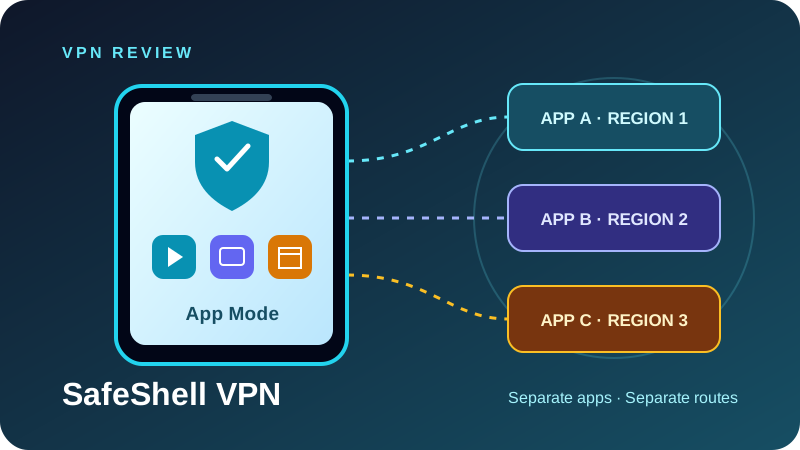
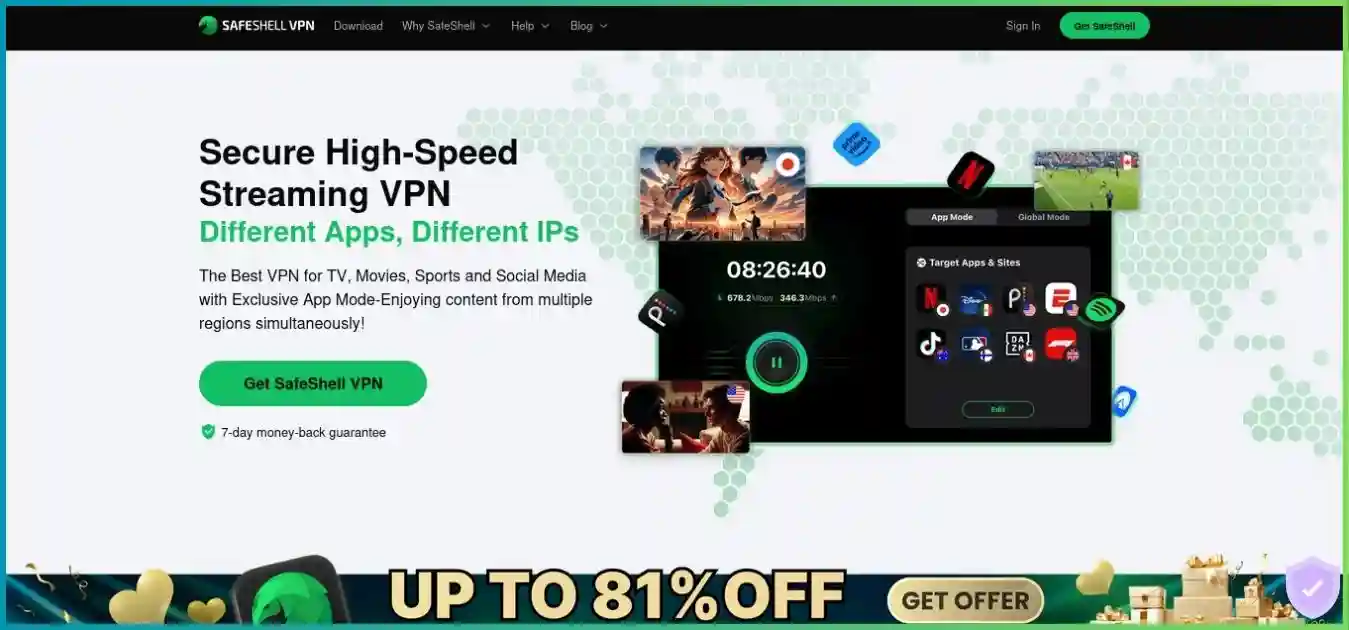
SafeShell VPN has a more specific appeal than a typical one-country-at-a-time VPN. Its App Mode lets you assign different supported apps to different regions on the same device, so switching apps does not require switching the whole VPN connection. That is particularly interesting for people who use several streaming services on a phone or Apple TV.
The service also promotes proprietary protocols, ad and tracker filtering, subtitle translation and mobile gaming tools. But a complete review needs to examine the less visible details: five simultaneous devices, subscription portability, a short direct-purchase refund window, inconsistent network totals and limited public independent privacy evidence.
Disclosure and approach: We may earn a commission through our SafeShell links. This update evaluates official product materials, policies, help pages and store disclosures. We did not run controlled speed, leak, gaming or streaming tests. Provider claims and our editorial conclusions are distinguished throughout.
Quick verdict: a streaming specialist with unresolved privacy questions
Editorial assessment · strongest for app-specific streaming routes
Consider SafeShell when App Mode solves a real daily inconvenience. It is a weaker default when independent privacy assurance and clearly documented fail-closed behavior are your main requirements.
Best-fit user
A viewer with compatible devices who wants several apps mapped to different countries and is willing to test each service, route and billing entitlement before committing.
Check SafeShell’s current plans| Topic | Documented position | Buying implication |
|---|---|---|
| Operator | GearUp Portal Pte. Ltd., Singapore | Evaluate the policy and controls alongside the jurisdiction. |
| Routing | App Mode and Global Mode; bypass options on supported builds | Per-app multi-region routing is different from privacy multi-hop. |
| Protocols | ShellGuard using TLS 1.3; Stealth using QUIC | Do not assume ordinary WireGuard/OpenVPN selection. |
| Apps | Windows, macOS, iOS/iPadOS, Android, Apple TV, Android/Google TV, Vision Pro | Features vary; verify the exact operating system and store. |
| Privacy evidence | No clearly surfaced public independent assessment found | The no-logs slogan is not equivalent to an audit report. |
| Billing | Website and app-store routes; store portability limitations | Check the receipt, entitlement, recurring charge and cancellation process. |
App Mode and Global Mode: SafeShell’s defining difference
App Mode: configure the region per supported app
SafeShell’s official App Mode guide describes adding a supported app, selecting its server region, saving the assignment and connecting. Different apps can use different regions simultaneously. The guide also describes selected free apps, with some locations restricted to VIP and a list that can change.
Illustrative assignments on one compatible device. These routes do not establish access to any particular catalog.
Three parallel app assignments; each app uses its selected route. This is not a three-hop chain.
This helps when your usual apps need different destinations. It does not guarantee that a service accepts the exit IP, that your subscription includes the desired title, or that a website sees the same location as a separately configured app. On supported current mobile/Apple builds, custom-domain routing can provide more flexibility; confirm its availability and behavior in your installed version.
Global Mode: one selected route, with deliberate exceptions
Global Mode is the more conventional choice when you want the device’s supported traffic to use one region. Bypass Apps can keep selected applications outside the VPN on supported builds. A bypass is a privacy decision: the excluded application uses the ordinary connection and does not gain tunnel protection from that route.
Before relying on App Mode for general browsing, establish what happens to unassigned apps, DNS requests and background connections. Per-app region assignment describes a convenience feature; it does not, by itself, demonstrate that every connection on the device enters the VPN. Verify the actual routing scope instead of inferring it from a connected icon.
| Mode | Useful for | Check before relying on it |
|---|---|---|
| App Mode | Several supported apps requiring separate regions | Unassigned-app behavior, available app list and custom-domain support. |
| Global Mode | A conventional single-region connection | Routing scope, local-network access and recovery after a dropped tunnel. |
| Bypass Apps | Keeping a local or incompatible app on the ordinary connection | Excluded traffic deliberately leaves the VPN path. |
| Game Mode | Supported mobile titles with game-specific routing | Device support, game compatibility and mobile-data use. |
Pricing, renewals and refunds: the purchase channel matters
SafeShell’s website uses dynamic checkout, so we could not establish one durable public USD web price for every visitor. The clearest numeric reference reviewed is the US Apple App Store, which lists annual, monthly and weekly in-app products. Those are store-specific amounts; they should not be presented as a guaranteed website offer.
| Product | Listed charge | Interpretation |
|---|---|---|
| Annual | $79.99 / year | One prepaid year; approximately $6.67 per month. |
| Monthly | $12.99 / month | Monthly billing; $155.88 for 12 payments at this rate. |
| Weekly | $5.99 / week | 52 payments total $311.48; normalized over 12 months for illustration. |
Annual ÷ 12; monthly as listed; weekly × 52 ÷ 12. Weekly normalization uses 52 weeks, not exact calendar-month billing. Prices may vary by store and offer.
Weekly flexibility can become expensive
A short subscription can be useful for evaluation or a brief trip, but repeated weekly billing adds up. At the listed $5.99 rate, 52 payments total $311.48. Twelve monthly payments at $12.99 total $155.88, while the listed annual product costs $79.99 upfront. These are arithmetic scenarios at unchanged rates, not guaranteed future renewal prices.
The store listing also contains multiple weekly products, including a $4.99 option. That does not establish eligibility for a particular offer. Use the confirmation screen for your actual product, trial length, recurring amount, currency and taxes. Avoid comparing an old provider blog promotion with a current in-app charge as though they were the same purchase.
Understand trials and renewal before confirming
SafeShell’s Subscription Terms say trials vary by plan and each user gets only one trial. They instruct users to turn off store auto-renewal at least 24 hours before the trial or current period ends to avoid the next charge. Check the renewal date and management screen immediately after purchase, especially if a trial is the reason you signed up.
After cancellation, access can continue until the paid period expires. Deleting the application or removing an account is not the same action as canceling the subscription in its billing channel. Website, Apple and Google purchases can have separate management flows.
The seven-day guarantee is for eligible initial website purchases
The official refund policy gives eligible first-time direct website purchasers seven days to request a refund. Renewals are excluded, as are users with a previous or pending refund. App Store and Google Play purchases follow the respective store’s refund decisions, while reseller purchases go to that seller.
The policy says direct requests are processed within ten business days; payment-provider settlement can take longer. Supply the order details appropriate to your payment method and mask unrelated statement information. Cryptocurrency availability and refund terms need extra attention: current policy labels a crypto section “coming soon” and warns of incomplete refunds and network fees.
| Purchase route | Refund route | Key distinction |
|---|---|---|
| Eligible initial website purchase | SafeShell support, within 7 days | First-time eligibility and payment-method conditions apply. |
| Website renewal | Not covered by the stated guarantee | Prevent the next charge through the applicable cancellation flow. |
| Apple App Store | Apple refund process | SafeShell’s direct guarantee does not apply. |
| Google Play | Google refund process | The store decides eligibility. |
| Reseller | Request from the seller | SafeShell says it cannot access those payment records. |
Protocols and security: documented building blocks, limited assurance
The official protocol guide identifies two proprietary options. ShellGuard uses TLS 1.3 and is positioned for everyday performance; Stealth uses QUIC to disguise VPN traffic on restrictive networks. The provider notes that some ISPs can throttle QUIC. These descriptions do not establish ordinary OpenVPN, WireGuard or IKEv2 selection. Use our VPN protocol guide to compare the connection options before choosing an app or router configuration.
SafeShell separately advertises AES-256-GCM, forward secrecy andDNS leak protection. TLS 1.3, QUIC and authenticated encryption are credible building blocks, but the presence of those names does not independently establish implementation quality. We did not find a clearly surfaced public independent protocol or infrastructure assessment in the reviewed materials.
| Capability | What is documented | What remains to verify |
|---|---|---|
| Encryption and transport | ShellGuard/TLS 1.3; Stealth/QUIC; AES-256-GCM claims | Protocol implementation assessment and exact options on your app. |
| Forward secrecy | Advertised session-key protection | Independent assessment of the implemented key lifecycle. |
| DNS protection | Provider advertises handling DNS within its service | Resolvers and fallback behavior across app routes and interruptions. |
| Kill switch | No consistent platform behavior established by reviewed help pages | Whether your app blocks all relevant traffic after tunnel failure. |
| SafeNet | Ad/tracker filtering on supported platforms | Availability, route requirements and false positives. |
| Storage architecture | No comparably detailed independently assessed RAM-only design found | Published architecture and assessment scope. |
Kill-switch behavior is a material unanswered question
A kill switch prevents traffic from falling back to the ordinary connection when the tunnel fails. The public feature and help materials reviewed do not clearly establish consistent system-wide availability and behavior across SafeShell platforms. An older provider article mentioning the feature is not enough to promise protection on every app.
Check the settings of your exact version, then observe what happens during an interruption, sleep/wake and a network change. Review any operating-system blocking options separately. If an application must never communicate outside the tunnel, do not infer fail-closed protection from IP masking or an automatic reconnection feature.
Read our final verdictPrivacy policy and logging: read the details behind the slogan
SafeShell is operated by Singapore-based GearUp Portal Pte. Ltd. Its marketing states that online activity and connection logs are not retained. The linked April 7, 2025 policy, however, describes broader information collection across its services. Understanding that scope is more useful than assuming either complete anonymityor indiscriminate browsing surveillance.
The policy includes account and transaction records, approximate location, IP/MAC and device identifiers, ISP information, event timestamps, diagnostics, performance data and usage/preferences. It also contains game-service categories. It does not clearly reconcile every category with the VPN marketing summary. These categories describe stated policy scope; they do not establish that every category is collected from every SafeShell session.
Account data, diagnostics and traffic history are different
A paid VPN normally needs some billing and account information. The consequential questions are which technical records SafeShell retains for the VPN, how long they remain, whether they can be associated with a subscriber, and what happens to optional diagnostic submissions. Ask for a VPN-specific explanation if that distinction affects your decision.
We did not find a clearly surfaced independent SafeShell no-logs audit or a comparable public infrastructure assessment. Nor did the reviewed sources establish the old article’s claimed quarterly transparency program and two independent audits. That leaves less public verification than services that publish named assessors, dates and scoped reports.
What this means for the recommendation
SafeShell can be evaluated as a convenience-focused routing product without treating its privacy claims as independently proven. For a journalist, activist or someone whose threat model depends on demonstrably limited retention and failure handling, stronger technical documentation and independent evidence should carry more weight than streaming features.
No VPN removes website cookies, hides a logged-in account from the website, or makes every download safe. It changes the network path and shifts trust toward the operator. Singapore jurisdiction alone settles neither privacy quality nor data-handling behavior.
Server network: keep regions, locations and nodes separate
The latest reviewed live-directory snapshot lists 61 regions and 2,000+ servers, with up-to-10-Gbps capacity labels in most locations. Separate official pages advertise 100+ locations and 10,000+ nodes across 40+ countries. These are unreconciled provider-defined measures, so they should not be merged into a single country or fleet total.
| Source/category | Published measure | How to interpret it |
|---|---|---|
| Reviewed live directory | 61 regions; 2,000+ servers | Most concrete directory snapshot; a region is not automatically a country. |
| Features page | 100+ locations; Super Servers up to 2 Gbps | Marketing categories and link-capacity labels. |
| Separate FAQ/homepage material | 10,000+ server nodes; 40+ countries | Nodes need not be standalone servers; totals are not reconciled. |
| P2P labels | Supported regions marked in the directory | Check the relevant route rather than assuming every exit permits P2P. |
For a buyer, the more useful check is whether the current app offers a working route for the region and service you need. A large fleet claim does not establish low latency from your ISP or explain physical server placement. Likewise, 2-Gbps or 10-Gbps link capacity is shared infrastructure rather than a promise of that speed on your device.
Streaming, TV apps and SafeNet: test your exact viewing setup
App Mode is particularly convenient when switching between region-specific services. Streaming routes and supported-app lists make discovery easier, while subtitle translation can help on supported platforms. Treat these as available workflows rather than guaranteed access: catalogs, account eligibility, VPN detection and device support can all change.
Apple TV and other TV devices
The Apple listing includes Apple TV with tvOS 17 or later. SafeShell’s main download page also lists Android/Google TV, desktop, phone, tablet and Vision Pro options. Fire TV appears in marketing material but is not separately listed on the reviewed main download page, so verify the supported installation route for your exact model. Follow our VPN testing checklist to verify routing and leak protection on your own device.
Do not assume a Samsung Tizen TV, LG webOS TV, Roku or game console can install an Android TV app. We did not find comparably documented Linux, router or console-client pathways. Check compatibility before buying an annual subscription for hardware that depends on a manual installation.
SafeNet is useful filtering, with platform and content limits
The SafeNet FAQ says filtering needs both SafeNet enabled and an active App Mode or Global Mode connection. Some services require an “Ad Free” tagged route. It cannot block ads embedded directly into Netflix or Disney+ video streams, and the FAQ describes expansion to additional TV/desktop platforms as forthcoming. Verify the control exists in your current app.
Filtering is not full antivirus protection. A blocked domain can also break a sign-in, payment or app feature; briefly compare behavior with filtering disabled if necessary. Subtitle translation likewise needs supported content and software, and translated text should not be assumed to match every original subtitle perfectly.
Use a real bandwidth requirement, not an invented VPN benchmark
Netflix recommends stable speeds of 3 Mbps for 720p, 5 Mbps for 1080p and 15 Mbps for 4K. These are service guidelines, not measured SafeShell results. Your plan, screen and playback settings must support the requested resolution; see Netflix’s official connection recommendations.
Service requirements only; these bars do not measure VPN throughput or unblocking success.
After connecting or changing an assignment, restart the streaming app so it can refresh its location state. Check that the service works without the VPN first, verify the relevant App Mode assignment, then compare another supported route. A VPN does not change a service’s payment-country rules or replace a required subscription.
For wider comparisons of devices, routing and privacy evidence, see our best VPNs for streaming guide.
Explore SafeShell’s streaming optionsPerformance and Game Mode: evaluate routing, latency and recovery
We did not conduct controlled throughput tests for this update, so we do not publish regional speed results, a universal speed-retention rate or an industry average. SafeShell’s capacity labels and provider performance descriptions do not substitute for measurements on your own connection.
| Activity | Measure | Keep the comparison fair |
|---|---|---|
| Browsing/downloads | Repeated download/upload speed and page loading | Same device, baseline ISP connection, time window and destination. |
| Streaming | Playback startup, sustained resolution and buffering | Same service, account, device and title at busy hours. |
| Game sessions | Ping, jitter, packet loss and disconnects | Same game region and comparable session conditions. |
| Mobile recovery | Connection after Wi-Fi/mobile changes and sleep/wake | Observe both recovery and unintended ordinary-connection traffic. |
| Multiple App Mode routes | Each app’s location and reliability | Verify assignments independently; one working app proves little about another. |
Game Mode focuses on supported mobile workflows
The Game Mode announcement identifies iOS and Android support. Auto-select chooses a route, Server Lock targets supported game regions, and Dual Assurance compares Wi-Fi and mobile-data paths on compatible devices. These tools can help a mobile session, but they should not be described as a universal desktop or console feature.
Dual Assurance may use mobile data even while Wi-Fi is available, so check your allowance and roaming settings. Server Lock can affect matchmaking or queue length. Test your actual game rather than assuming a country setting determines every matchmaking decision.
Network routing does not increase GPU rendering capacity. It can reduce network-related stutter when it avoids a specific congestion problem, but cannot repair a slow device, every unstable last-mile link or an overloaded game server. IP masking can reduce exposure to peers, yet does not guarantee DDoS immunity or undo a previously disclosed home address.
Devices, setup and support: verify entitlement as well as installation
SafeShell’s current terms allow five simultaneous devices. Supported apps make phone and TV use approachable, but feature parity varies. Before buying, verify the operating system, app availability and whether the selected billing channel covers every device you plan to use.
Hypothetical household: two phones, one laptop and one TV, leaving one slot. This is not a usage survey.
4 allocated + 1 spare = 5 devices
4 devices in the example
1 remaining device slot
Several App Mode routes on one device are different from several device connections. Streaming services can also impose their own viewing limits.
Apple and Google purchases may not transfer automatically
The Subscription Terms say the store ecosystems are independent and a subscription purchased on one platform cannot automatically be transferred or shared on another. This creates an important distinction between an available app and a portable paid entitlement. Ask support which purchase route covers your combination of Apple, Android and desktop devices before purchasing twice.
A practical first-session checklist
- Record the offer. Save the product, purchase channel, price, renewal date, trial conditions and refund route.
- Install the supported app. Use the official source for the device and match the login method associated with the purchase.
- Choose the routing scope. Start with Global Mode for a conventional route or configure App Mode deliberately, including checking unassigned traffic.
- Check connections. Inspect public IP/DNS behavior and recovery after a network change. Verify the exact app’s failure controls.
- Test the real workload. Try required streaming services, supported games and any filtering/translation features on each device.
- Resolve issues early. Contact support within the applicable evaluation period; cancellation and refunds require separate actions.
Support channels and troubleshooting
Official help pages provide email, in-app feedback and Telegram support. The reviewed materials do not justify promising a universal 24/7 live-chat response time. Send the app version, operating system, mode, protocol, assigned route and exact error. Avoid including passwords or unnecessary full financial statements.
| Problem | Check first |
|---|---|
| Paid access missing on another device | Login identity, purchase channel, restore-purchase options and store portability. |
| An app sees the wrong region | Its App Mode assignment; restart the app after connection changes. |
| Filtering does nothing | SafeNet availability, active tunnel and any required Ad Free route. |
| One route is slow | Baseline Wi-Fi/ISP performance, server distance and ShellGuard versus Stealth. |
| Game sessions consume mobile data | Dual Assurance and the device’s data/roaming controls. |
| A renewal remains active after uninstalling | Cancel in the billing channel; uninstalling is not cancellation. |
Our VPN Tools can help inspect connection behavior. Treat a successful IP check as one observation, not proof of no retention or complete device coverage.
P2P and restrictive networks: capability is not a blanket guarantee
Torrenting requires more than a P2P label
SafeShell advertises P2P and labels supported regions, but the reviewed documentation does not establish ordinary VPN-side inbound port forwarding. If incoming peer connectivity matters, seek a documented forwarding workflow rather than assuming the label provides it.
For legitimate P2P transfers, choose a compatible region and verify client routing. A torrent client bound to an appropriate VPN interface can help control its traffic, but only when the app exposes a stable interface and the binding works as intended. The uncertainty around system-wide kill-switch behavior makes SafeShell harder to recommend for privacy-sensitive unattended transfers.
Stealth gives a purpose-built fallback
Stealth is designed to camouflage traffic using QUIC and may help on networks that block ordinary VPN connections. Its effectiveness depends on the network, app and current blocking methods. QUIC itself can be restricted or throttled. No protocol name guarantees operation through every national firewall.
Before travel, install the supported app, establish access to your account and save relevant setup instructions. Complete a hotel captive-portal login before starting the tunnel. Test both documented protocols when one fails, and make sure essential activities have a workable fallback.
Alternatives: choose the capability that solves your problem
| Priority | Relevant comparison | What to evaluate |
|---|---|---|
| General-purpose security and broader documentation | NordVPN vs SafeShell VPN | Protocol fallbacks, device allowance and assessed privacy controls. |
| Unlimited household devices | Surfshark vs SafeShell VPN | Device policy and platform controls versus App Mode convenience. |
| TV/router workflows | ExpressVPN vs SafeShell VPN | Exact TV hardware, router support and simultaneous multi-region routing. |
| P2P and desktop routing | PIA vs SafeShell VPN | Supported port forwarding and granular routing controls. |
| Public privacy evidence | Proton VPN vs SafeShell VPN | Public reports and app transparency, alongside streaming compatibility. |
SafeShell’s specialist advantage remains assigning several apps to different regions. A broader VPN can be the better fit when you normally use one route at a time and place more weight on independently examined infrastructure, fail-closed controls or a larger household allowance.
SafeShell’s main pros and cons
Reasons to consider it
- App Mode simplifies separate region assignments for supported apps.
- Native Apple TV and Android/Google TV paths alongside mainstream devices.
- Purpose-built ShellGuard and QUIC-based Stealth options.
- Mobile Game Mode with supported routing and Wi-Fi/data tools.
- SafeNet and subtitle translation add convenience on supported builds.
Reasons to compare alternatives
- Five devices and store portability restrictions can complicate household use.
- No clearly surfaced public independent no-logs or protocol assessment found.
- System-wide kill-switch behavior and platform parity remain unclear.
- Only eligible initial website purchases receive the direct seven-day guarantee.
- Network units conflict, and Linux/router/P2P-forwarding pathways are less clear.
Frequently asked questions
Is SafeShell VPN worth it?
SafeShell is worth considering when assigning different streaming apps to different countries on one device is your main priority. App Mode is the standout. If you need independently assessed privacy controls, clearly documented kill-switch behavior, unlimited devices or inbound P2P forwarding, compare other services before committing.
How many devices does SafeShell allow?
Current Subscription Terms specify five simultaneous devices. That replaces older ten-device claims. Five devices do not mean five streaming accounts or five regions: connection slots, App Mode routes and streaming subscription limits are separate concepts.
Does an Apple subscription work on Android?
Do not assume it transfers automatically. SafeShell’s terms state that Apple and Google store ecosystems are independent. Verify your purchase channel, login method and entitlement with support before paying for a mixed-device household. An account login by itself does not prove the paid subscription is portable.
What is App Mode?
App Mode assigns different supported apps to different VPN regions at the same time. For example, one app can use a US route while another uses a UK route. It is a routing convenience rather than a privacy multi-hop chain. Check what happens to unassigned apps and custom domains in your installed version.
Does SafeShell use WireGuard or OpenVPN?
The current official protocol guide documents proprietary ShellGuard, based on TLS 1.3, and Stealth, based on QUIC. We did not find documentation establishing ordinary WireGuard, OpenVPN or IKEv2 selection across SafeShell apps. Do not buy on the assumption those protocols are included.
Is SafeShell independently audited?
We did not find a clearly surfaced independent SafeShell no-logs, protocol or infrastructure audit in the public materials reviewed. This is an evidence limitation, not proof that no private assessment exists. Ask for the named assessor, date, report and scope if independent assurance is important to you.
Does SafeShell have a kill switch?
The reviewed help and feature documentation does not establish consistent system-wide kill-switch availability and behavior across platforms. Check the exact app and test what happens during a dropped tunnel, Wi-Fi switch and sleep/wake cycle. Do not assume an IP-masking claim means all traffic stays blocked after failure.
Does SafeShell have a free version or trial?
SafeShell advertises trials, with terms that can differ by plan and store. Its App Mode guide also describes free access for selected apps, with some routes reserved for VIP users and a changeable app list. This is narrower than a permanently free, unrestricted full VPN. Read the confirmation screen for the trial length and automatic charge.
Is the seven-day refund available for App Store purchases?
No. SafeShell’s direct seven-day guarantee applies to eligible first-time official-website purchases and excludes renewals. Apple and Google purchases use the respective store refund process. Reseller purchases go to the reseller. Canceling renewal does not automatically request a refund.
Can SafeNet remove Netflix or Disney+ ads?
SafeShell’s SafeNet FAQ says ads embedded directly into Netflix and Disney+ video streams are not blocked. SafeNet needs an active VPN connection, and some apps need an Ad Free-tagged route. Availability differs by platform; check your installed app.
Will Game Mode lower my ping?
It may help when an alternate route or better network path avoids a specific problem. Dual Assurance uses Wi-Fi and mobile data on supported devices, while Server Lock targets supported game regions. None of this guarantees lower ping, fixes every game-server issue or raises graphics performance.
Can I use SafeShell for torrenting?
The provider advertises P2P and its directory marks compatible regions. We did not establish a dependable public inbound port-forwarding workflow or consistent kill-switch behavior. Those limitations make it a less straightforward choice for a torrent client you want to keep strictly within a VPN tunnel.
Conclusion: buy for App Mode, after checking the constraints
SafeShell receives our 7.8/10 editorial assessment for a distinctive streaming workflow and useful supported mobile features. It is most compelling when App Mode makes daily viewing substantially easier on devices you know are compatible. The rating is a qualitative judgment, not a laboratory average.
Privacy evidence, failure controls, billing portability and hardware support deserve more scrutiny than the old review suggested. Test the exact apps and regions you need, resolve the purchase entitlement before paying, and avoid a long commitment until the service fits your setup.
Check the offer against your devices
Confirm the five-device allowance, purchase channel, recurring charge and refund process. Then evaluate the routes that matter to you.
View SafeShell’s current plansResearch notes and visual methodology
Updated October 1, 2026. Research includes official features/download materials, App Mode and protocol guides, SafeNet and Game Mode documentation, subscription terms, refund policy, privacy policy and US Apple App Store disclosures, together with the latest reviewed live-directory snapshot. Public checkout and store offers can vary; confirm the actual billing screen.
Price columns use the reviewed US store amounts and explicitly stated arithmetic. Netflix bars show official service recommendations. The routing diagram illustrates parallel app assignments; the donut illustrates four devices within a five-device allowance. Text labels and tables expose the values. No visual represents measured SafeShell speeds, regional fleet shares, streaming success or an independent security score.
The absence of a clearly surfaced public assessment is an evidence gap, not proof that the provider has never commissioned private work. Platform features, free-app lists and server availability can change. Our conclusions distinguish documented claims from independently verified assurance.